
HTML Tables to XLSX Spreadsheets od GrabzIt
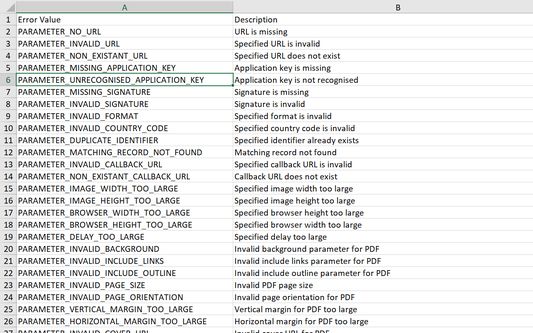
Convert all HTML tables in a web page or local HTML file to a XLSX spreadsheet, with each table placed on a seperate tab.
Použití některých funkcí může být zpoplatněnoPoužití některých funkcí může být zpoplatněno
40 uživatelů40 uživatelů
Metadata rozšíření
Snímky obrazovky
O tomto rozšíření
Stop manually copy-pasting data! Automatically extract HTML tables from any web page and turn them into clean spreadsheets.
Whether you are looking at a local HTML file or a live web page, this extension intelligently finds the tables and perfectly converts them into an XLSX spreadsheet, keeping all your rows and columns neatly intact.
Perfect for:
How It Works:
Simply navigate to a webpage containing the table you want, click the extension, and let GrabzIt do the heavy lifting! The tool securely sends the page data to GrabzIt's API, accurately extracts the table structure, and automatically downloads a ready-to-use XLSX spreadsheet straight to your computer.
Getting Started & Pricing:
Once installed, follow the instructions in the extension popup to create your free GrabzIt account and start extracting data.
Backed by GrabzIt Limited's enterprise-grade infrastructure. Fast, secure, and reliable.
Whether you are looking at a local HTML file or a live web page, this extension intelligently finds the tables and perfectly converts them into an XLSX spreadsheet, keeping all your rows and columns neatly intact.
Perfect for:
- Extracting financial data, pricing tables, or sports stats for analysis.
- Pulling research data from sites like Wikipedia into Excel.
- Capturing web directories, contact lists, and product inventories.
- Saving hours of tedious manual data entry and formatting.
How It Works:
Simply navigate to a webpage containing the table you want, click the extension, and let GrabzIt do the heavy lifting! The tool securely sends the page data to GrabzIt's API, accurately extracts the table structure, and automatically downloads a ready-to-use XLSX spreadsheet straight to your computer.
Getting Started & Pricing:
Once installed, follow the instructions in the extension popup to create your free GrabzIt account and start extracting data.
- Premium Trial: You will automatically start with a 7-day free trial of our Premium tier, giving you full, unrestricted table extractions.
- Free Tier: After your 7-day trial expires, you can continue using the tool for free! (Note: On the free tier, some cell values in your downloaded spreadsheets will be replaced with an upgrade watermark).
Backed by GrabzIt Limited's enterprise-grade infrastructure. Fast, secure, and reliable.
Hodnocení: 0 od 0 redaktorů
Oprávnění a data
Požadovaná oprávnění:
- Stahovat soubory a číst a upravovat historii stahování prohlížeče
Volitelná oprávnění:
- Přistupovat k vašim datům stránky grabz.it
Další informace
- Verze
- 1.2.4
- Velikost
- 79,81 KB
- Poslední aktualizace
- před 4 dny (2. srp 2026)
- Příbuzné kategorie
- Licence
- Všechna práva vyhrazena
- Historie změn
- Přidat do sbírky