Context Search Origin von NNKOD
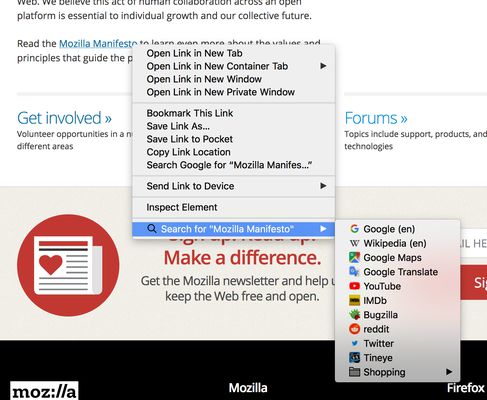
Search from the context menu! Right click on some selected text, a link text, or an image – search for it on the engines of your choice. Manage your search engines easily with the native Firefox bookmarks manager.
693 Benutzer693 Benutzer
Metadaten zur Erweiterung
Screenshots
Über diese Erweiterung
Search from the context menu! Right click on some selected text, a link text, or an image, and perform a search for it on the engines of your choice (link text and image searches require Firefox 60 or later). Manage your search engines easily with the native Firefox bookmarks manager.
How to use
- Right click some selected text, a link, or an image on a web page.
- Select the preferred search engine under "Search for...".
Manage your search engines
- Make a folder anywhere in your bookmarks called "Searches" (you only need to do this step once).
- In Firefox version 140 and above: create a bookmark of a search result in that folder, e.g. https://www.example.com/search/?q=ZZZZZZ.
- Edit the bookmark: replace the query part of the URL with %s (lowercase), https://www.example.com/search/?q=%s, and choose a Keyword.
- In Firefox up to version 140: Add search engines by right clicking the search field on any website. In the context menu choose "Add a Keyword for this Search...", enter a keyword and click "Save" (make sure to save them in "Searches").
Questions or problems?
- Explanation of required permissions
- FAQ
- Please file bugs in the issue tracker
How to use
- Right click some selected text, a link, or an image on a web page.
- Select the preferred search engine under "Search for...".
Manage your search engines
- Make a folder anywhere in your bookmarks called "Searches" (you only need to do this step once).
- In Firefox version 140 and above: create a bookmark of a search result in that folder, e.g. https://www.example.com/search/?q=ZZZZZZ.
- Edit the bookmark: replace the query part of the URL with %s (lowercase), https://www.example.com/search/?q=%s, and choose a Keyword.
- In Firefox up to version 140: Add search engines by right clicking the search field on any website. In the context menu choose "Add a Keyword for this Search...", enter a keyword and click "Save" (make sure to save them in "Searches").
Questions or problems?
- Explanation of required permissions
- FAQ
- Please file bugs in the issue tracker
Bewertet mit 4,3 von 112 Bewertern
Berechtigungen und Daten
Benötigte Berechtigungen:
- Lesezeichen lesen und verändern
- Auf Browsertabs zugreifen
- Auf Ihre Daten für diverse Websites zugreifen
Weitere Informationen
- Add-on-Links
- Version
- 2.8.2
- Größe
- 40,97 KB
- Zuletzt aktualisiert
- vor 2 Monaten (3. Jan. 2026)
- Verwandte Kategorien
- Datenschutzrichtlinie
- Lesen Sie die Datenschutzrichtlinie für dieses Add-on
- Versionsgeschichte
- Zur Sammlung hinzufügen