Fancy Links von Evan Wondrasek
Fancy Links transforms plain URLs into friendly links with included page titles. Perfect for sharing in chat apps, Reddit, GitHub, documentation, and anywhere formatted links look better than bare URLs.
1 Benutzer1 Benutzer
Metadaten zur Erweiterung
Screenshots
Über diese Erweiterung
Fancy Links transforms plain URLs into friendly links with included page titles. Perfect for sharing in chat apps, documentation, and anywhere formatted links look better than bare URLs.
MULTIPLE LINK FORMATS:
- Markdown:
- HTML:
- Plain Text:
- URL with Title Parameter:
ADDITIONAL FEATURES:
- One-click copy from toolbar popup with live format previews
- Keyboard shortcut (Windows:
- Clean URLs option to remove tracking parameters (UTM, Facebook, etc.)
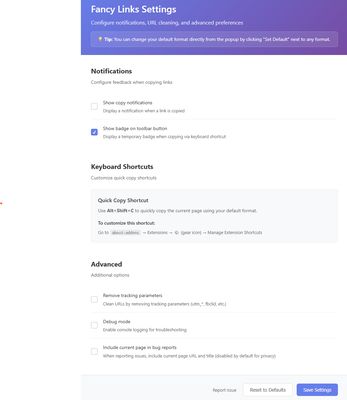
- Customizable settings for default format and notifications
- Works on Windows, macOS, and Linux
HOW TO USE:
1. Click the toolbar icon to see all format options with live previews
2. Use the keyboard shortcut for quick copy with your default format
3. Configure preferences in the settings page (click the toolbar icon → select the settings/gear icon)
The extension requires minimal permissions and respects your privacy. All processing happens locally in your browser. And it's open source!
MULTIPLE LINK FORMATS:
- Markdown:
[Title](URL) - Used in Reddit, GitHub, Discord, Obisidan, Notion, and many more- HTML:
<a href="URL">Title</a>- Plain Text:
Title - URL- URL with Title Parameter:
URL?_title=TitleADDITIONAL FEATURES:
- One-click copy from toolbar popup with live format previews
- Keyboard shortcut (Windows:
Alt+Shift+C / macOS: Opt+Shift+C) for instant copying with your default format- Clean URLs option to remove tracking parameters (UTM, Facebook, etc.)
- Customizable settings for default format and notifications
- Works on Windows, macOS, and Linux
HOW TO USE:
1. Click the toolbar icon to see all format options with live previews
2. Use the keyboard shortcut for quick copy with your default format
3. Configure preferences in the settings page (click the toolbar icon → select the settings/gear icon)
The extension requires minimal permissions and respects your privacy. All processing happens locally in your browser. And it's open source!
Bewertet mit 0 von 0 Bewertern
Berechtigungen und Daten
Weitere Informationen
- Add-on-Links
- Version
- 1.4.5
- Größe
- 48,1 KB
- Zuletzt aktualisiert
- vor 2 Monaten (21. Okt. 2025)
- Verwandte Kategorien
- Lizenz
- MIT-Lizenz
- Versionsgeschichte
- Schlagwörter
- Zur Sammlung hinzufügen