Jira Exporter von Picsweb
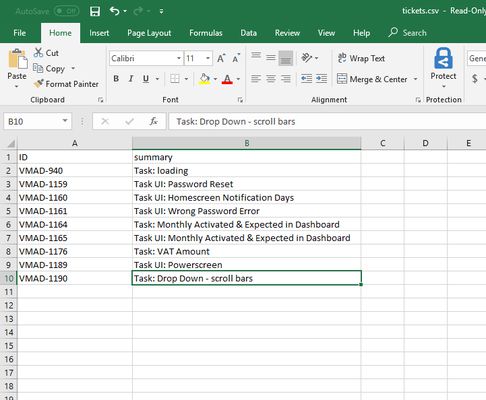
Export Jira tickets to csv file from Jira board. Latest version export JIRA tickets from Active Sprints board and Backlogs . watch demo - https://youtu.be/yKbO_U2ltHU Extension sponsored by https://bestvpn.se/ Best VPN
1 Benutzer1 Benutzer
Metadaten zur Erweiterung
Screenshots
Über diese Erweiterung
The extension export JIRA tickets from Active Sprints and Backlogs.
Latest version include copy to clipboard feature. User can copy individual ticket details to clipboard by clicking Copy button next it.
Follow this below steps to try the export option
1) Install add-on in Firefox.
2) Visit your Atlassion JIRA website . Go to active sprints or backlogs.
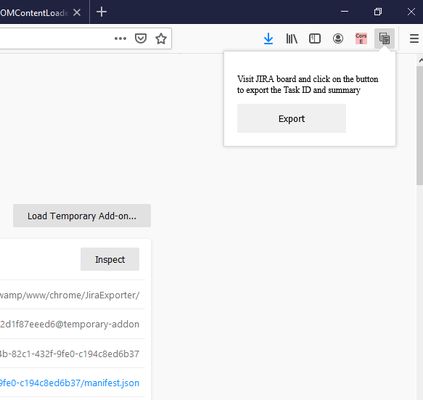
3) Click on the addon icon on top right side.
4) Click on the export button which will download csv file.
watch demo - https://youtu.be/yKbO_U2ltHU
Please share your valuable feedback. We will try to enhance this extension.
Extension sponsored by https://bestvpn.se/ Best VPN
Latest version include copy to clipboard feature. User can copy individual ticket details to clipboard by clicking Copy button next it.
Follow this below steps to try the export option
1) Install add-on in Firefox.
2) Visit your Atlassion JIRA website . Go to active sprints or backlogs.
3) Click on the addon icon on top right side.
4) Click on the export button which will download csv file.
watch demo - https://youtu.be/yKbO_U2ltHU
Please share your valuable feedback. We will try to enhance this extension.
Extension sponsored by https://bestvpn.se/ Best VPN
Bewertet mit 0 von 0 Bewertern
Berechtigungen und Daten
Benötigte Berechtigungen:
- Zwischenablage ändern
- Auf Browsertabs zugreifen
- Auf Ihre Daten für Websites in der Domain atlassian.net zugreifen
Weitere Informationen
- Add-on-Links
- Version
- 1.2.0
- Größe
- 21,11 KB
- Zuletzt aktualisiert
- vor 6 Jahren (21. Mai 2020)
- Verwandte Kategorien
- Lizenz
- Alle Rechte vorbehalten
- Versionsgeschichte
- Zur Sammlung hinzufügen
Der Entwickler dieser Erweiterung bittet Sie, dass Sie die Entwicklung unterstützen, indem Sie einen kleinen Betrag spenden.
1) Install addon in Firefox
2) Visit your Atlassion JIRA website . Go to active sprints with tickets
3) Click on the addon icon on top right side
4) Click on the export button which will download csv file