
New Tab GTD von xaviesteve
Clean, pleasing and minimalist New Tab Extension that makes you more productive by just showing you the essentials
5 Benutzer5 Benutzer
Metadaten zur Erweiterung
Screenshots



Über diese Erweiterung
New Tab GTD is a clean, pleasing and minimalist New Tab Extension that makes you more productive by just showing you the essentials: a clock and the tabs you have open right now on all windows in a vertical easy-to-scan way. It features both light and colorful themes to cheer you up and dark themes to avoid distractions and eye-strain while keeping it highly legible.
Features
🕒 Clock
Beautiful clock, date and week number. In some layouts a Calendar is also shown.
📚 Tab List
You can click on any tab to go to it, or close it by clicking the × button. By seeing all tabs from all windows top to bottom, you can manage "tab-chaos" in a very efficient way and clean up all the clutter you may have accumulated after a long browsing session. Below those, you will find the last 5 tabs you've recently closed, so you can restore any accidentally closed tabs.
There is a tiny unobstrusive counter of the tabs and windows you have open on the right that turns red whenever you have more than 9 tabs open (why 9 tabs? see https://lifehacker.com/why-you-should-never-have-more-than-nine-browser-tabs-o-5984149 ). Whenever you have more than one window open, a [Merge] button will show up when hovering the window number, clicking it will merge all windows into one.
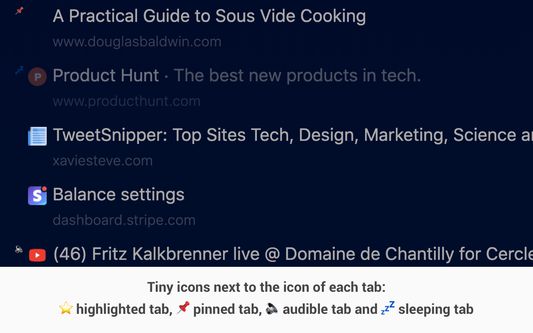
You will also see tiny icons next to the favicon of each tab, these are: ⭐️ highlighted tab, 📌 pinned tab, 🔈 audible tab and 💤 sleeping tab.
🎨 Themes and Layouts
If you don't like the default theme, you can change the color theme by clicking the [theme] button, you can also change the size of the clock and elements shown by clicking on [layout].
🔖 Bookmark links (optional)
You can add bookmarks in your Bookmarks Menu folder, and they will be displayed as handy shortcuts. The sorting and bookmark name will be respected. The cool thing about managing bookmarks like this is that they are synced across your Firefox Sync devices.
🌦️ Weather info (optional)
You can get the weather info by clicking on the Weather button and typing coordinates, the extension will not try to geolocate you to respect your privacy and ask you to write it manually. Weather data uses open-meteo.com, when setting it up you will be asked for permission to access their servers.
🌐 IP address info (optional)
Click on the IP button to see your public IP address. IP data uses ipinfo.io and ifconfig.co (fallback provider in case the first one is down), you will be asked for permission to access their servers.
📝 Notes
I have reenabled an old feature that allows you to type text to save quick notes. The cool thing is that the notes sync across your devices connected via Firefox Sync. It is done automatically by the browser every 10 minutes or so, if you need the note synced immediately you can go to the Firefox menu and click on Sync now. Note that there's a 100KB limit, the extension will trim it automatically so you can see if you've reached the limit.
💬 Inspiring Quotes
At the bottom of the page, you will find hundreds of manually curated quotes about getting things done, motivation, inspiration, productivity, business, positivity and life-advice. So you can momentarily declutter your mind and get inspired. Clicking on a quote will show a new one.
Focused on minimalism
There is nothing more to this extension, which makes it super lightweight and fast to load at just 37 KB of code (including images and the full quotes list).
Please keep in mind that the purpose of this extension is to be functional, minimal, simple and lightweight. If you need fancy features such as detailed/interactive weather forecasts, to-do lists, fancy backgrounds and so on, there are many amazing extensions available in the Browser Extensions Store that will suit your needs better. As for myself, I prefer to have a non-distracting straight-to-the-point extension that keeps me focused on whatever I'm doing, while also being super lightweight, this is New Tab GTD.
I'm not affiliated with any third party sites the extension uses. This extension is 100% free and open source and no code has been minified or obscured.
I do not monitor anything, sell any data, etc. The code is easy to read and very short so feel free to audit it yourself for your peace of mind, or ask a nerdy friend to help you out.
I developed it because I wanted something simple, minimal, lightweight and fast, that gave me simply what I want on my day to day: time, weather, organization and inspiration.
Any feedback is appreciated, you can check more of my free projects here: https://xaviesteve.com/projects/ or my other Firefox addons that are focused on performance and productivity.
Features
🕒 Clock
Beautiful clock, date and week number. In some layouts a Calendar is also shown.
📚 Tab List
You can click on any tab to go to it, or close it by clicking the × button. By seeing all tabs from all windows top to bottom, you can manage "tab-chaos" in a very efficient way and clean up all the clutter you may have accumulated after a long browsing session. Below those, you will find the last 5 tabs you've recently closed, so you can restore any accidentally closed tabs.
There is a tiny unobstrusive counter of the tabs and windows you have open on the right that turns red whenever you have more than 9 tabs open (why 9 tabs? see https://lifehacker.com/why-you-should-never-have-more-than-nine-browser-tabs-o-5984149 ). Whenever you have more than one window open, a [Merge] button will show up when hovering the window number, clicking it will merge all windows into one.
You will also see tiny icons next to the favicon of each tab, these are: ⭐️ highlighted tab, 📌 pinned tab, 🔈 audible tab and 💤 sleeping tab.
🎨 Themes and Layouts
If you don't like the default theme, you can change the color theme by clicking the [theme] button, you can also change the size of the clock and elements shown by clicking on [layout].
🔖 Bookmark links (optional)
You can add bookmarks in your Bookmarks Menu folder, and they will be displayed as handy shortcuts. The sorting and bookmark name will be respected. The cool thing about managing bookmarks like this is that they are synced across your Firefox Sync devices.
🌦️ Weather info (optional)
You can get the weather info by clicking on the Weather button and typing coordinates, the extension will not try to geolocate you to respect your privacy and ask you to write it manually. Weather data uses open-meteo.com, when setting it up you will be asked for permission to access their servers.
🌐 IP address info (optional)
Click on the IP button to see your public IP address. IP data uses ipinfo.io and ifconfig.co (fallback provider in case the first one is down), you will be asked for permission to access their servers.
📝 Notes
I have reenabled an old feature that allows you to type text to save quick notes. The cool thing is that the notes sync across your devices connected via Firefox Sync. It is done automatically by the browser every 10 minutes or so, if you need the note synced immediately you can go to the Firefox menu and click on Sync now. Note that there's a 100KB limit, the extension will trim it automatically so you can see if you've reached the limit.
💬 Inspiring Quotes
At the bottom of the page, you will find hundreds of manually curated quotes about getting things done, motivation, inspiration, productivity, business, positivity and life-advice. So you can momentarily declutter your mind and get inspired. Clicking on a quote will show a new one.
Focused on minimalism
There is nothing more to this extension, which makes it super lightweight and fast to load at just 37 KB of code (including images and the full quotes list).
Please keep in mind that the purpose of this extension is to be functional, minimal, simple and lightweight. If you need fancy features such as detailed/interactive weather forecasts, to-do lists, fancy backgrounds and so on, there are many amazing extensions available in the Browser Extensions Store that will suit your needs better. As for myself, I prefer to have a non-distracting straight-to-the-point extension that keeps me focused on whatever I'm doing, while also being super lightweight, this is New Tab GTD.
I'm not affiliated with any third party sites the extension uses. This extension is 100% free and open source and no code has been minified or obscured.
I do not monitor anything, sell any data, etc. The code is easy to read and very short so feel free to audit it yourself for your peace of mind, or ask a nerdy friend to help you out.
I developed it because I wanted something simple, minimal, lightweight and fast, that gave me simply what I want on my day to day: time, weather, organization and inspiration.
Any feedback is appreciated, you can check more of my free projects here: https://xaviesteve.com/projects/ or my other Firefox addons that are focused on performance and productivity.
Bewertet mit 0 von 0 Bewertern
Berechtigungen und Daten
Benötigte Berechtigungen:
- Lesezeichen lesen und verändern
- Auf kürzlich geschlossene Tabs zugreifen
- Auf Browsertabs zugreifen
Optionale Berechtigungen:
- Auf Ihre Daten für ipinfo.io zugreifen
- Auf Ihre Daten für ifconfig.co zugreifen
- Auf Ihre Daten für api.open-meteo.com zugreifen
- Auf Ihre Daten für geocoding-api.open-meteo.com zugreifen
Erforderliche Datenerfassung nach Angaben des Entwicklers:
- Lesezeichen
Weitere Informationen
- Add-on-Links
- Version
- 1.8.3
- Größe
- 46,31 KB
- Zuletzt aktualisiert
- vor 4 Monaten (23. März 2026)
- Lizenz
- MIT-Lizenz
- Versionsgeschichte
- Zur Sammlung hinzufügen