
SynthPass von F. Ruiz
High-security password synthesizer. You only have to remember your Master Password, which you never need to change. There is no encrypted vault that may be compromised because passwords are generated on the fly. You can also store user-generated ones
1 Benutzer1 Benutzer
Metadaten zur Erweiterung
Screenshots
Über diese Erweiterung
SynthPass is a different kind of password manager: it is a password synthesizer.
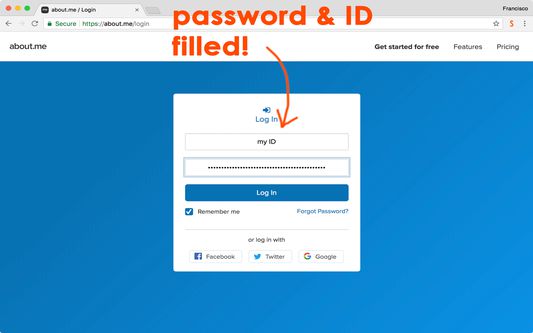
With SynthPass, there is no "vault" that has to be protected from hackers because your passwords are synthesized on the fly, just as you need them. SynthPass-made passwords are always high strength and comprise letters, numbers, and special characters. Passwords for different websites are guaranteed to be totally different.
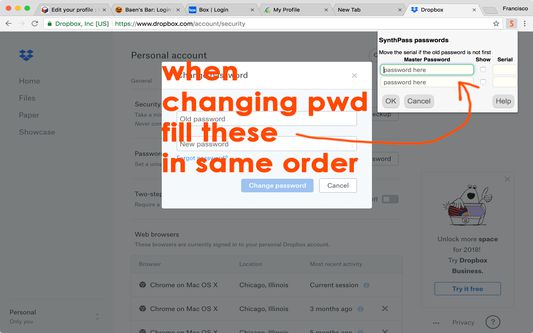
You never have to change your Master Password. When a website forces you to change its password, simply change the optional serial that is used to synthesize that password. SynthPass will remember the serial, as well as your user ID. Your Master Password will never be stored, and it disappears from memory after five minutes not using it.
And, if you absolutely must use a certain password, SynthPass can use that too! It is encrypted for storage and synced with the browser's own files so no third parties need to be involved.
Unlike conventional password managers, SynthPass
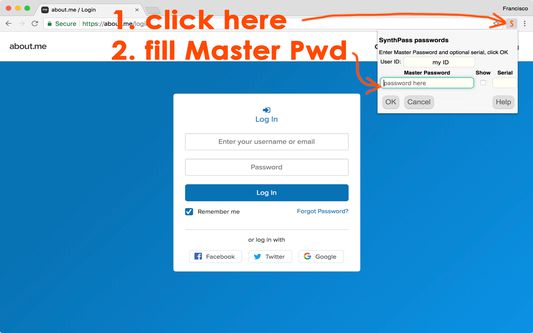
- won't pop up and interrupt your flow; it is activated only when you click its icon on the browser toolbar
- won't store anything secret, only user IDs and optional serials, if you allow it
- is always available, because it does not have to connect to "the Cloud"
- makes only strong passwords
- won't ask you for money
- won't show ads
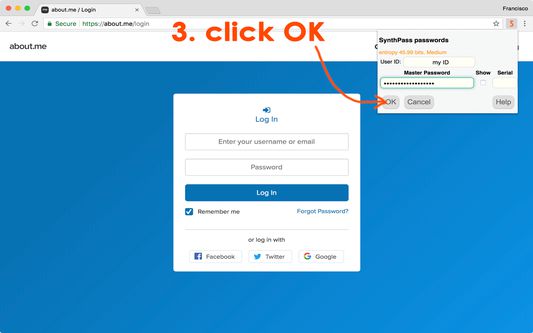
SynthPass is based on the WiseHash key-stretching algorithm, which evaluates the information entropy of your Master Password and subjects it to a variable number of rounds of SCRYPT key-stretching. The weaker the password, the more stretching. This forces would-be hackers to spend an inordinate amount of computer time testing weak passwords before they can get to yours. SynthPass displays an accurate measurement of your Master Password's entropy to help you come up with a strong one. This is the same algorithm stretching the user password in PassLok Privacy and PassLok for Email, also in this web store.
When there is no password to be filled, SynthPass displays a box where you can store securely encrypted notes for that particular website. Good place for extra login instructions, your first pet's name, or whatnot. Like everything else, the notes sync with the browser without a need for extra servers.
There's also a button for moving the current page into an isolation cage similar to Private Browsing, but within the same set of tabs as the regular pages. This is also accessible via the right-click menu.
This is a browser extension, and therefore is poorly supported on mobile devices. There is, however, a web app that includes the same password-making engine and runs well on mobile devices. It can be found at:
https://synthpass.com/app
With SynthPass, there is no "vault" that has to be protected from hackers because your passwords are synthesized on the fly, just as you need them. SynthPass-made passwords are always high strength and comprise letters, numbers, and special characters. Passwords for different websites are guaranteed to be totally different.
You never have to change your Master Password. When a website forces you to change its password, simply change the optional serial that is used to synthesize that password. SynthPass will remember the serial, as well as your user ID. Your Master Password will never be stored, and it disappears from memory after five minutes not using it.
And, if you absolutely must use a certain password, SynthPass can use that too! It is encrypted for storage and synced with the browser's own files so no third parties need to be involved.
Unlike conventional password managers, SynthPass
- won't pop up and interrupt your flow; it is activated only when you click its icon on the browser toolbar
- won't store anything secret, only user IDs and optional serials, if you allow it
- is always available, because it does not have to connect to "the Cloud"
- makes only strong passwords
- won't ask you for money
- won't show ads
SynthPass is based on the WiseHash key-stretching algorithm, which evaluates the information entropy of your Master Password and subjects it to a variable number of rounds of SCRYPT key-stretching. The weaker the password, the more stretching. This forces would-be hackers to spend an inordinate amount of computer time testing weak passwords before they can get to yours. SynthPass displays an accurate measurement of your Master Password's entropy to help you come up with a strong one. This is the same algorithm stretching the user password in PassLok Privacy and PassLok for Email, also in this web store.
When there is no password to be filled, SynthPass displays a box where you can store securely encrypted notes for that particular website. Good place for extra login instructions, your first pet's name, or whatnot. Like everything else, the notes sync with the browser without a need for extra servers.
There's also a button for moving the current page into an isolation cage similar to Private Browsing, but within the same set of tabs as the regular pages. This is also accessible via the right-click menu.
This is a browser extension, and therefore is poorly supported on mobile devices. There is, however, a web app that includes the same password-making engine and runs well on mobile devices. It can be found at:
https://synthpass.com/app
Bewertet mit 4 von 1 Bewerter
Berechtigungen und Daten
Weitere Informationen
- Add-on-Links
- Version
- 0.2.9
- Größe
- 100,02 KB
- Zuletzt aktualisiert
- vor 3 Jahren (23. März 2023)
- Verwandte Kategorien
- Versionsgeschichte
- Zur Sammlung hinzufügen