
Convert Case από Convert Case Ltd
Convert text in your browser between UPPER CASE, lower case and more.
756 χρήστες756 χρήστες
Μεταδεδομένα επέκτασης
Στιγμιότυπα
Σχετικά με την επέκταση
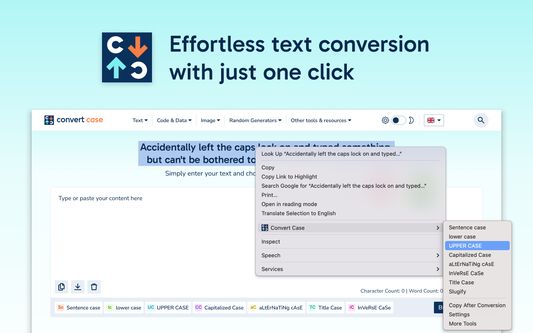
Tired of retyping text just to change the case? Select text anywhere in your browser, right-click, and convert it instantly — no copy-pasting to external tools.
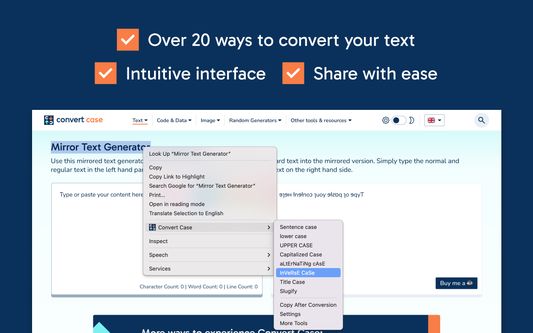
Convert Case is a fast, lightweight text case changer with 16 conversions, keyboard shortcuts, and automatic clipboard copy. Change case directly in your browser — select, right-click, done. Works on regular web pages, Google Docs, Reddit, and more.
Writing conversions
UPPER CASE, lower case, Title Case, Sentence case, Capitalized Case, No Accents
Developer conversions
camelCase, PascalCase, snake_case, CONSTANT_CASE, param-case (slugify), dot.case, path/case
Utility conversions
Alternating Case, Inverse Case, No Case (plain lowercase words)
Features
- Change case in place via right-click context menu
- Keyboard shortcuts for quick access (Alt+U, Alt+L, Alt+C, Alt+A) — or set your own
- Copy After Conversion — automatically copies converted text to the clipboard
- Ignored words list for words that should never be transformed during any conversion
- Correct words list for names, brands, and acronyms that should always be cased a specific way
- Configurable Title Case options (ignore words like "the", "and", "of")
Works with
Google Docs (Shift+right-click or keyboard shortcut), Reddit, Disqus, WYSIWYG editors, TinyMCE, and iframe-based content.
Privacy
All conversions are performed locally on your device. Convert Case does not collect, transmit, or store any user data.
Changelog
- 2.0.0 - New developer conversions (camelCase, PascalCase, CONSTANT_CASE, param-case, snake_case, dot.case, path/case), new utility conversions (Capitalized Case, Alternating Case, Inverse Case, No Accents, No Case), ignored words and correct words settings, autosave
- 1.6.0 - Support for Google Docs
- 1.5.2 - Fixed conversions not working on existing tabs after first install
- 1.5.1 - Added keyboard shortcuts link to context menu
- 1.5.0 - Additional keyboard shortcuts and refreshed info/settings UI
- 1.4.1 - Reliability updates
- 1.4.0 - Bug fixes and optimisation
- 1.3.0 - New icon
- 1.2.1 - Disqus and Slate Editor fixes
- 1.2.0 - Support for Disqus and more iframe-based content
- 1.1.0 - Support for Reddit and WYSIWYG editors
- 1.0.10 - Fixed automatic copy after conversion not working
- 1.0.9 - Settings page for title case options and keyboard shortcuts
- 1.0.8 - Reliability updates
- 1.0.7 - Title Case conversion and Slugify option
- 1.0.0 - Initial release
Convert Case is a fast, lightweight text case changer with 16 conversions, keyboard shortcuts, and automatic clipboard copy. Change case directly in your browser — select, right-click, done. Works on regular web pages, Google Docs, Reddit, and more.
Writing conversions
UPPER CASE, lower case, Title Case, Sentence case, Capitalized Case, No Accents
Developer conversions
camelCase, PascalCase, snake_case, CONSTANT_CASE, param-case (slugify), dot.case, path/case
Utility conversions
Alternating Case, Inverse Case, No Case (plain lowercase words)
Features
- Change case in place via right-click context menu
- Keyboard shortcuts for quick access (Alt+U, Alt+L, Alt+C, Alt+A) — or set your own
- Copy After Conversion — automatically copies converted text to the clipboard
- Ignored words list for words that should never be transformed during any conversion
- Correct words list for names, brands, and acronyms that should always be cased a specific way
- Configurable Title Case options (ignore words like "the", "and", "of")
Works with
Google Docs (Shift+right-click or keyboard shortcut), Reddit, Disqus, WYSIWYG editors, TinyMCE, and iframe-based content.
Privacy
All conversions are performed locally on your device. Convert Case does not collect, transmit, or store any user data.
Changelog
- 2.0.0 - New developer conversions (camelCase, PascalCase, CONSTANT_CASE, param-case, snake_case, dot.case, path/case), new utility conversions (Capitalized Case, Alternating Case, Inverse Case, No Accents, No Case), ignored words and correct words settings, autosave
- 1.6.0 - Support for Google Docs
- 1.5.2 - Fixed conversions not working on existing tabs after first install
- 1.5.1 - Added keyboard shortcuts link to context menu
- 1.5.0 - Additional keyboard shortcuts and refreshed info/settings UI
- 1.4.1 - Reliability updates
- 1.4.0 - Bug fixes and optimisation
- 1.3.0 - New icon
- 1.2.1 - Disqus and Slate Editor fixes
- 1.2.0 - Support for Disqus and more iframe-based content
- 1.1.0 - Support for Reddit and WYSIWYG editors
- 1.0.10 - Fixed automatic copy after conversion not working
- 1.0.9 - Settings page for title case options and keyboard shortcuts
- 1.0.8 - Reliability updates
- 1.0.7 - Title Case conversion and Slugify option
- 1.0.0 - Initial release
Βαθμολογήθηκε με 4,6 από 15 αξιολογητές
Δικαιώματα και δεδομένα
Απαιτούμενα δικαιώματα:
- Έχει πρόσβαση στις καρτέλες περιήγησης
- Έχει πρόσβαση στα δεδομένα σας για κάθε ιστότοπο
Περισσότερες πληροφορίες
- Σύνδεσμοι προσθέτου
- Έκδοση
- 2.0.0
- Μέγεθος
- 43,03 KB
- Τελευταία ενημέρωση
- 11 ώρες πριν (6 Απρ 2026)
- Σχετικές κατηγορίες
- Άδεια
- Με την επιφύλαξη παντός δικαιώματος
- Ιστορικό εκδόσεων
- Προσθήκη σε συλλογή
Ο προγραμματιστής της επέκτασης σάς ζητά να βοηθήσετε τη συνεχή ανάπτυξή της με μια μικρή συνεισφορά.