Πρόσθετα προγράμματος περιήγησης Firefox
  • Επεκτάσεις
  • Θέματα
    • για το Firefox
    • Λεξικά και πακέτα γλωσσών
    • Άλλα προγράμματα περιήγησης
    • Πρόσθετα για Android
Σύνδεση
Προεπισκόπηση του REtoUN

REtoUN από DBSH

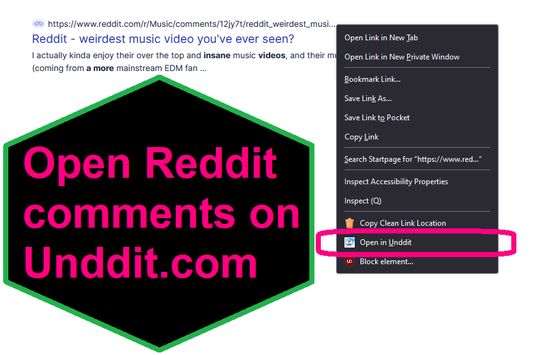
EXTENSION IS DEPRECATED - SEE ABOUT THIS EXTENSION BELOW FOR MORE DETAIL A simple extension that adds an option to the context menu to open links to Reddit comments on unddit.com instead, in a new tab.

0 (0 κριτικές)0 (0 κριτικές)
2 χρήστες2 χρήστες
Λήψη Firefox και απόκτηση επέκτασης
Λήψη αρχείου

Μεταδεδομένα επέκτασης

Στιγμιότυπα
Σχετικά με την επέκταση
EXTENSION IS DEPRECATED. NOTES: https://www.unddit.com is gone, and its existence was necessary for this extension to function. I am leaving this extension published for educational purposes (someone may want to use the source for a similar use case where an option in the context menu links to a re-written URL)

This is for those who prefer to read Reddit comments on https://www.unddit.com - maybe you prefer to see deleted comments, or maybe you think "continue this thread" is a crime against UI.
To use, right-click on a link to a Reddit post, and choose Open in Unddit from the context menu. If the link to the Reddit post is https://www.reddit.com/r/news/comments/130kndv for example, using REtoUN will open https://www.unddit.com/r/news/comments/130kndv instead, in a new tab.
Σχόλια προγραμματιστών
Note that in Firefox, content on https://www.unddit.com requires turning off Enhanced Tracking Protection to load. This behavior is not at all related to this extension.

Developer is not affiliated with Unddit.com, but is a huge fan of the project.

To view this extension's source code:
1. In a Firefox instance that already has this extension installed, type about:profiles in the Firefox address bar, then press Enter
2. Under the profile labeled This is the profile in use and it cannot be deleted, click on the Open Directory button (appears as Open Folder on Windows) next to Root Directory
3. In the file explorer window that opens, go into the extensions directory (the extensions folder)
4. Copy the file {d40ec1bd-9875-4dbd-a1f7-cba6e2d9d281}.xpi and paste it somewhere else, such as your Desktop
5. Rename the file you just pasted, changing the extension to .zip - so {d40ec1bd-9875-4dbd-a1f7-cba6e2d9d281}.xpi becomes {d40ec1bd-9875-4dbd-a1f7-cba6e2d9d281}.zip
6. Unzip the file {d40ec1bd-9875-4dbd-a1f7-cba6e2d9d281}.zip. The extracted files are the source, especially the .json and .js files.
Βαθμολογήθηκε με 0 από 0 αξιολογητές
Συνδεθείτε για βαθμολόγηση της επέκτασης
Δεν υπάρχουν ακόμη βαθμολογίες

Η βαθμολογία αστεριών αποθηκεύτηκε

5
0
4
0
3
0
2
0
1
0
Καμία κριτική ακόμα
Δικαιώματα και δεδομένα

Απαιτούμενα δικαιώματα:

  • Έχει πρόσβαση στις καρτέλες περιήγησης
Μάθετε περισσότερα
Περισσότερες πληροφορίες
Έκδοση
1.0
Μέγεθος
26,31 KB
Τελευταία ενημέρωση
3 χρόνια πριν (27 Απρ 2023)
Σχετικές κατηγορίες
  • Ροές, ειδήσεις και ιστολόγια
  • Απόρρητο και ασφάλεια
  • Κοινωνικά δίκτυα και επικοινωνία
Άδεια
Μόνο GNU General Public License v3.0
Πολιτική απορρήτου
Διαβάστε την πολιτική απορρήτου του προσθέτου
Ιστορικό εκδόσεων
  • Προβολή όλων των εκδόσεων
Προσθήκη σε συλλογή
Αναφορά προσθέτου
Μετάβαση στην αρχική σελίδα της Mozilla

Πρόσθετα

  • Σχετικά
  • Blog προσθέτων Firefox
  • Εργαστήριο επεκτάσεων
  • Κέντρο προγραμματιστών
  • Πολιτικές προγραμματιστών
  • Blog κοινότητας
  • Φόρουμ
  • Αναφορά σφάλματος
  • Οδηγίες κριτικής

Προγράμματα περιήγησης

  • Desktop
  • Mobile
  • Enterprise

Προϊόντα

  • Browsers
  • VPN
  • Relay
  • Monitor
  • Pocket
  • Bluesky (@firefox.com)
  • Instagram (Firefox)
  • YouTube (firefoxchannel)
  • Απόρρητο
  • Cookie
  • Νομικά

Εκτός από τα μέρη όπου αναφέρεται διαφορετικά, το περιεχόμενο του ιστοτόπου υπόκειται στην άδεια Creative Commons Attribution Share-Alike License v3.0 ή τυχόν νεότερες εκδόσεις.