
Translator menu από y4v8
The menu for translation/switching between the current tab and a tab with one of translators in the current or another window.
32 χρήστες32 χρήστες
Μεταδεδομένα επέκτασης
Στιγμιότυπα
Σχετικά με την επέκταση
The menu for translation/switching between the current tab and a tab with one of translators in the current or another window.
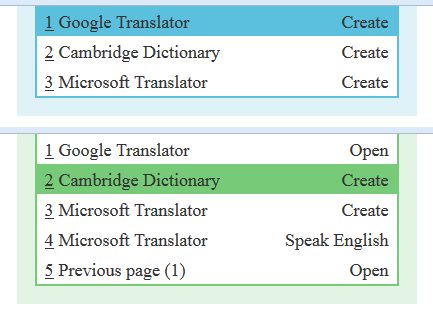
Currently for 'Google Translator', 'Microsoft Translator', 'Cambridge Dictionary'.
A simple usage scenario:
1) using the keyboard:
- open the menu by short pressing 'Shift';
- execute the menu item by pressing 'Shift' again.
2) using the mouse:
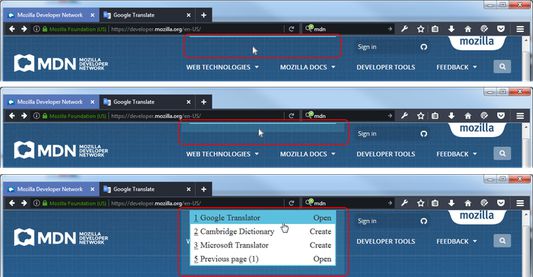
- hover over the menu border and swipe down;
- execute the menu item by clicking the left mouse button.
The menu is displayed at the top in the center of the screen.
In details:
To show the menu, do one of the following:
- shortly press the 'Shift' key;
- click on the menu border;
- hover over the menu border and move it down.
To hide the menu, do one of the following:
- press the 'Escape' key or the 'Control' key;
- click on the menu border or out of the menu;
- leave the menu.
To select a menu item, do one of the following:
- press one of the keys 'ArrowUp','ArrowDown','Home','End';
- move mouse pointer;
- scroll wheel mouse.
To execute a menu item, do one of the following:
- press one of the keys 'Shift','Space','Enter','ArrowRight';
- click the middle button (with the wheel) of the mouse;
- press the appropriate hotkey ('1','2','3'...).
To return to previous page, do one of the following:
- press one of the keys 'ArrowLeft','Backspace','Backquote';
- execute the appropriate menu item.
Known issues:
The extension does not work on the following sites:
- addons.mozilla.org (for security reasons);
- docs.google.com and sites similar to it (there is no possibility to get the selected text).
The menu item 'Microsoft Translator - Speaking English' may not work:
- if you have not visited this site before;
- if it is blocked by another extension, for example 'NoScript'.
Currently for 'Google Translator', 'Microsoft Translator', 'Cambridge Dictionary'.
A simple usage scenario:
1) using the keyboard:
- open the menu by short pressing 'Shift';
- execute the menu item by pressing 'Shift' again.
2) using the mouse:
- hover over the menu border and swipe down;
- execute the menu item by clicking the left mouse button.
The menu is displayed at the top in the center of the screen.
In details:
To show the menu, do one of the following:
- shortly press the 'Shift' key;
- click on the menu border;
- hover over the menu border and move it down.
To hide the menu, do one of the following:
- press the 'Escape' key or the 'Control' key;
- click on the menu border or out of the menu;
- leave the menu.
To select a menu item, do one of the following:
- press one of the keys 'ArrowUp','ArrowDown','Home','End';
- move mouse pointer;
- scroll wheel mouse.
To execute a menu item, do one of the following:
- press one of the keys 'Shift','Space','Enter','ArrowRight';
- click the middle button (with the wheel) of the mouse;
- press the appropriate hotkey ('1','2','3'...).
To return to previous page, do one of the following:
- press one of the keys 'ArrowLeft','Backspace','Backquote';
- execute the appropriate menu item.
Known issues:
The extension does not work on the following sites:
- addons.mozilla.org (for security reasons);
- docs.google.com and sites similar to it (there is no possibility to get the selected text).
The menu item 'Microsoft Translator - Speaking English' may not work:
- if you have not visited this site before;
- if it is blocked by another extension, for example 'NoScript'.
Βαθμολογήθηκε με 4,6 από 10 αξιολογητές
Δικαιώματα και δεδομένα
Απαιτούμενα δικαιώματα:
- Έχει πρόσβαση στις καρτέλες περιήγησης
- Έχει πρόσβαση στα δεδομένα σας για κάθε ιστότοπο
Περισσότερες πληροφορίες
- Σύνδεσμοι προσθέτου
- Έκδοση
- 1.0.16resigned1
- Μέγεθος
- 17,65 KB
- Τελευταία ενημέρωση
- 2 χρόνια πριν (25 Απρ 2024)
- Σχετικές κατηγορίες
- Άδεια
- Άδεια MIT
- Ιστορικό εκδόσεων
- Προσθήκη σε συλλογή