Firefox Browser Add-ons
  • Extensions
  • Themes
    • for Firefox
    • Dictionaries & Language Packs
    • Other Browser Sites
    • Add-ons for Android
Log in
Preview of PrivacyScreen

PrivacyScreen by odacavo

Browse the web and prevent shoulder surfing by automatically blurring sensitive webpage data.

4.5 (2 reviews)4.5 (2 reviews)
7 Users7 Users
Download Firefox and get the extension
Download file

Extension Metadata

Screenshots
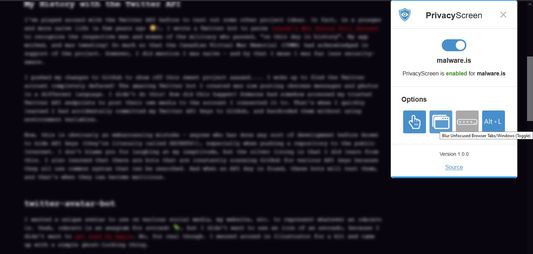
PrivacyScreen's options popup menu. The popup menu includes the ability to turn the extension on or off on a website-by-website basis, as well as configure various options.An example of PrivacyScreen blurring an unfocused webpage.An example of PrivacyScreen blurring potentially identifying address fields during a checkout page.An example of a webpage with PrivacyScreen turned off (disabled). No blurring is applied.
About this extension
PrivacyScreen is a lightweight client-side browser extension used as a digital filter to hide sensitive form inputs, inactive tabs, and unfocused browser windows from prying eyes.

Whether you're entering sensitive data beside a stranger on an airplane or streaming your internet browsing online, PrivacyScreen can help secure the confidentially of the data on your browser.
Rated 4.5 by 2 reviewers
Sign in to rate this extension
There are no ratings yet

Star rating saved

5
1
4
1
3
0
2
0
1
0
Read all 2 reviews
Permissions and data

Required permissions:

  • Access browser tabs
  • Access your data for all websites
Learn more
More information
Add-on Links
  • Support site
Version
1.0.2
Size
39.17 KB
Last updated
4 years ago (Mar 15, 2022)
Related Categories
  • Privacy & Security
License
MIT License
Version History
  • See all versions
Tags
  • privacy
  • security
Add to collection
Report this add-on
Go to Mozilla’s homepage

Add-ons

  • About
  • Firefox Add-ons Blog
  • Extension Workshop
  • Developer Hub
  • Developer Policies
  • Community Blog
  • Forum
  • Report a bug
  • Review Guide

Browsers

  • Desktop
  • Mobile
  • Enterprise

Products

  • Browsers
  • VPN
  • Relay
  • Monitor
  • Pocket
  • Bluesky (@firefox.com)
  • Instagram (Firefox)
  • YouTube (firefoxchannel)
  • Privacy
  • Cookies
  • Legal

Except where otherwise noted, content on this site is licensed under the Creative Commons Attribution Share-Alike License v3.0 or any later version.