Jira Exporter tekijä Picsweb
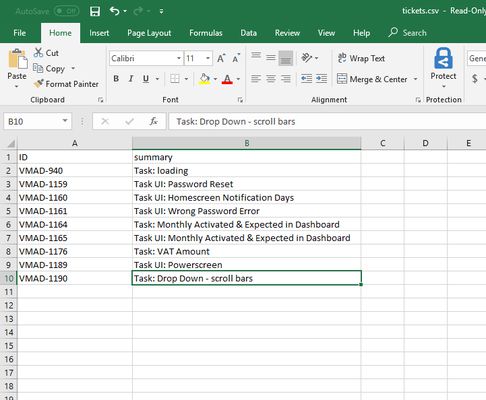
Export Jira tickets to csv file from Jira board. Latest version export JIRA tickets from Active Sprints board and Backlogs . watch demo - https://youtu.be/yKbO_U2ltHU Extension sponsored by https://bestvpn.se/ Best VPN
1 käyttäjä1 käyttäjä
Laajennuksen metatiedot
Kuvakaappaukset
Tietoja tästä laajennuksesta
The extension export JIRA tickets from Active Sprints and Backlogs.
Latest version include copy to clipboard feature. User can copy individual ticket details to clipboard by clicking Copy button next it.
Follow this below steps to try the export option
1) Install add-on in Firefox.
2) Visit your Atlassion JIRA website . Go to active sprints or backlogs.
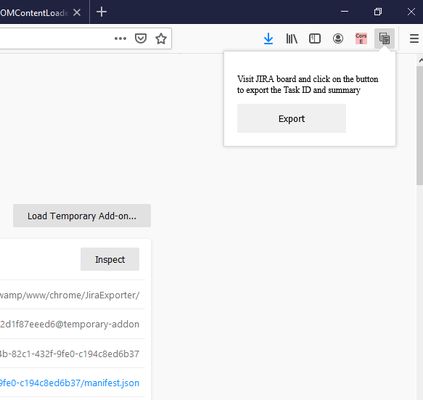
3) Click on the addon icon on top right side.
4) Click on the export button which will download csv file.
watch demo - https://youtu.be/yKbO_U2ltHU
Please share your valuable feedback. We will try to enhance this extension.
Extension sponsored by https://bestvpn.se/ Best VPN
Latest version include copy to clipboard feature. User can copy individual ticket details to clipboard by clicking Copy button next it.
Follow this below steps to try the export option
1) Install add-on in Firefox.
2) Visit your Atlassion JIRA website . Go to active sprints or backlogs.
3) Click on the addon icon on top right side.
4) Click on the export button which will download csv file.
watch demo - https://youtu.be/yKbO_U2ltHU
Please share your valuable feedback. We will try to enhance this extension.
Extension sponsored by https://bestvpn.se/ Best VPN
Arvio 0 0 arvostelijan toimesta
Käyttöoikeudet ja data
Vaaditut käyttöoikeudet:
- Vie tietoja leikepöydälle
- Pääsyoikeus selaimen välilehtiin
- Pääsy tietoihisi sivustoilla, jotka ovat verkkotunnuksessa atlassian.net
Lisätietoja
- Lisäosan linkit
- Versio
- 1.2.0
- Koko
- 21,11 kt
- Viimeksi päivitetty
- kuusi vuotta sitten (21. touko 2020)
- Liittyvät luokat
- Lisenssi
- Kaikki oikeudet pidätetään
- Versiohistoria
- Lisää kokoelmaan
Tämän laajennuksen kehittäjä pyytää taloudellista tukeasi laajennuksen kehityksen jatkamiseksi.
1) Install addon in Firefox
2) Visit your Atlassion JIRA website . Go to active sprints with tickets
3) Click on the addon icon on top right side
4) Click on the export button which will download csv file