BookmarksToFile par Sergio Ll.
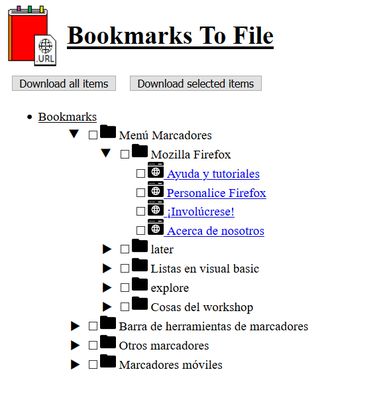
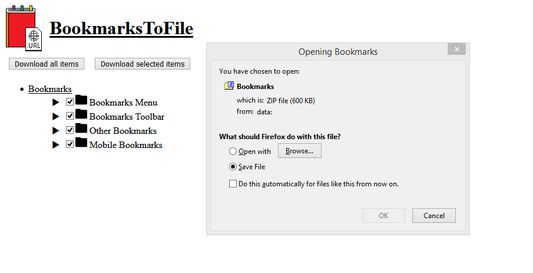
BookmarksToFile converts your bookmarks into shortcut files (.URL, .desktop or .webloc for Windows, Linux and Mac respectively). The interface allows you to select which bookmarks you want to extract and the result is delivered in a zip file.
19 utilisateurs·trices19 utilisateurs·trices
MĂ©tadonnĂ©es de lâextension
Captures dâĂ©cran
Ă propos de cette extension
BookmarksToFile converts your bookmarks into URL shortcut files (.URL, .desktop or .webloc for Windows, Linux and Mac respectively).
When clicked, all your bookmarks will be shown in a treeview. This view will allow you to select which bookmarks you want to convert and the files are delivered in a zip file. Alternative, you can download all your bookmarks by clicking a button.
Please, don't you dare to leave a review or rate your experience ;) .
Regarding privacy, this addon doesn't gather or store any user data.
The source code of the extension is available at <a href="https://github.com/Rebel1898/BookmarksToFile"> https://github.com/Rebel1898/BookmarksToFile</a>
Icons were made by <a href="https://www.flaticon.com/authors/freepik" title="Freepik">Freepik</a> from <a href="https://www.flaticon.com/" title="Flaticon"> www.flaticon.com</a> and by myself.
When clicked, all your bookmarks will be shown in a treeview. This view will allow you to select which bookmarks you want to convert and the files are delivered in a zip file. Alternative, you can download all your bookmarks by clicking a button.
Please, don't you dare to leave a review or rate your experience ;) .
Regarding privacy, this addon doesn't gather or store any user data.
The source code of the extension is available at <a href="https://github.com/Rebel1898/BookmarksToFile"> https://github.com/Rebel1898/BookmarksToFile</a>
Icons were made by <a href="https://www.flaticon.com/authors/freepik" title="Freepik">Freepik</a> from <a href="https://www.flaticon.com/" title="Flaticon"> www.flaticon.com</a> and by myself.
Noté 5 par 3 personnes
Autorisations et données
Autorisations nécessaires :
- Consulter et modifier les marque-pages
- TĂ©lĂ©charger des fichiers, et consulter et modifier lâhistorique des tĂ©lĂ©chargements du navigateur
- Accéder aux onglets du navigateur
Plus dâinformations
- Liens du module
- Version
- 3.0
- Taille
- 54,82Â Ko
- DerniĂšre mise Ă jour
- il y a 8 mois (20 mai 2025)
- Catégories associées
- Historique des versions
- Ajouter Ă la collection
Le dĂ©veloppeur de cette extension demande que vous lâaidiez Ă assurer la poursuite de son dĂ©veloppement en lui versant une petite contribution.