SimpleFill - Autofill Forms par Softal
Browser extension that fills out forms with smart auto-suggestions in dropdowns and right-click menu. This is the simplest form filler everâperiod.
Certaines fonctionnalitĂ©s peuvent ĂȘtre payantesCertaines fonctionnalitĂ©s peuvent ĂȘtre payantes
566 utilisateurs·trices566 utilisateurs·trices
MĂ©tadonnĂ©es de lâextension
Captures dâĂ©cran
Ă propos de cette extension
Feature Highlights
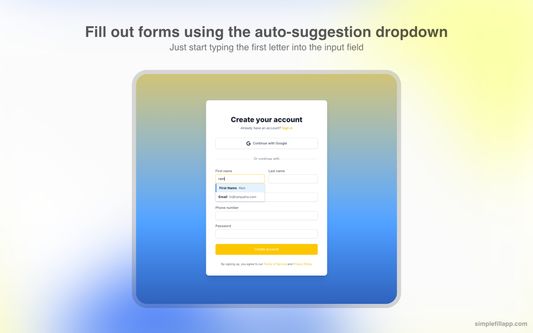
âą Auto-suggestions in dropdowns as you start typing.
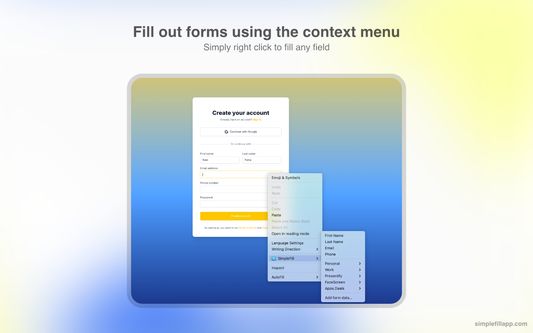
âą Autofill any field using your context menu.
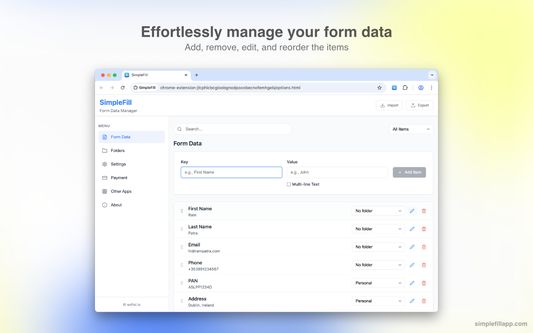
âą Add, edit, remove, and reorder your data as you wish.
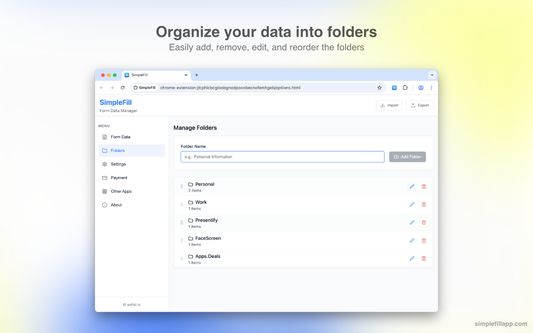
âą Organize your data in folders.
âą All data is stored locally in your browser storage.
âą Import/export your data to a file.
Why Use SimpleFill
âą On average, it takes 12 seconds to type out a name, email, and address. With SimpleFill, it takes a maximum of 3 seconds.
âą The default browser autofill isn't accurate most of the time, and browsers don't allow you to edit the saved information.
âą Without SimpleFill, you can't fill out forms using your right-click context menu, which is super handy.
âą The default browser autofill do not work with large blocks of text, such as emails.
Some Use Cases
âą Marketers: Quickly fill out campaign sign-up forms, lead gen tools, and demo requests.
âą Customer Support: Auto-fill repetitive ticket forms, canned responses, or internal tools.
âą Sales Teams: Speed through CRM entry, contact forms, and follow-up request pages.
âą Recruiters: Autofill job board listings or candidate submission forms across platforms.
âą QA Engineers: Instantly populate test forms with dummy data during website testing.
âą Freelancers & Consultants: Save time filling proposals, invoices, and registration forms.
âą Product Managers: Quickly submit feedback or bug reports across multiple tools.
âą HR Teams: Fill internal employee forms or vendor onboarding forms effortlessly.
âą Job Seekers: Apply faster by autofilling job applications, profile info, and cover letter fields.
Getting Started
âą It's quite simple (no pun intended) to use SimpleFill.
âą Install the extension by clicking the 'Add to Firefox' button on the product listing page.
âą Right-click on any input field and select SimpleFill > Add form data...
âą Enter your details and click on the "Add" button.
âą As you type in any input field, SimpleFill will automatically suggest relevant entries. Alternatively, right-click on an input field and select your saved data directly from the SimpleFill context menu to instantly fill the form.
Contact
âą Website - https://simplefillapp.com
âą X - https://x.com/softal_io or https://x.com/rampatra_
Extras
âą Faq - https://simplefillapp.com/faq
âą Privacy - https://simplefillapp.com/privacy
Note: To import your form data from older versions of SimpleFill, go to https://simplefillapp.com/tools/data-converter.
âą Auto-suggestions in dropdowns as you start typing.
âą Autofill any field using your context menu.
âą Add, edit, remove, and reorder your data as you wish.
âą Organize your data in folders.
âą All data is stored locally in your browser storage.
âą Import/export your data to a file.
Why Use SimpleFill
âą On average, it takes 12 seconds to type out a name, email, and address. With SimpleFill, it takes a maximum of 3 seconds.
âą The default browser autofill isn't accurate most of the time, and browsers don't allow you to edit the saved information.
âą Without SimpleFill, you can't fill out forms using your right-click context menu, which is super handy.
âą The default browser autofill do not work with large blocks of text, such as emails.
Some Use Cases
âą Marketers: Quickly fill out campaign sign-up forms, lead gen tools, and demo requests.
âą Customer Support: Auto-fill repetitive ticket forms, canned responses, or internal tools.
âą Sales Teams: Speed through CRM entry, contact forms, and follow-up request pages.
âą Recruiters: Autofill job board listings or candidate submission forms across platforms.
âą QA Engineers: Instantly populate test forms with dummy data during website testing.
âą Freelancers & Consultants: Save time filling proposals, invoices, and registration forms.
âą Product Managers: Quickly submit feedback or bug reports across multiple tools.
âą HR Teams: Fill internal employee forms or vendor onboarding forms effortlessly.
âą Job Seekers: Apply faster by autofilling job applications, profile info, and cover letter fields.
Getting Started
âą It's quite simple (no pun intended) to use SimpleFill.
âą Install the extension by clicking the 'Add to Firefox' button on the product listing page.
âą Right-click on any input field and select SimpleFill > Add form data...
âą Enter your details and click on the "Add" button.
âą As you type in any input field, SimpleFill will automatically suggest relevant entries. Alternatively, right-click on an input field and select your saved data directly from the SimpleFill context menu to instantly fill the form.
Contact
âą Website - https://simplefillapp.com
âą X - https://x.com/softal_io or https://x.com/rampatra_
Extras
âą Faq - https://simplefillapp.com/faq
âą Privacy - https://simplefillapp.com/privacy
Note: To import your form data from older versions of SimpleFill, go to https://simplefillapp.com/tools/data-converter.
Noté 3,9 par 22 personnes
Autorisations et données
Plus dâinformations
- Liens du module
- Version
- 3.1.1
- Taille
- 385,13Â Ko
- DerniĂšre mise Ă jour
- il y a 7 mois (11 juin 2025)
- Catégories associées
- Licence
- Tous droits réservés
- Politique de confidentialité
- Lire la politique de confidentialité de ce module
- Historique des versions
- Ajouter Ă la collection
Le dĂ©veloppeur de cette extension demande que vous lâaidiez Ă assurer la poursuite de son dĂ©veloppement en lui versant une petite contribution.