Tickety-Tick par bitcrowd
How do you name this branch? What is the message for that commit? At bitcrowd we love conventions. One of them is how we name branches and commits. This makes it easy to relate a particular branch or commit to a certain ticket.
18 utilisateurs·trices18 utilisateurs·trices
MĂ©tadonnĂ©es de lâextension
Captures dâĂ©cran
Ă propos de cette extension
How do you name this branch? What is the message for that commit?
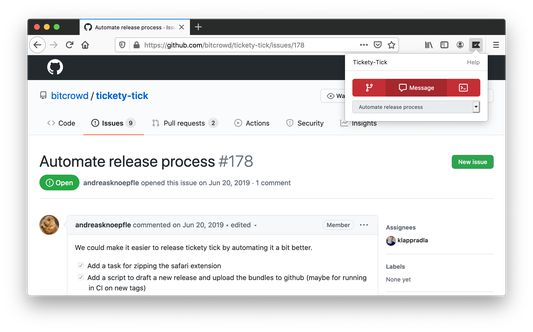
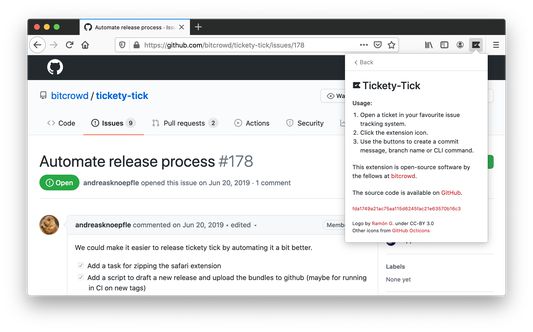
At bitcrowd we love conventions. One of them is how we name branches and commits. This makes it easy to relate a particular branch or commit to a certain ticket. Just open a ticket or select it and click on the tickety-tick button. You will see a dialog where you can copy a branch name or the commit message.
Branches by default always follow the format type/id-title, where type can be one of feature, bug, chore etc., id is the identifier of the ticket in your ticketing system and title is a lowercase, dasherized version of the ticket title.
Commit messages default to the format "[#id] title".
If you have different conventions regarding commit messages, branch names or just use a different source management tool, you can also customize the output format to your needs in the preferences.
Tickety-Tick helps you create branches and commits for a few ticket systems.
Currently, we support:
<ul>
<li>GitHub</li>
<li>GitLab</li>
<li>Jira</li>
<li>Linear.app</li>
<li>Notion</li>
<li>Tara</li>
<li>Trello</li>
<li>YouTrack</li>
<li>Polarion</li>
</ul>
At bitcrowd we love conventions. One of them is how we name branches and commits. This makes it easy to relate a particular branch or commit to a certain ticket. Just open a ticket or select it and click on the tickety-tick button. You will see a dialog where you can copy a branch name or the commit message.
Branches by default always follow the format type/id-title, where type can be one of feature, bug, chore etc., id is the identifier of the ticket in your ticketing system and title is a lowercase, dasherized version of the ticket title.
Commit messages default to the format "[#id] title".
If you have different conventions regarding commit messages, branch names or just use a different source management tool, you can also customize the output format to your needs in the preferences.
Tickety-Tick helps you create branches and commits for a few ticket systems.
Currently, we support:
<ul>
<li>GitHub</li>
<li>GitLab</li>
<li>Jira</li>
<li>Linear.app</li>
<li>Notion</li>
<li>Tara</li>
<li>Trello</li>
<li>YouTrack</li>
<li>Polarion</li>
</ul>
Noté 5 par 3 personnes
Autorisations et données
Autorisations nécessaires :
- Ajouter des données dans le presse-papiers
- Accéder à vos données pour tous les sites web
Plus dâinformations
- Liens du module
- Version
- 5.6.0
- Taille
- 1,31Â Mo
- DerniĂšre mise Ă jour
- il y a 4 mois (27 oct. 2025)
- Catégories associées
- Licence
- Licence MIT
- Historique des versions
- Ajouter Ă la collection