
YouTube Simple View par Johnson Towoju
Focus tool for YouTube - control distracting elements settings to stay focused.
18 utilisateurs·trices18 utilisateurs·trices
Métadonnées de l’extension
Captures d’écran



À propos de cette extension
YouTube Simple View provides features to help minimize some of the unnecessary distractions on the Youtube web interface while watching videos.
Imagine the times you only wanted to watch a single video during work, only to end up watching multiple videos from the sidebar suggestions and losing focus.
Or when a video ends, and you end up binging the next one that plays automatically because autoplay was on.
This extension helps you stay focused when you need to by eliminating these distractions.
Features:
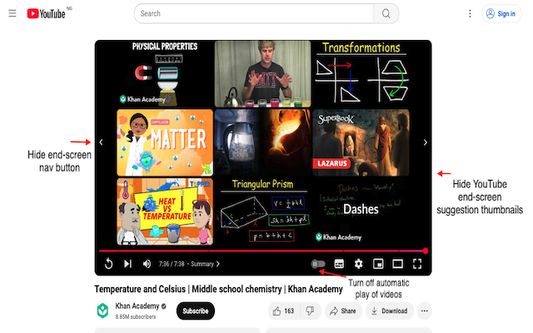
✅ Turn off auto-play — Automatically uncheck the auto-play setting to prevent subsequent videos from playing after the current video ends.
✅ Hide Sidebar — Hide or unhide the sidebar section from the layout.
✅ Hide Comments — Hide or unhide comments.
✅ Hide end-screen channel overlays — Hide or unhide channel overlays including suggested channel videos and channel profile cards that typically appear towards the end of a video.
✅ Hide end-screen youtube suggestions — Hide or unhide recommended youtube video thumbnails that typically appear at the end of a video.
✅ Hide end-screen navigation — Hide or unhide the navigation arrow buttons that appear at the end of a video (note: these buttons do not show on some screen sizes).
Release notes:
- Version 0.9.4 (March, 2025)
✨ Minimize layout shift on page render
✨ Add control to hide only channel overlays
✨ Update extension icons
- Version 0.9.6 (Oct. 2025)
✨ Fix end-screen suggestions not hidden on the new video player
Imagine the times you only wanted to watch a single video during work, only to end up watching multiple videos from the sidebar suggestions and losing focus.
Or when a video ends, and you end up binging the next one that plays automatically because autoplay was on.
This extension helps you stay focused when you need to by eliminating these distractions.
Features:
✅ Turn off auto-play — Automatically uncheck the auto-play setting to prevent subsequent videos from playing after the current video ends.
✅ Hide Sidebar — Hide or unhide the sidebar section from the layout.
✅ Hide Comments — Hide or unhide comments.
✅ Hide end-screen channel overlays — Hide or unhide channel overlays including suggested channel videos and channel profile cards that typically appear towards the end of a video.
✅ Hide end-screen youtube suggestions — Hide or unhide recommended youtube video thumbnails that typically appear at the end of a video.
✅ Hide end-screen navigation — Hide or unhide the navigation arrow buttons that appear at the end of a video (note: these buttons do not show on some screen sizes).
Release notes:
- Version 0.9.4 (March, 2025)
✨ Minimize layout shift on page render
✨ Add control to hide only channel overlays
✨ Update extension icons
- Version 0.9.6 (Oct. 2025)
✨ Fix end-screen suggestions not hidden on the new video player
Noté 5 par 3 personnes
Autorisations et données
Autorisations nécessaires :
- Accéder à l’activité du navigateur pendant la navigation
- Accéder à vos données pour les sites du domaine youtube.com
Plus d’informations
- Liens du module
- Version
- 0.9.6
- Taille
- 73,63 Ko
- Dernière mise à jour
- il y a 4 mois (22 oct. 2025)
- Catégories associées
- Licence
- Mozilla Public License 2.0
- Historique des versions
- Étiquettes
- Ajouter à la collection