Add-ons foar Firefox Browser
  • Utwreidingen
  • Tema’s
    • foar Firefox
    • Wurdboeken en taalpakketten
    • Oare browserwebsites
    • Add-ons foar Android
Oanmelde
Foarbyld fan Amazon DP and ASIN Only

Amazon DP and ASIN Only troch DBSH

Adds an option to the context menu to open links to items on Amazon in a new tab, using only DP and the ASIN, stripping away all the, ref, tracking, and other unnecessary URL parameters so URLs look like https://www.amazon.com/dp/ASIN

0 (0 reviews)0 (0 reviews)
Gjin brûkersGjin brûkers
Jo hawwe Firefox nedich om dizze útwreiding te brûken
Firefox downloade en de útwreiding ûntfange
Bestân downloade

Metadata útwreiding

Skermôfbyldingen
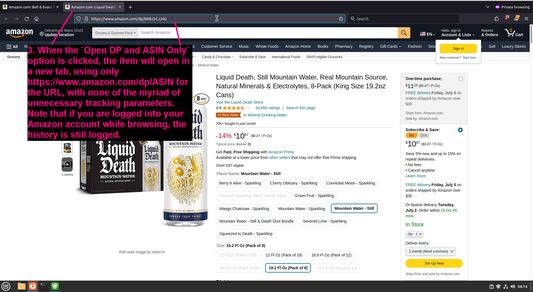
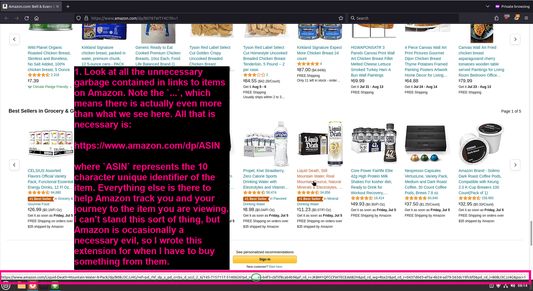
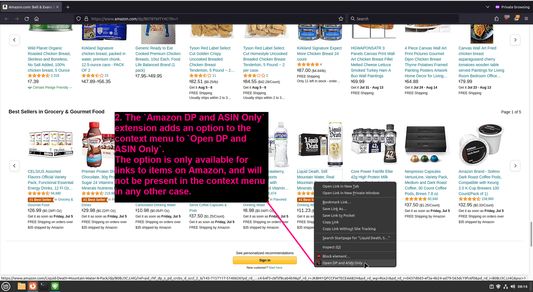
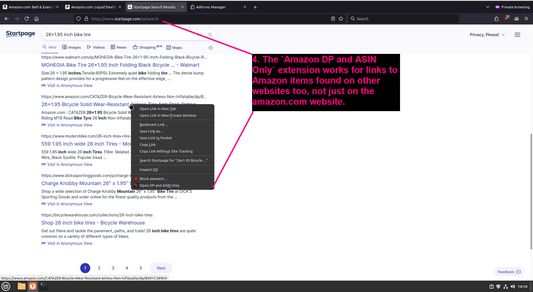
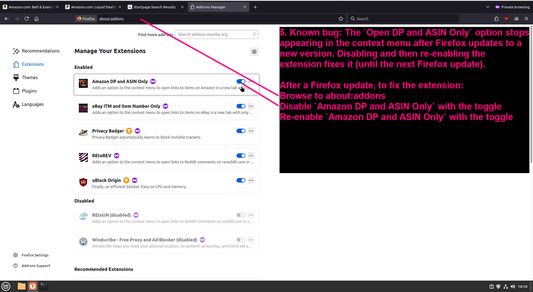
Look at all the unnecessary garbage contained in links to items on AmazonThe `Amazon DP and ASIN Only` extension adds an option to the context menu to `Open DP and ASIN Only`When the `Open DP and ASIN Only` option is clicked, the item will open in a new tab, using only https://www.amazon.com/dp/ASIN for the URL, with none of the myriad of unnecessary tracking parametersThe `Amazon DP and ASIN Only` extension works for links to Amazon items found on other websites too, not just on the amazon.com websiteKnown bug: The `Open DP and ASIN Only` option stops appearing in the context menu after Firefox updates to a new version
Oer dizze útwreiding
Adds an option to the context menu to open links to items on Amazon in a new tab, using only DP and the ASIN, stripping away all the, ref, tracking, and other unnecessary URL parameters so URLs look like https://www.amazon.com/dp/ASIN
Untwikkelersopmerkingen
To view this extension's source code:
  1. In a Firefox instance that already has this extension installed, type `about:profiles` in the Firefox address bar, then press Enter
  2. Under the profile labeled `This is the profile in use and it cannot be deleted`, click on the `Open Directory` button (appears as `Open Folder` on Windows) next to `Root Directory`
  3. In the file explorer window that opens, go into the `extensions` directory (the `extensions` folder)
  4. Copy the file `{91f0f467-2cdb-4bab-b460-652b7aceaacd}.xpi` and paste it somewhere else, such as your Desktop
  5. Rename the file, changing the extension to `.zip` - so `{91f0f467-2cdb-4bab-b460-652b7aceaacd}.xpi` becomes `{91f0f467-2cdb-4bab-b460-652b7aceaacd}.zip`
  6. Unzip the file `{91f0f467-2cdb-4bab-b460-652b7aceaacd}.zip`. The extracted files are the source, especially the .json and .js files.
Wurdearre: 0 troch 0 beoardielers
Meld jo oan om dizze útwreiding te wurdearjen
Der binne noch gjin wurdearringen

Stjer-wurdearring wurdt bewarre

5
0
4
0
3
0
2
0
1
0
Noch gjin beoardelingen
Tastimmingen en gegevensMear ynfo

Fereaske machtigingen:

  • Browserljepblêden benaderje
Mear ynformaasje
Ferzje
1.0.1
Grutte
27,53 KB
Lêst bywurke
ien jier lyn (29 jun. 2024)
Sibbe kategoryen
  • Privacy en befeiliging
  • Winkelje
Lisinsje
Allinnich GNU General Public License v3.0
Privacybelied
It privacybelied foar dizze add-on lêze
Ferzjeskiednis
  • Alle ferzjes besjen
Tafoegje oan kolleksje
Dizze add-on rapportearje
Mear útwreidingen fan DBSH
  • Der binne noch gjin wurdearringen

  • Der binne noch gjin wurdearringen

  • Der binne noch gjin wurdearringen

  • Der binne noch gjin wurdearringen

  • Der binne noch gjin wurdearringen

  • Der binne noch gjin wurdearringen

Nei Mozilla’s startside

Add-ons

  • Oer
  • Firefox-add-onsblog
  • Utwreidingsworkshop
  • Untwikkelershub
  • Untwikkelersbelied
  • Mienskipsblog
  • Foarum
  • In bug melde
  • Beoardielingsrjochtlinen

Browser

  • Desktop
  • Mobile
  • Enterprise

Produkten

  • Browsers
  • VPN
  • Relay
  • Monitor
  • Pocket
  • Bluesky (@firefox.com)
  • Instagram (Firefox)
  • YouTube (firefoxchannel)
  • Privacy
  • Cookies
  • Juridysk

Utsein oars vermeld, is op de ynhâld fan dizze website de Creative Commons Attribution Share-Alike License v3.0 of lettere ferzje fan tapassing.