OGS Kbd Nav troch Fanaro009
OGS keyboard navigation to the max.
1 brûker1 brûker
Metadata útwreiding
Skermôfbyldingen
Oer dizze útwreiding
PT-BR: Para falantes de português, assista ao tutorial aqui
Warning: I will not guarantee the Firefox version has the same quality standard of the Chromium ones.
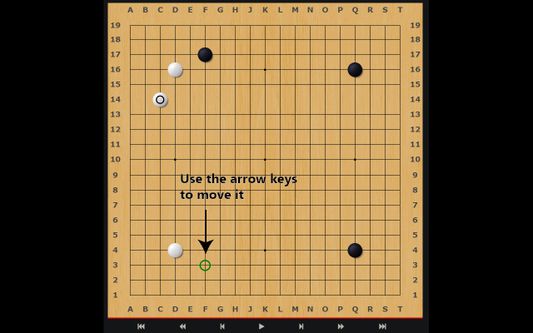
Keyboard — better — navigation for OGS, the best online platform for playing the game of Go. Now, instead of only being able to play the ancient game online with your mouse, you can do it with your keyboard as well. Other handy shortcuts are also included.
This extension currently only works if you have all the coordinates turned on.
Please visit the homepage for a full table of shortcuts.
- Ctrl + \: Global switch: enables or disables the whole extension
- Ctrl + m: Toggle the chat input box on a game page
- Ctrl + b: Toggle the canvas overlay with the stone marker
- Ctrl + ]: Toggle the arrow keys
- w or ↑: Move the stone marker up
- a or ←: Move the stone marker left
- s or ↓: Move the stone marker down
- d or →: Move the stone marker right
- Enter or f: Click on the stone marker's location
- Ctrl + [: Pass
- Ctrl + ;: Toggle AI Analysis
- Ctrl + ,: Cycle through the different board sizes
- Ctrl + .: Toggle the coordinates input field
This is supposed to only work with the game pages on https://online-go.com. Reviewing games will not work as smoothly.
Wurdearre: 0 troch 0 beoardielers
Tastimmingen en gegevens
Mear ynformaasje
- Add-on-keppelingen
- Ferzje
- 1.0.2
- Grutte
- 34,46 KB
- Lêst bywurke
- 5 jierren lyn (6 jan. 2021)
- Sibbe kategoryen
- Ferzjeskiednis
- Tafoegje oan kolleksje
De ûnwikkeler fan dizze útwreiding freget om stipe foar de trochgeande ûntwikkeling troch it meitsjen fan in lytse bydrage.