
taigi-sandhi-visualization troch hey0wing
Highlights tone sandhi changes in Taiwanese romanization on the MOE dictionary site.
Gjin brûkersGjin brûkers
Metadata útwreiding
Skermôfbyldingen

Oer dizze útwreiding
台語變調視像化 taigi-sandhi-visualization
A browser extension/userscript that highlights tone sandhi changes in Taiwanese Hokkien romanization on the MOE Taiwanese Dictionary.
Features
Installation
Option 1: Browser Extension
Option 2: Userscript Manager
| Platform | Supported Browsers | Userscript Manager |
|----------|--------------------|--------------------|
| Desktop | Chrome, Brave, Safari, Firefox, Edge | Tampermonkey, Violentmonkey, Greasemonkey |
| Android | Firefox, Edge | Tampermonkey, Violentmonkey |
| iOS | Safari | Userscript (Free), Tampermonkey (USD 2.99) |
Planned Improvements
Credits
License
This project is licensed under the MIT License.
A browser extension/userscript that highlights tone sandhi changes in Taiwanese Hokkien romanization on the MOE Taiwanese Dictionary.
Features
- Tone Sandhi Highlighting:
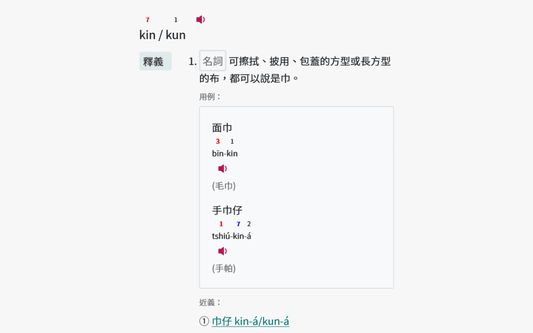
- Automatically detects and highlights tone changes in Taiwanese romanization text on the MOE dictionary site.
- Tone changes for every syllable except for the last one in a phrase.
- Tone sandhi for three common accents (Referenced from link1, link2)
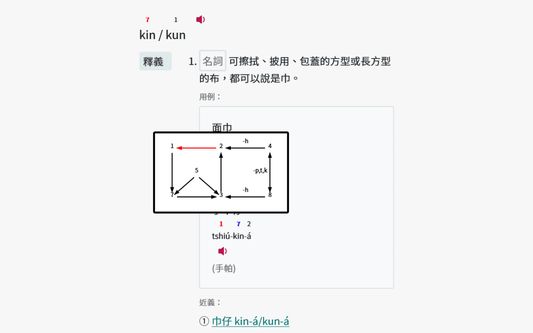
- 南部腔 Southern (偏漳腔 Zhangzhou-leaning)
- 北部腔 Northern (偏泉腔 Quanzhou-leaning)
- 海口腔 Seaport / Coastal (泉州腔 Quanzhou)
- Color Coding:
- Red: Normal tone sandhi.
- Blue: Tone sandhi before the
-ásuffix. - Green: Neutral tones.
- Tooltips: Clicking a highlighted syllable to view the tone sandhi diagram.
Installation
Option 1: Browser Extension
- Install from the Firefox Add-ons Store or Chrome Web Store.
Option 2: Userscript Manager
| Platform | Supported Browsers | Userscript Manager |
|----------|--------------------|--------------------|
| Desktop | Chrome, Brave, Safari, Firefox, Edge | Tampermonkey, Violentmonkey, Greasemonkey |
| Android | Firefox, Edge | Tampermonkey, Violentmonkey |
| iOS | Safari | Userscript (Free), Tampermonkey (USD 2.99) |
- Install via Userscript Manager (Alternative):
- Follow the Greasy Fork tutorial to install one.
- Or install Tampermonkey (Recommended), Violentmonkey or Greasemonkey on your own
- Add the Userscript:
- Greasy Fork (Recommended): Click Here and install the script directly by clicking "Install this script".
- Otherwise, copy the script directly from
taigi-sandhi-visualization.user.js, and paste the code.
- Follow the Greasy Fork tutorial to install one.
Planned Improvements
- Add Chao's Tone letter / Pitch contour for visualization
- Real-time audio conversion(?)
Credits
- Inspired by https://github.com/Aiuanyu/KIPSutian-autoplay
- Inspired by https://github.com/andreihar/taibun.js
License
This project is licensed under the MIT License.
Wurdearre: 0 troch 0 beoardielers
Tastimmingen en gegevens
Mear ynformaasje
- Add-on-keppelingen
- Ferzje
- 1.6
- Grutte
- 87,84 KB
- Lêst bywurke
- ien moanne lyn (7 jan. 2026)
- Sibbe kategoryen
- Lisinsje
- Alle rjochten foarbehâlden
- Ferzjeskiednis
- Tafoegje oan kolleksje