FreeDOM:Unlock Elements xodbox מאת
Unlock disabled, readonly, and hidden form elements instantly. FreeDOM helps developers, testers, and web enthusiasts debug, test, and explore forms with one click or shortcut.
3 משתמשים3 משתמשים
נתוני העל של ההרחבה
צילומי מסך
על אודות הרחבה זו
FreeDOM – Unlock Disabled, Readonly & Hidden Form Elements Instantly
FreeDOM is a developer-friendly browser extension that helps you quickly remove
With just one click or a shortcut, you can:
- Enable disabled inputs & buttons
- Unlock readonly fields
- Reveal hidden inputs
- Bypass restricted UI elements
Why use FreeDOM?
It’s perfect for:
1. Frontend developers – test forms without restrictions
2. QA testers – debug web applications more effectively
3. Penetration testers – explore hidden fields during audits
4. Web enthusiasts – learn how websites work behind the scenes
> Key Features
FreeDOM is a developer-friendly browser extension that helps you quickly remove
disabled, readonly, and hidden attributes from any form input or button. With just one click or a shortcut, you can:
- Enable disabled inputs & buttons
- Unlock readonly fields
- Reveal hidden inputs
- Bypass restricted UI elements
Why use FreeDOM?
It’s perfect for:
1. Frontend developers – test forms without restrictions
2. QA testers – debug web applications more effectively
3. Penetration testers – explore hidden fields during audits
4. Web enthusiasts – learn how websites work behind the scenes
> Key Features
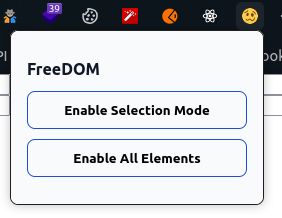
- 🎯 Selection Mode → Pick any element & enable it instantly
- 🚀 Enable All Mode → Unlock all disabled/readonly/hidden fields at once
- ⚡ Keyboard Shortcuts →
Ctrl+Alt+A→ Enable All- ✅ Secure – No unsafe code, minimal permissions, and no data tracking
מדורג 0 על־ידי 0 סוקרים
הרשאות ונתונים
מידע נוסף
- קישורים לתוספת
- גרסה
- 1.0.0
- גודל
- 23.57 ק״ב
- עדכון אחרון
- לפני 4 חודשים (20 אוג׳ 2025)
- קטגוריות קשורות
- היסטוריית הגרסאות
- הוספה לאוסף