
Open in Popup Window emvaized מאת
Open any links and images in a popup window
271 משתמשים271 משתמשים
נתוני העל של ההרחבה
צילומי מסך

על אודות הרחבה זו
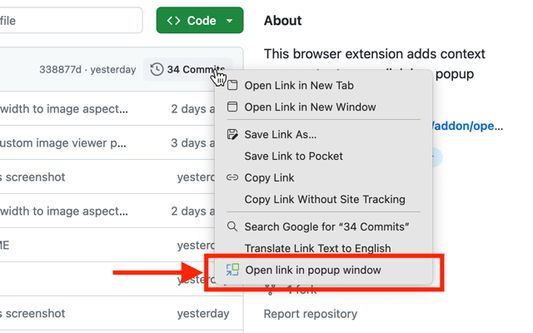
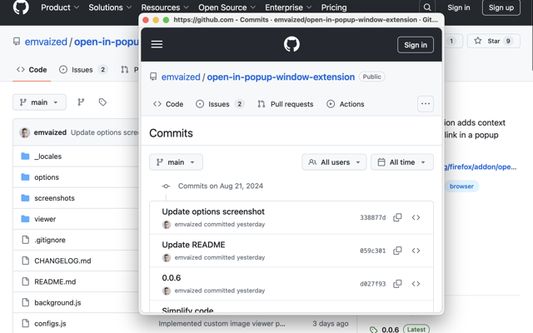
This tiny and lightweight extension provides ability to quickly preview links without leaving the current page context. It adds entry in context menu of links, and when clicked, opens new small window at cursor position, with no tab bar and address bar.
This tiny and lightweight extension provides ability to quickly preview links without leaving the current page context. It adds entry in context menu of links, and when clicked, opens new small window at cursor position, with no tab bar and address bar.
This extension is intended to be used as an analogue of Safari Link Preview, Arc Peek or Zen Glance. It's a great way to preview links, which works everywhere and is not affected by the CORS problem like extensions which are using iframe element for link preview.
Features
● Open images and search selected text in popup window
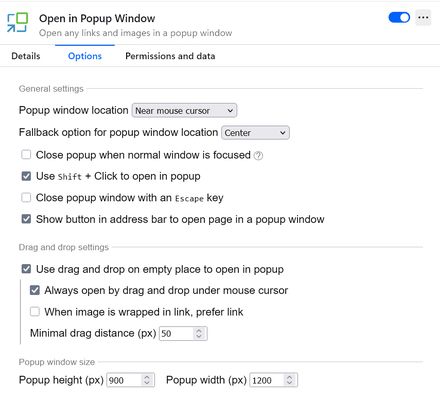
● Configurable popup height, width and default position on the screen
● Close popup window when regular window regains focus
● Automatically reopen new single tab windows and tabs opened by page as popup windows (learn more)
● Remember popup window size on manual resize
● Advanced image viewer with GIF playback control
● Customisable keyboard hotkeys
Additional ways to open popup window
● Modifier key + left click (possible options: Shift / Ctrl / Alt / Meta)
● Double press modifier key (disabled by default)
● Drag and drop on empty space (disabled by default)
● Click on toolbar icon (search/open current page in popup)
This extension is intended to be used as an analogue of Safari Link Preview, Arc Peek or Zen Glance. It's a great way to preview links, which works everywhere and is not affected by the CORS problem like other extensions which are using
⚠️ If "Open by drag" and "Shift+click to open" options are not working, or the popup window always gets positioned in the top left corner disregarding the settings, please make sure you gave extension permission to run on every page
🛡️ Privacy:
This extension doesn't collect any private data. It's fully open source, and you can see the code on Github page. It only requires access to currently open page in order to fetch information about the object under cursor when, for example, drag and drop event occurred, or context menu was opened.
This tiny and lightweight extension provides ability to quickly preview links without leaving the current page context. It adds entry in context menu of links, and when clicked, opens new small window at cursor position, with no tab bar and address bar.
This extension is intended to be used as an analogue of Safari Link Preview, Arc Peek or Zen Glance. It's a great way to preview links, which works everywhere and is not affected by the CORS problem like extensions which are using iframe element for link preview.
Features
● Open images and search selected text in popup window
● Configurable popup height, width and default position on the screen
● Close popup window when regular window regains focus
● Automatically reopen new single tab windows and tabs opened by page as popup windows (learn more)
● Remember popup window size on manual resize
● Advanced image viewer with GIF playback control
● Customisable keyboard hotkeys
Additional ways to open popup window
● Modifier key + left click (possible options: Shift / Ctrl / Alt / Meta)
● Double press modifier key (disabled by default)
● Drag and drop on empty space (disabled by default)
● Click on toolbar icon (search/open current page in popup)
This extension is intended to be used as an analogue of Safari Link Preview, Arc Peek or Zen Glance. It's a great way to preview links, which works everywhere and is not affected by the CORS problem like other extensions which are using
iframe element for the link preview.⚠️ If "Open by drag" and "Shift+click to open" options are not working, or the popup window always gets positioned in the top left corner disregarding the settings, please make sure you gave extension permission to run on every page
🛡️ Privacy:
This extension doesn't collect any private data. It's fully open source, and you can see the code on Github page. It only requires access to currently open page in order to fetch information about the object under cursor when, for example, drag and drop event occurred, or context menu was opened.
מדורג 4.8 על־ידי 6 סוקרים
הרשאות ונתונים
מידע נוסף
- קישורים לתוספת
- גרסה
- 0.5.1
- גודל
- 54.29 ק״ב
- עדכון אחרון
- לפני 3 ימים (10 אפר׳ 2026)
- היסטוריית הגרסאות
- הוספה לאוסף