
screenshot any element vacantthinker מאת
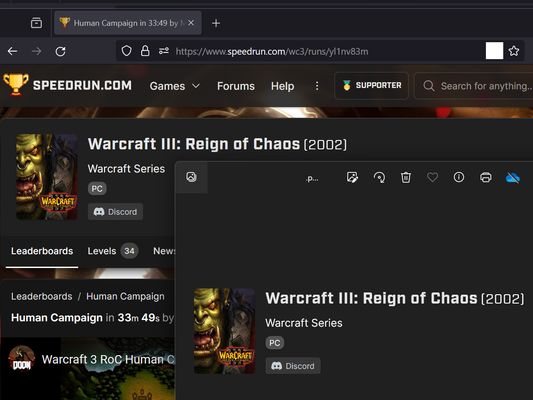
webpage screenshot support: screenshot full page pick one element to screenshot
23 משתמשים23 משתמשים
נתוני העל של ההרחבה
צילומי מסך



על אודות הרחבה זו
Extension User Guide
📸 1. How to Capture a Full Page
🎯 2. How to Capture a Specific Element
⚠️ 3. Known Limitations
Browser extensions are restricted by standard security architectures and cannot run on native browser pages or official extension stores.
Examples of restricted pages include:
* Official Stores: Mozilla Add-ons Store (
📸 1. How to Capture a Full Page
- Right-click anywhere on the web page to open the context menu.
- Select "Screenshot Full Page" from the list.
🎯 2. How to Capture a Specific Element
- Click the extension icon in your browser toolbar.
- Move your mouse over the specific web element you want to capture. A red selection box will highlight the targeted area.
- Left-click the element. The extension will automatically capture the highlighted area and download it as a
.pngfile.
⏳ Note: Capturing larger web elements or extensive sections may take a few moments to process and download.
⚠️ 3. Known Limitations
Browser extensions are restricted by standard security architectures and cannot run on native browser pages or official extension stores.
Examples of restricted pages include:
* Official Stores: Mozilla Add-ons Store (
addons.mozilla.org).מדורג 5 על־ידי סוקר אחד
הרשאות ונתונים
הרשאות נדרשות:
- הצגת התרעות
- גישה ללשוניות
- גישה לנתונים שלך מכל האתרים
איסוף נתונים:
- המפתח אומר שהרחבה זו אינה דורשת איסוף נתונים.
מידע נוסף
- קישורים לתוספת
- גרסה
- 2026.5.30.1
- גודל
- 12.11 ק״ב
- עדכון אחרון
- לפני 9 ימים (30 מאי 2026)
- קטגוריות קשורות
- היסטוריית הגרסאות
- תגיות
- הוספה לאוסף