תוספות לדפדפן Firefox
הרחבות
ערכות נושא
עוד…
עבור Firefox
מילונים וחבילות שפה
אתרי דפדפנים אחרים
תוספות עבור Android
כניסה
חיפוש
חיפוש
Spotify Hotkeys
Jerosa
מאת
Add configurable keyboard shortcuts and notifications to the Spotify Web Player
4.9 (34 סקירות)
4.9 (34 סקירות)
171 משתמשים
171 משתמשים
הורדת Firefox וקבלת ההרחבה
הורדת קובץ
נתוני העל של ההרחבה
צילומי מסך
על אודות הרחבה זו
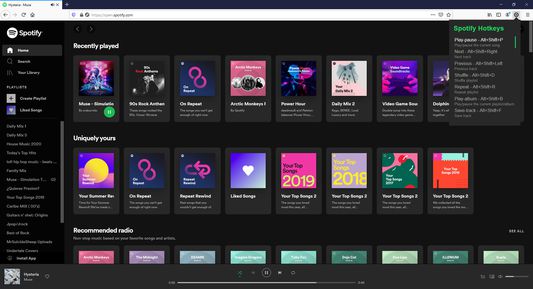
Add configurable keyboard shortcuts and notifications to the Spotify Web Player
Default Keyboard Shortcuts
Play/Pause: Alt+Shift+W
Next: Alt+Shift+Right Arrow
Previous: Alt+Shift+Left Arrow
Shuffle: Alt+Shift+D
Repeat: Alt+Shift+R
Play Album: Alt+Shift+G
Save Track: Alt+Shift+L
Mute/Unmute: Alt+Shift+M
Volume Up: Alt+Shift+Up Arrow
Volume Down: Alt+Shift+Down Arrow
Skip Forward: Alt+Shift+Period
Skip Back: Alt+Shift+Comma
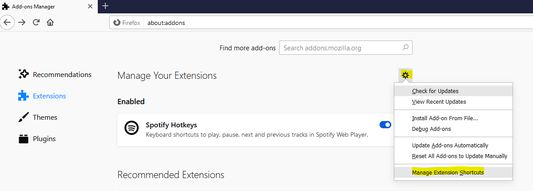
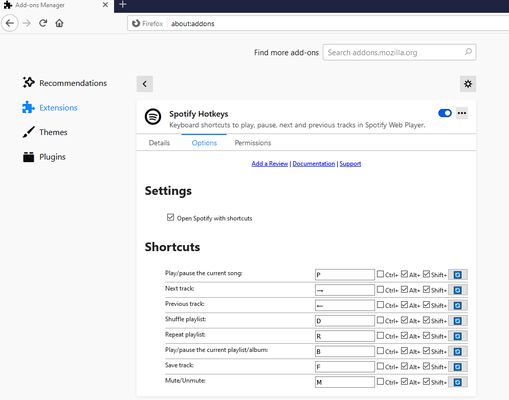
All shortcuts can be customized in Firefox extension settings. Skip duration is configurable (1-60 seconds) in the extension options page.
מדורג 4.9 על־ידי 34 סוקרים
יש להתחבר כדי לדרג הרחבה זו
אין דירוגים עדיין
דירוג הכוכבים נשמר
5
30
4
3
3
1
2
0
1
0
הרשאות ונתונים
הרשאות נדרשות:
הצגת התרעות
גישה ללשוניות
גישה לנתונים שלך עבור open.spotify.com
גישה לנתונים שלך עבור play.spotify.com
איסוף נתונים:
המפתח אומר שהרחבה זו אינה דורשת איסוף נתונים.
מידע נוסף
קישורים לתוספת
דף הבית
אתר תמיכה
גרסה
2.2.0
גודל
21.6 ק״ב
עדכון אחרון
לפני 23 ימים (21 מרץ 2026)
קטגוריות קשורות
תצוגה
תמונות, מוסיקה ווידאו
לשוניות
רישיון
MIT License
היסטוריית הגרסאות
הצגת כל הגרסאות
הוספה לאוסף
בחירת אוסף…
יצירת אוסף חדש
דיווח על תוספת זו