Dodaci za preglednik Firefox
  • Proširenja
  • Teme
    • za Firefox
    • Rječnici i jezični paketi
    • Druge stranice preglednika
    • Dodaci za Android
Prijavi se
Pregled za QR Issue Card Printer PRO for Jira Cloud

QR Issue Card Printer PRO for Jira Cloud Autor: MrAddon

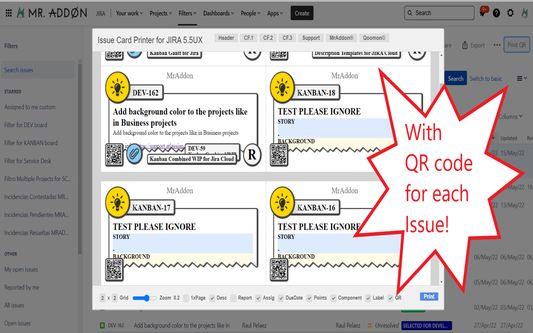
Print your filters and issues with a single click, with a configurable and beautiful layout.Show a large QR code in each card to quickly locate your tickets.Now you can also print from your Kanban or Scrum board and from your backlog view!New feature

EksperimentalnoEksperimentalno
0 (0 recenzije)0 (0 recenzije)
2 korisnika2 korisnika
Preuzmi Firefox i nabavi proširenje
Preuzmi datoteku

Metapodaci proširenja

Snimke ekrana
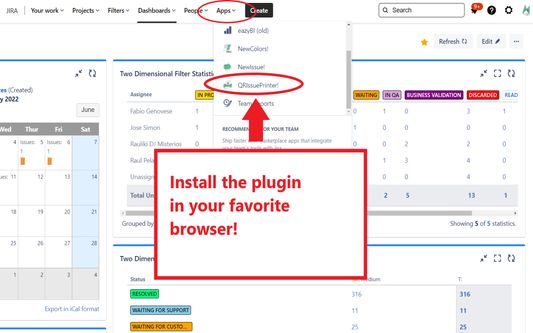
Install the add-on in your favorite browser!
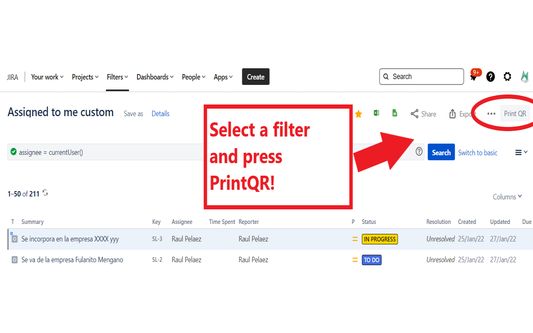
Go to Apps → QRIssuePrinter! and install the add-on in your favorite browserPush PrintQR! button in issues, filters or boards
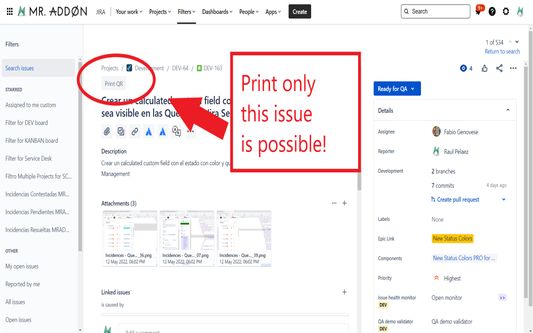
That’s all! Now take a look in your Issues, Filters and Kanban/SCRUM boards and backlogs and you will see a new button “Print QR”Ready to print in one click!!
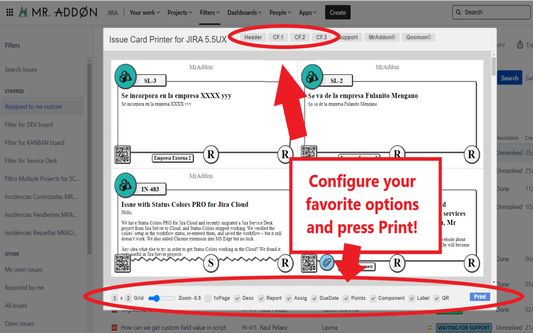
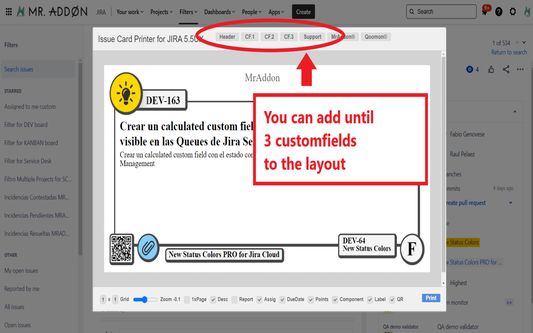
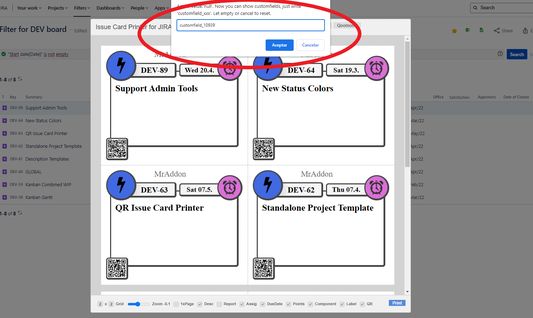
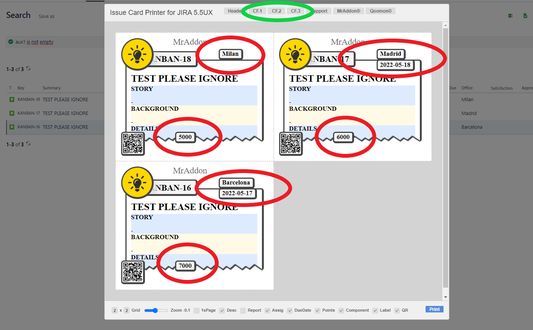
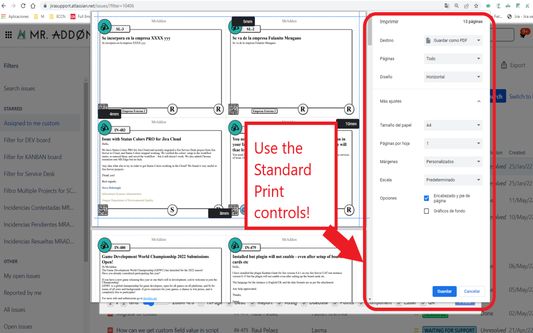
After press the “Print QR” button you will see a beatiful cards ready to print in one click!!Just configure the final part, page margins and Save it as PDF or just print in your usual printer!Now we can configure show/hide the system fields of Jira, we have a Zoom control and grid control, also of course, the QR code.If you need to print only one issue, it’s possible of course! Search the “Print QR” button and that’s all!Click in CF1 or CF2 or CF3 buttons and add the “customfield_xxxx” value where “xxxx” is the ID of the customfieldClick in CF1 or CF2 or CF3 buttons and add the “customfield_xxxx” value where “xxxx” is the ID of the customfieldClick in CF1 or CF2 or CF3 buttons and add the “customfield_xxxx” value where “xxxx” is the ID of the customfield
Informacije o ovom proširenju
Print your filters and issues with a single click, with a configurable and beautiful layout.Show a large QR code in each card to quickly locate your tickets.Now you can also print from your Kanban or Scrum board and from your backlog view!New features coming soon!

Install the add-on in your favorite browser!
Go to Apps → QRIssuePrinter! and install the add-on in your favorite browser

Push PrintQR! button in issues, filters or boards
That’s all! Now take a look in your Issues, Filters and Kanban/SCRUM boards and backlogs and you will see a new button “Print QR”

Ready to print in one click!!
After press the “Print QR” button you will see a beatiful cards ready to print in one click!!

Vide summary: https://www.youtube.com/watch?v=AVp7n4f4qUk
Ocjena 0 od 0 recenzenta
Prijavi se i ocijeni ovo proširenje
Još nema ocjena

Ocjena je spremljena

5
0
4
0
3
0
2
0
1
0
Još nema recenzija
Dozvole i podaci

Potrebne dozvole:

  • Pristup tvojim podacima za web-stranice na domeni atlassian.net
  • Pristup tvojim podacima za web-stranice na domeni jira.com

Opcionalne dozvole:

  • Pristup tvojim podacima za web-stranice na domeni atlassian.net
  • Pristup tvojim podacima za web-stranice na domeni jira.com
Saznaj više
Daljnje informacije
Poveznice dodatka
  • Početna stranica
  • Stranica podrške
  • E-adresa podrške
Verzija
7.3.0
Veličina
170,84 KB
Zadnje aktualiziranje
prije 4 mjeseca (18. pro. 2025)
Povezane kategorije
  • Razvoj weba
Licenca
Mozilla javna licenca 2.0
Povijest verzija
  • Pogledaj sve verzije
Dodaj u zbirku
Prijavi ovaj dodatak
Idi na početnu stranicu Mozille

Dodaci

  • Informacije
  • Blog za Firefox dodatke
  • Radionica za proširenja
  • Centar za programere
  • Pravila za programere
  • Blog zajednice
  • Forum
  • Prijavi grešku
  • Priručnik za recenziranje

Preglednici

  • Desktop
  • Mobile
  • Enterprise

Proizvodi

  • Browsers
  • VPN
  • Relay
  • Monitor
  • Pocket
  • Bluesky (@firefox.com)
  • Instagram (Firefox)
  • YouTube (firefoxchannel)
  • Privatnost
  • Kolačići
  • Pravne informacije

Osim gdje je drugačije navedeno, sadržaj ove stranice licenciran je pod licencom Creative Commons Imenovanje dijeli pod istim uvjetima verzija 3.0 ili novijoj.