Dodaci za preglednik Firefox
  • Proširenja
  • Teme
    • za Firefox
    • Rječnici i jezični paketi
    • Druge stranice preglednika
    • Dodaci za Android
Prijavi se
Pregled za Narrow Page

Narrow Page Autor: b.

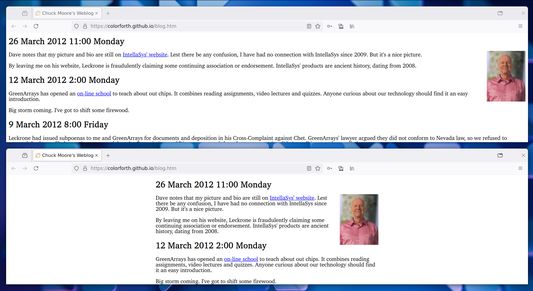
Adjust the width of your webpages with a shortcut.

5 (1 recenzija)5 (1 recenzija)
32 korisnika32 korisnika
Preuzmi Firefox i nabavi proširenje
Preuzmi datoteku

Metapodaci proširenja

Snimke ekrana
Resize your webpage width dynamically.
Informacije o ovom proširenju
Use Shift+Alt+W (configurable shortcut) or click the toolbar icon to cycle through some preset width modes (720px, 900px, 1080px, "Fit Content"). This add-on affects the style of the <body> tag, namely the width and max-width properties, and adds a subtle status bar at the top.

Keywords: resize shrink view small large full widescreen browsing center wide narrow fit-content configure column decrease
Ocjena 5 od jednog recenzenta
Prijavi se i ocijeni ovo proširenje
Još nema ocjena

Ocjena je spremljena

5
1
4
0
3
0
2
0
1
0
Pročitaj 1 recenziju
Daljnje informacije
Poveznice dodatka
  • Početna stranica
  • Stranica podrške
  • E-adresa podrške
  • Copy add-on ID
Verzija
0.1.0
Veličina
13,33 KB
Zadnje aktualiziranje
prije 2 godine (1. lis. 2024)
Povezane kategorije
  • Izgled
Licenca
Mozilla javna licenca 2.0
Povijest verzija
  • Pogledaj sve verzije
Dodaj u zbirku
Prijavi ovaj dodatak
Idi na početnu stranicu Mozille

Dodaci

  • Informacije
  • Blog za Firefox dodatke
  • Radionica za proširenja
  • Centar za programere
  • Pravila za programere
  • Blog zajednice
  • Forum
  • Prijavi grešku
  • Priručnik za recenziranje

Download

  • Download Firefox
  • Windows
  • macOS
  • iOS
  • Android
  • Linux
  • All

Latest Builds

  • Nightly
  • Beta

Firefox for Business

  • Enterprise

Community

  • Connect
  • Contribute
  • Developer

Follow

  • Instagram
  • YouTube
  • TikTok
  • Bluesky
  • Podcast
  • Privatnost
  • Kolačići
  • Pravne informacije

Osim gdje je drugačije navedeno, sadržaj ove stranice licenciran je pod licencom Creative Commons Imenovanje dijeli pod istim uvjetima verzija 3.0 ili novijoj.