Save incognito session Autor: Marco Scarpetta
This addon let you create an incognito window which cookies get saved for the following session.
128 korisnika128 korisnika
Metapodaci proširenja
Snimke ekrana
Informacije o ovom proširenju
NOTE: this addon requires Firefox 56+.
This addon let you create an incognito window which cookies get saved for the following session. This is useful if you want to keep logged to a web service, without being tracked by that service during your daily navigation.
Usage
Click on the addon icon inside the toolbar to create the incognito window. Its cookies will be automatically saved.
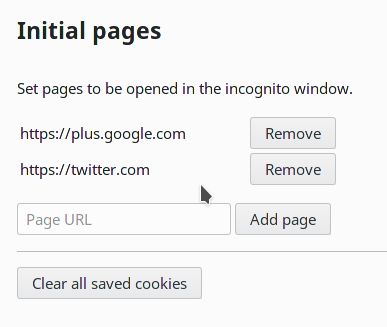
You can set the pages initially opened inside the incognito window through the addon's options page.
This addon let you create an incognito window which cookies get saved for the following session. This is useful if you want to keep logged to a web service, without being tracked by that service during your daily navigation.
Usage
Click on the addon icon inside the toolbar to create the incognito window. Its cookies will be automatically saved.
You can set the pages initially opened inside the incognito window through the addon's options page.
This addon requires Firefox 56+.
Ocjena 3,8 od 4 recenzenta
Dozvole i podaci
Potrebne dozvole:
- Pristup karticama preglednika
- Pristup tvojim podacima za sve web stranice
Daljnje informacije
- Poveznice dodatka
- Verzija
- 0.3resigned1
- Veličina
- 13,87 KB
- Zadnje aktualiziranje
- prije 2 godine (25. tra. 2024)
- Povezane kategorije
- Povijest verzija
- Dodaj u zbirku