Přidatki za Firefox Browser
  • Rozšěrjenja
  • Drasty
    • za Firefox
    • Słowniki a rěčne pakćiki
    • Druhe sydła wobhladowaka
    • Přidatki za Android
Přizjewić
Přehlad Amazon DP and ASIN Only

Amazon DP and ASIN Only wot DBSH

Adds an option to the context menu to open links to items on Amazon in a new tab, using only DP and the ASIN, stripping away all the, ref, tracking, and other unnecessary URL parameters so URLs look like https://www.amazon.com/dp/ASIN

0 (pohódnoćenja: 0)0 (pohódnoćenja: 0)
3 wužiwarjo3 wužiwarjo
Firefox sćahnyć a rozšěrjenje wobstarać
Dataju sćahnyć

Metadaty rozšěrjenja

Fota wobrazowki
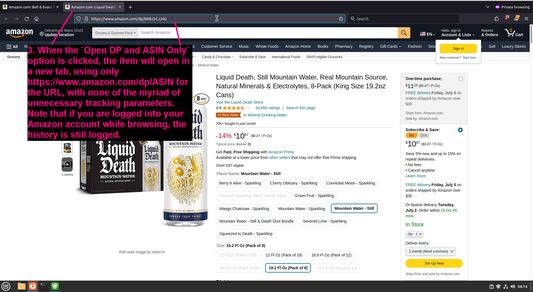
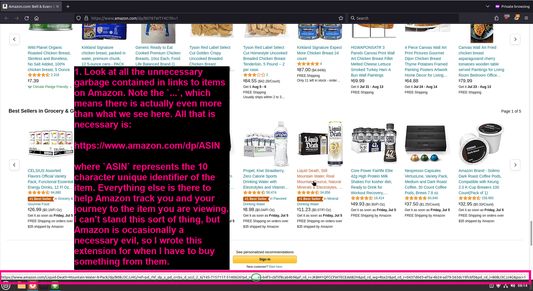
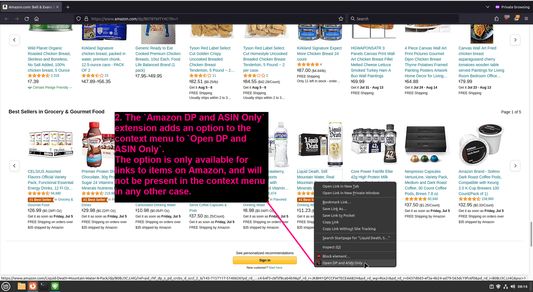
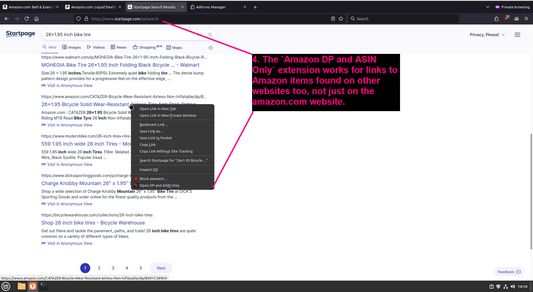
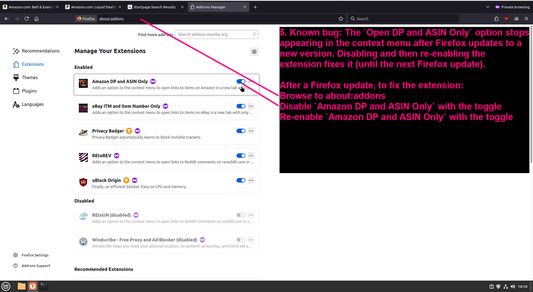
Look at all the unnecessary garbage contained in links to items on AmazonThe `Amazon DP and ASIN Only` extension adds an option to the context menu to `Open DP and ASIN Only`When the `Open DP and ASIN Only` option is clicked, the item will open in a new tab, using only https://www.amazon.com/dp/ASIN for the URL, with none of the myriad of unnecessary tracking parametersThe `Amazon DP and ASIN Only` extension works for links to Amazon items found on other websites too, not just on the amazon.com websiteKnown bug: The `Open DP and ASIN Only` option stops appearing in the context menu after Firefox updates to a new version
Wo tutym rozšěrjenju
Adds an option to the context menu to open links to items on Amazon in a new tab, using only DP and the ASIN, stripping away all the, ref, tracking, and other unnecessary URL parameters so URLs look like https://www.amazon.com/dp/ASIN
Wuwiwarske komentary
To view this extension's source code:
  1. In a Firefox instance that already has this extension installed, type `about:profiles` in the Firefox address bar, then press Enter
  2. Under the profile labeled `This is the profile in use and it cannot be deleted`, click on the `Open Directory` button (appears as `Open Folder` on Windows) next to `Root Directory`
  3. In the file explorer window that opens, go into the `extensions` directory (the `extensions` folder)
  4. Copy the file `{91f0f467-2cdb-4bab-b460-652b7aceaacd}.xpi` and paste it somewhere else, such as your Desktop
  5. Rename the file, changing the extension to `.zip` - so `{91f0f467-2cdb-4bab-b460-652b7aceaacd}.xpi` becomes `{91f0f467-2cdb-4bab-b460-652b7aceaacd}.zip`
  6. Unzip the file `{91f0f467-2cdb-4bab-b460-652b7aceaacd}.zip`. The extracted files are the source, especially the .json and .js files.
Z 0 wot 0 pohódnoćacych pohódnoćeny
Přizjewće so, zo byšće tute rozšěrjenje pohódnoćił
Hišće pohódnoćenja njejsu

Hwězdne pohódnoćenje je so składowało

5
0
4
0
3
0
2
0
1
0
Hišće žane pohódnoćenja
Prawa a daty

Trěbne prawa:

  • Mějće přistup k rajtarkam wobhladowaka
Dalše informacije
Dalše informacije
Wersija
1.0.1
Wulkosć
27,53 KB
Posledni raz zaktualizowany
ένας χρόνος πριν (29 Ιουν 2024)
Přiwuzne kategorije
  • Priwatnosć a wěstota
  • Nakupowanje
Licenca
Jenož licenca GNU General Public License v3.0
Prawidła priwatnosće
Čitajće prawidła priwatnosće za tutón přidatk
Wersijowa historija
  • Wšě wersije pokazać
Zběrce přidać
Tutón přidatk zdźělić
K startowej stronje Mozilla

Přidatki

  • Wo
  • Blog přidatkow Firefox
  • Dźěłarnička rozšěrjenjow
  • Wuwiwarski róžk
  • Wuwiwarske prawidła
  • Blog zhromadźenstwa
  • Forum
  • Programowy zmylk zdźělić
  • Směrnica za pohódnoćenja

Wobhladowaki

  • Desktop
  • Mobile
  • Enterprise

Produkty

  • Browsers
  • VPN
  • Relay
  • Monitor
  • Pocket
  • Bluesky (@firefox.com)
  • Instagram (Firefox)
  • YouTube (firefoxchannel)
  • Priwatnosć
  • Placki
  • Prawniske

Jeli nic hinak zapisane, so wobsah na tutym sydle pod Creative Commons Attribution Share-Alike License v3.0 abo poždźišej wersiju licencuje.