Media Queue wot Zac Whalley
Adds a browser action icon to the toolbar. Click on the icon to add links to a queue.
Metadaty rozšěrjenja
Fota wobrazowki
Wo tutym rozšěrjenju
A Firefox extension for adding a queue to the browser. Links can be added to the queue which are removed after viewing.
Use
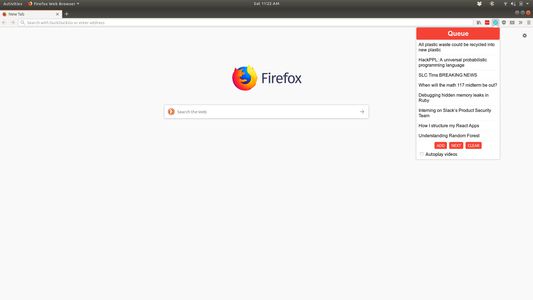
View the current queue by opening the popup
Add links in one of two ways:
1. Open the popup and click 'Add' on a page you want to save to the queue
2. Right click a link and select 'Add to media queue' in the context menu
Clear the queue with the 'Clear' button
Navigate to the next video with the 'Next' button, or keyboard shortcuts
Commands
Ctrl+Shift+Q or Command+Shift+Q: Navigate to next item in queue
Ctrl+Shift+1 or Command+Shift+1: Open popup to view queue / use UI controls
Use
View the current queue by opening the popup
Add links in one of two ways:
1. Open the popup and click 'Add' on a page you want to save to the queue
2. Right click a link and select 'Add to media queue' in the context menu
Clear the queue with the 'Clear' button
Navigate to the next video with the 'Next' button, or keyboard shortcuts
Commands
Ctrl+Shift+Q or Command+Shift+Q: Navigate to next item in queue
Ctrl+Shift+1 or Command+Shift+1: Open popup to view queue / use UI controls
Z 0 wot 0 pohódnoćacych pohódnoćeny
Prawa a daty
Trěbne prawa:
- Mějće přistup k rajtarkam wobhladowaka
- Mějće přistup k swojim datam za www.youtube.com
Dalše informacije
- Wersija
- 1.1
- Wulkosć
- 49,93 KB
- Posledni raz zaktualizowany
- kuusi vuotta sitten (19. loka 2019)
- Přiwuzne kategorije
- Wersijowa historija
- Zběrce přidać