
screenshot any element wot vacantthinker
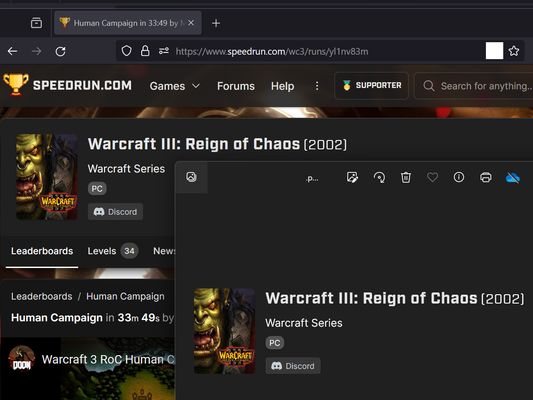
webpage screenshot support: screenshot full page pick one element to screenshot
22 wužiwarjow22 wužiwarjow
Metadaty rozšěrjenja
Fota wobrazowki



Wo tutym rozšěrjenju
Extension User Guide
📸 1. How to Capture a Full Page
🎯 2. How to Capture a Specific Element
⚠️ 3. Known Limitations
Browser extensions are restricted by standard security architectures and cannot run on native browser pages or official extension stores.
Examples of restricted pages include:
* Official Stores: Mozilla Add-ons Store (
📸 1. How to Capture a Full Page
- Right-click anywhere on the web page to open the context menu.
- Select "Screenshot Full Page" from the list.
🎯 2. How to Capture a Specific Element
- Click the extension icon in your browser toolbar.
- Move your mouse over the specific web element you want to capture. A red selection box will highlight the targeted area.
- Left-click the element. The extension will automatically capture the highlighted area and download it as a
.pngfile.
⏳ Note: Capturing larger web elements or extensive sections may take a few moments to process and download.
⚠️ 3. Known Limitations
Browser extensions are restricted by standard security architectures and cannot run on native browser pages or official extension stores.
Examples of restricted pages include:
* Official Stores: Mozilla Add-ons Store (
addons.mozilla.org).Z 5 wot 1 pohódnoćaceho pohódnoćeny
Prawa a daty
Trěbne prawa:
- Zdźělenki na was pokazać
- Mějće přistup k rajtarkam wobhladowaka
- Přistup k wašim datam za wšě websydła měć
Hromadźenje datow:
- Wuwiwar praji, zo tute rozšěrjenje hromadźenje datow njetrjeba.
Dalše informacije
- Přidatkowe wotkazy
- Wersija
- 2026.5.30.1
- Wulkosć
- 12,11 KB
- Posledni raz zaktualizowany
- 5 dagar sidan (30. mai 2026)
- Přiwuzne kategorije
- Wersijowa historija
- Znački
- Zběrce přidać