
TextMind AI wot MiladF
Your AI-Powered Text Analysis Companion. Transform text selection into intelligent insights with multiple AI models.
1 wužiwar1 wužiwar
Metadaty rozšěrjenja
Fota wobrazowki
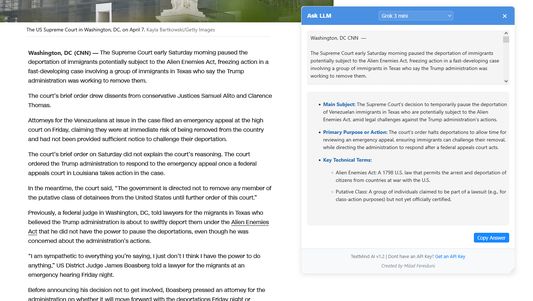

Wo tutym rozšěrjenju
TextMind AI is your intelligent text analysis companion that transforms any selected text into valuable insights. With support for multiple AI models, it helps you understand, analyze, and interact with text content in real-time. Key features include:
Perfect for researchers, students, content creators, and anyone who needs quick, intelligent text analysis while browsing. Transform your web browsing experience with AI-powered insights at your fingertips.
- Smart Text Analysis: Select any text on web pages to get instant AI-powered analysis and insights
- Multiple AI Models: Choose from different AI models to get the most relevant analysis for your needs
- Floating Interface: Clean, non-intrusive floating UI that appears exactly where you need it
- Customizable Options: Fine-tune the extension's behavior through an intuitive options page
- Privacy-Focused: All processing is done through secure API endpoints, with no data storage
- Lightweight: Minimal impact on browser performance with efficient code implementation
Perfect for researchers, students, content creators, and anyone who needs quick, intelligent text analysis while browsing. Transform your web browsing experience with AI-powered insights at your fingertips.
Z 0 wot 0 pohódnoćacych pohódnoćeny
Prawa a daty
Trěbne prawa:
- Mějće přistup k rajtarkam wobhladowaka
- Mějće přistup k aktiwiće wobhladowaka za nawigaciju
- Přistup k wašim datam za wšě websydła měć
Dalše informacije
- Přidatkowe wotkazy
- Wersija
- 1.4
- Wulkosć
- 93,17 KB
- Posledni raz zaktualizowany
- 10 måneder siden (20. apr. 2025)
- Přiwuzne kategorije
- Licenca
- Licenca MIT
- Wersijowa historija
- Zběrce přidać
You’re now ready to use TextMind AI to process selected text on any webpage!