Firefox böngészőkiegészítők
  • Kiegészítők
  • Témák
    • Firefoxhoz
    • Szótárak és nyelvi csomagok
    • Más böngészők oldalai
    • Kiegészítők Androidra
Bejelentkezés
HTML Tag Changer előnézete

HTML Tag Changer szerző: Kai Grunert

Select HTML elements and change their tag names. You can select elements with a CSS selector and specify the intended new tag name. You can also hide or remove the elements. E.g. this can be useful to include specific elements in the Reader View.

0 (0 értékelés)0 (0 értékelés)
2 felhasználó2 felhasználó
A Firefox letöltése és a kiegészítő beszerzése
Fájl letöltése

Kiegészítő metaadatai

Képernyőképek
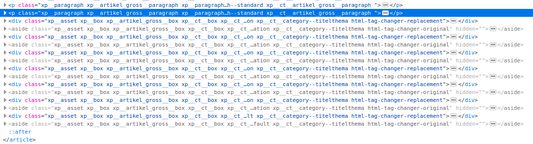
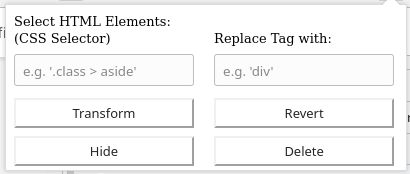
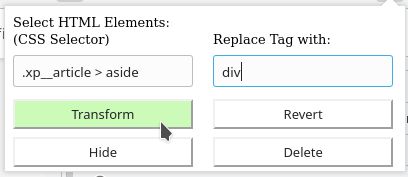
Default display if you open the add-onSelect the HTML elements with a CSS selector and type the new tag nameThe original source code before the transformationThe new source code after the transformation
A kiegészítő névjegye
This browser add-on can change the HTML element tag names on a web page into another tag name. You can select the HTML elements that should be replaced with a CSS selector and state the new tag names.

Furthermore you can hide or delete the selected elements from the web page. The former is usually preferred, because you will be able to revert the changes afterwards. If you use delete, you need to reload the complete page to revert the changes.

Example: The Reader View of Firefox includes and presents only a selection of HTML elements like <p>. But if the web page contains important hint or content boxes in <aside> elements, you will not see them in the Reader View. You can use this add-on to change all <aside> elements in appropriate elements before you turn on the Reader.

There is a Revert button - if it doesn't work correctly, just reload the complete page.

Hints:
  • Due to a lack of API support, the event listeners for an element can not be copied into the new element
  • Pay attention to the structure of a web page: some elements (often inline elements) don't allow to include other elements. E.g. if you want to change all <aside> elements into <p> elements, this can lead to unpredictable behavior if the <aside> element contains further block elements, because <p> is not allowed to contain block elements.
  • If the replacement contains web components, this can also lead to some side effects

Details:

The add-on does not delete the original elements, but it hides them. Therefore the actions can be reverted.
Értékelés 0 szerkesztő által: 0
Jelentkezzen be a kiegészítő értékeléséhez
Még nincsenek csillagos értékelések

Csillagos értékelés mentve

5
0
4
0
3
0
2
0
1
0
Még nincsenek értékelések
További információk
Kiegészítő hivatkozásai
  • Kezdőlap
  • Támogatói oldal
Verzió
1.0
Méret
29,6 kB
Legutóbb frissítve
6 éve (2020. máj. 2.)
Kapcsolódó kategóriák
  • Webfejlesztés
  • Megjelenés
Licenc
Egyéni licenc
Verziótörténet
  • Összes verzió megtekintése
Gyűjteményhez adás
Kiegészítő jelentése
Ugrás a Mozilla honlapjára

Kiegészítők

  • Névjegy
  • Firefox kiegészítők blogja
  • Kiegészítő-műhely
  • Fejlesztőközpont
  • Fejlesztői irányelvek
  • Közösségi blog
  • Fórum
  • Hiba jelentése
  • Értékelési útmutató

Böngészők

  • Desktop
  • Mobile
  • Enterprise

Termékek

  • Browsers
  • VPN
  • Relay
  • Monitor
  • Pocket
  • Bluesky (@firefox.com)
  • Instagram (Firefox)
  • YouTube (firefoxchannel)
  • Adatvédelem
  • Sütik
  • Jogi információk

Kivéve, ahol másként van jelölve, az oldal tartalma Creative Commons Nevezd meg! – Így add tovább! licenc v3.0 vagy bármelyik újabb verziója alatt érhető el.