PrivateSearch szerző: Patrik
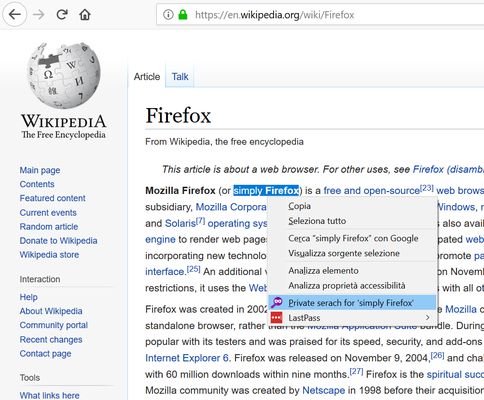
Search any text privately, with a simple right-click. The extension adds an option to the context menu to instantly open a search in a new private window, using your default search engine.
39 felhasználó39 felhasználó
Kiegészítő metaadatai
Képernyőképek
A kiegészítő névjegye
How does it work?
1. Select the text you want to search
2. Right-click on the selected text
3. Select "Private search for..."
4. A new private window will open with the search results.
No data collected, no configuration needed.
⚠️ Important
To work properly, the extension requires the "Run in Private Windows" permission. Firefox will ask you to enable it during installation; you can also do it later from the extensions settings.
1. Select the text you want to search
2. Right-click on the selected text
3. Select "Private search for..."
4. A new private window will open with the search results.
No data collected, no configuration needed.
⚠️ Important
To work properly, the extension requires the "Run in Private Windows" permission. Firefox will ask you to enable it during installation; you can also do it later from the extensions settings.
Értékelés 4 szerkesztő által: 5
További információk
- Verzió
- 1.2resigned1
- Méret
- 22,47 kB
- Legutóbb frissítve
- 2 éve (2024. ápr. 26.)
- Kapcsolódó kategóriák
- Licenc
- Minden jog fenntartva
- Verziótörténet
- Gyűjteményhez adás