Componenti aggiuntivi per Firefox
  • Estensioni
  • Temi
    • per Firefox
    • Dizionari e language pack
    • Altri siti
    • Componenti aggiuntivi per Android
Accedi
Anteprima di QR Issue Card Printer PRO for Jira Cloud

QR Issue Card Printer PRO for Jira Cloud di MrAddon

Print your filters and issues with a single click, with a configurable and beautiful layout.Show a large QR code in each card to quickly locate your tickets.Now you can also print from your Kanban or Scrum board and from your backlog view!New feature

SperimentaleSperimentale
0 (0 recensioni)0 (0 recensioni)
3 utenti3 utenti
Scarica Firefox e installa l’estensione
Scarica file

Metadati estensione

Screenshot
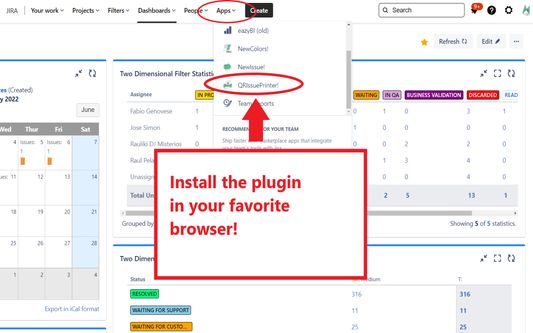
Install the add-on in your favorite browser!
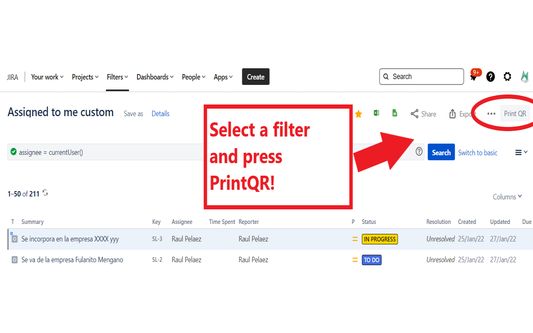
Go to Apps → QRIssuePrinter! and install the add-on in your favorite browserPush PrintQR! button in issues, filters or boards
That’s all! Now take a look in your Issues, Filters and Kanban/SCRUM boards and backlogs and you will see a new button “Print QR”Ready to print in one click!!
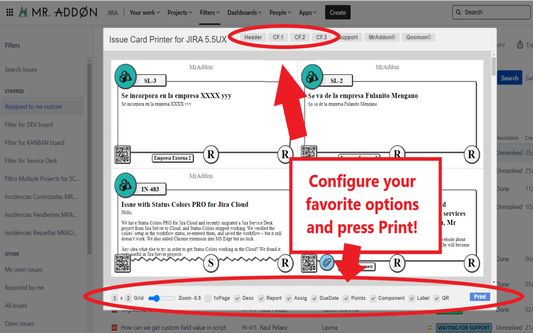
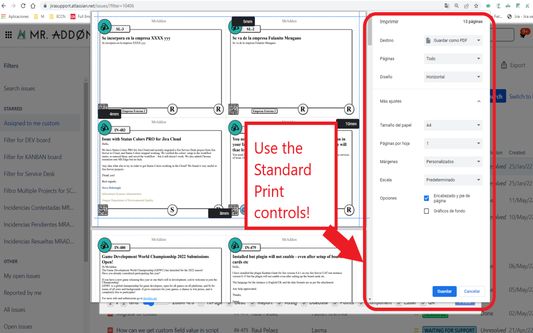
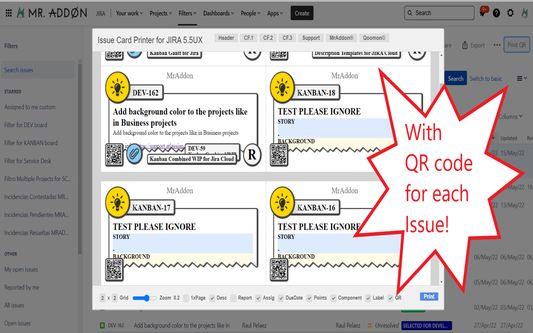
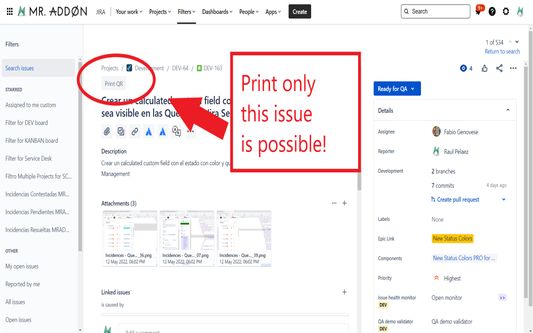
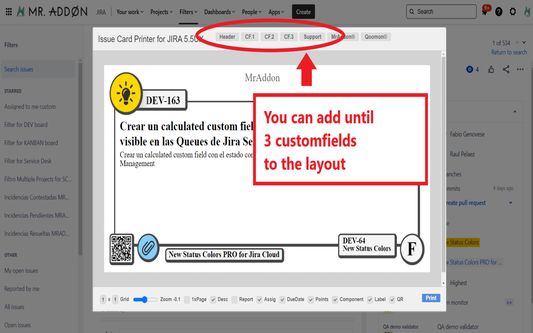
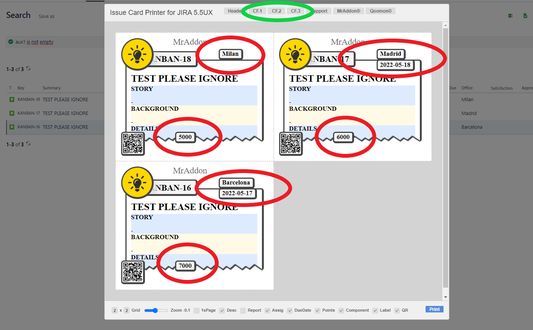
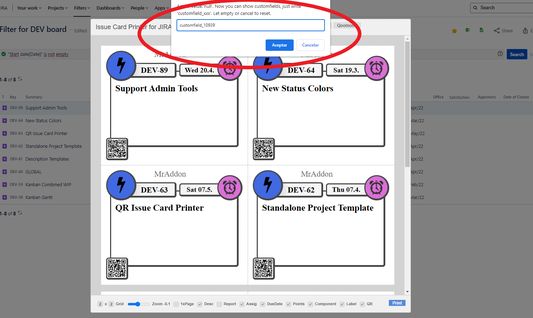
After press the “Print QR” button you will see a beatiful cards ready to print in one click!!Just configure the final part, page margins and Save it as PDF or just print in your usual printer!Now we can configure show/hide the system fields of Jira, we have a Zoom control and grid control, also of course, the QR code.If you need to print only one issue, it’s possible of course! Search the “Print QR” button and that’s all!Click in CF1 or CF2 or CF3 buttons and add the “customfield_xxxx” value where “xxxx” is the ID of the customfieldClick in CF1 or CF2 or CF3 buttons and add the “customfield_xxxx” value where “xxxx” is the ID of the customfieldClick in CF1 or CF2 or CF3 buttons and add the “customfield_xxxx” value where “xxxx” is the ID of the customfield
Informazioni sull’estensione
Print your filters and issues with a single click, with a configurable and beautiful layout.Show a large QR code in each card to quickly locate your tickets.Now you can also print from your Kanban or Scrum board and from your backlog view!New features coming soon!

Install the add-on in your favorite browser!
Go to Apps → QRIssuePrinter! and install the add-on in your favorite browser

Push PrintQR! button in issues, filters or boards
That’s all! Now take a look in your Issues, Filters and Kanban/SCRUM boards and backlogs and you will see a new button “Print QR”

Ready to print in one click!!
After press the “Print QR” button you will see a beatiful cards ready to print in one click!!

Vide summary: https://www.youtube.com/watch?v=AVp7n4f4qUk
Voto 0 da 0 revisori
Effettua l’accesso per dare un voto a questa estensione
Non ci sono ancora valutazioni

Valutazione in stelle salvata

5
0
4
0
3
0
2
0
1
0
Ancora nessuna recensione
Permessi e dati

Permessi obbligatori:

  • Accedere ai dati utente dei siti inclusi nel dominio atlassian.net
  • Accedere ai dati utente dei siti inclusi nel dominio jira.com

Permessi facoltativi:

  • Accedere ai dati utente dei siti inclusi nel dominio atlassian.net
  • Accedere ai dati utente dei siti inclusi nel dominio jira.com
Ulteriori informazioni
Link componente aggiuntivo
  • Pagina principale
  • Sito di supporto
  • Email per il supporto
Versione
7.3.0
Dimensione
170,84 kB
Ultimo aggiornamento
3 mesi fa (18 dic 2025)
Categorie correlate
  • Sviluppo web
Licenza
Mozilla Public License 2.0
Cronologia versioni
  • Visualizza tutte le versioni
Aggiungi alla raccolta
Segnala questo componente aggiuntivo
Vai alla pagina principale del sito Mozilla

Componenti aggiuntivi

  • Informazioni
  • Blog sui componenti aggiuntivi per Firefox
  • Laboratorio estensioni
  • Centro di sviluppo
  • Criteri per sviluppatori
  • Blog della comunità
  • Forum
  • Segnala malfunzionamento
  • Guida per le recensioni

Browser

  • Desktop
  • Mobile
  • Enterprise

Prodotti

  • Browsers
  • VPN
  • Relay
  • Monitor
  • Pocket
  • Bluesky (@firefox.com)
  • Instagram (Firefox)
  • YouTube (firefoxchannel)
  • Informativa sulla privacy
  • Cookie
  • Note legali

Eccetto dove diversamente indicato, i contenuti su questo sito sono distribuiti con licenza Creative Commons Attribuzione Condividi allo stesso modo 3.0 o versioni successive.