Jira Exporter di Picsweb
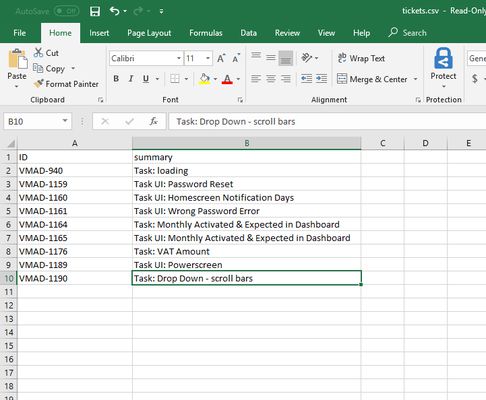
Export Jira tickets to csv file from Jira board. Latest version export JIRA tickets from Active Sprints board and Backlogs . watch demo - https://youtu.be/yKbO_U2ltHU Extension sponsored by https://bestvpn.se/ Best VPN
1 utente1 utente
Metadati estensione
Screenshot
Informazioni sull’estensione
The extension export JIRA tickets from Active Sprints and Backlogs.
Latest version include copy to clipboard feature. User can copy individual ticket details to clipboard by clicking Copy button next it.
Follow this below steps to try the export option
1) Install add-on in Firefox.
2) Visit your Atlassion JIRA website . Go to active sprints or backlogs.
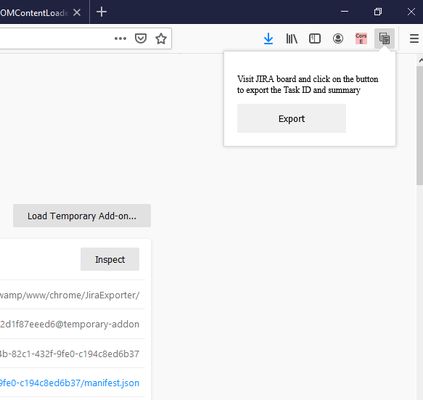
3) Click on the addon icon on top right side.
4) Click on the export button which will download csv file.
watch demo - https://youtu.be/yKbO_U2ltHU
Please share your valuable feedback. We will try to enhance this extension.
Extension sponsored by https://bestvpn.se/ Best VPN
Latest version include copy to clipboard feature. User can copy individual ticket details to clipboard by clicking Copy button next it.
Follow this below steps to try the export option
1) Install add-on in Firefox.
2) Visit your Atlassion JIRA website . Go to active sprints or backlogs.
3) Click on the addon icon on top right side.
4) Click on the export button which will download csv file.
watch demo - https://youtu.be/yKbO_U2ltHU
Please share your valuable feedback. We will try to enhance this extension.
Extension sponsored by https://bestvpn.se/ Best VPN
Voto 0 da 0 revisori
Permessi e dati
Permessi obbligatori:
- Salvare dati negli appunti
- Accedere alle schede
- Accedere ai dati utente dei siti inclusi nel dominio atlassian.net
Ulteriori informazioni
- Link componente aggiuntivo
- Versione
- 1.2.0
- Dimensione
- 21,11 kB
- Ultimo aggiornamento
- 6 anni fa (21 mag 2020)
- Categorie correlate
- Licenza
- Tutti i diritti riservati
- Cronologia versioni
- Aggiungi alla raccolta
Sostieni il mantenimento e l’aggiornamento di questa estensione con una piccola donazione allo sviluppatore.
1) Install addon in Firefox
2) Visit your Atlassion JIRA website . Go to active sprints with tickets
3) Click on the addon icon on top right side
4) Click on the export button which will download csv file