
Anti Anti Debug 作成者: Andrew S
Be able to use developer tools again
218 人のユーザー218 人のユーザー
拡張機能メタデータ
スクリーンショット
この拡張機能について
Be able to use developer tools again
Allows you to use developer tools on websites which utilize anti-debug techniques such as:
1. Repeated calls to debugger
2. getter traps
3. Console.clear() spam
What it does:
1. console.clear and console.table are set to do nothing.
2. console.log is overridden to filter DOM elements, functions, and objects with custom getters
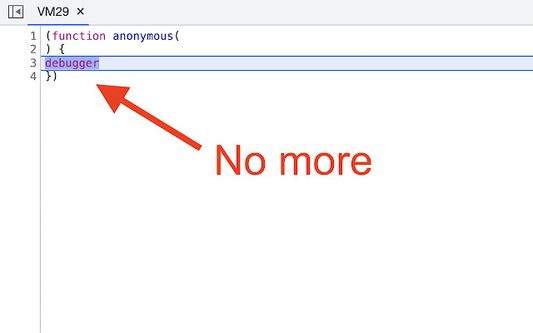
3. Functions containing debugger calls are removed
4. setInterval checks for anti debugging scripts
Please report any issues to the Github:
https://github.com/Andrews54757/Anti-Anti-Debug/issues
This extension may break some websites which rely on certain specific logging tools. It is recommended to enable the extension only when needed.
Debug icons created by Alfian Dwi Hartanto - Flaticon
Troubleshooting Tips
0. For Firefox, you must allow the extension to view/edit data on the website you are on for the extension to work. Right click the extension icon to manage permissions.
1. Open devtools in new window, otherwise sites may detect using viewport width/height information
2. Disable source maps in devtools. Some sites will detect when source maps are automatically loaded through the devtools
3. Open devtools first, and then navigate to the site
Allows you to use developer tools on websites which utilize anti-debug techniques such as:
1. Repeated calls to debugger
2. getter traps
3. Console.clear() spam
What it does:
1. console.clear and console.table are set to do nothing.
2. console.log is overridden to filter DOM elements, functions, and objects with custom getters
3. Functions containing debugger calls are removed
4. setInterval checks for anti debugging scripts
Please report any issues to the Github:
https://github.com/Andrews54757/Anti-Anti-Debug/issues
This extension may break some websites which rely on certain specific logging tools. It is recommended to enable the extension only when needed.
Debug icons created by Alfian Dwi Hartanto - Flaticon
Troubleshooting Tips
0. For Firefox, you must allow the extension to view/edit data on the website you are on for the extension to work. Right click the extension icon to manage permissions.
1. Open devtools in new window, otherwise sites may detect using viewport width/height information
2. Disable source maps in devtools. Some sites will detect when source maps are automatically loaded through the devtools
3. Open devtools first, and then navigate to the site
10 人のレビュー担当者が 5 と評価しました
権限とデータ
詳しい情報
- アドオンリンク
- バージョン
- 1.0.7
- サイズ
- 19.52 KB
- 最終更新日
- 2年前 (2024年6月5日)
- 関連カテゴリー
- ライセンス
- Unlicense
- バージョン履歴
- コレクションへ追加