
CF Fetcher 作成者: Mohabbat
Fetch your Codeforces accepted submissions and generate a README.md file for your GitHub repository
1 人のユーザー1 人のユーザー
拡張機能メタデータ
スクリーンショット


この拡張機能について
Fetch your Codeforces accepted submissions and generate a README.md file for your GitHub repository
Codeforces Submission Fetcher is a simple Chrome extension that lets you fetch your latest Codeforces accepted submissions, generate a README.md in a beautiful tabular format, and upload it to your GitHub repository.
Features
- Fetch your latest Codeforces accepted solutions.
- Automatically format results into a clean and organized table.
- Generate a ready-to-use README.md file.
- Option to upload directly to your GitHub repository.
- Works entirely in your browser — no external server needed.
Usage
- Get API Keys: Go to Codeforces Settings → API and generate keys
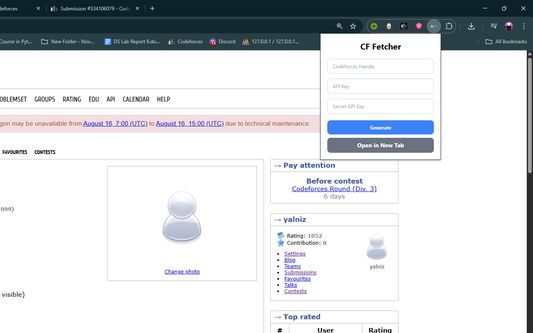
- Open Extension: Click the CF Fetcher icon in your browser
- Enter Details: Add your handle, API key, and secret key
- Generate: Click "Generate" to create your ZIP file
- Download: The file will download automatically
- Unzip: Extract the contents of the ZIP file
- Upload: Upload the extracted files to your GitHub repository
How It Works
1. Enter your Codeforces handle, API key, and secret key.
2. Click "Generate".
3. Download your auto-generated README.md and upload it to GitHub.
4. Share your competitive programming achievements with the world!
Privacy
Your API credentials are only used locally in your browser. Nothing is stored or sent to third-party servers.
Created with with ❤️ for competitive programmers.
Codeforces Submission Fetcher is a simple Chrome extension that lets you fetch your latest Codeforces accepted submissions, generate a README.md in a beautiful tabular format, and upload it to your GitHub repository.
Features
- Fetch your latest Codeforces accepted solutions.
- Automatically format results into a clean and organized table.
- Generate a ready-to-use README.md file.
- Option to upload directly to your GitHub repository.
- Works entirely in your browser — no external server needed.
Usage
- Get API Keys: Go to Codeforces Settings → API and generate keys
- Open Extension: Click the CF Fetcher icon in your browser
- Enter Details: Add your handle, API key, and secret key
- Generate: Click "Generate" to create your ZIP file
- Download: The file will download automatically
- Unzip: Extract the contents of the ZIP file
- Upload: Upload the extracted files to your GitHub repository
How It Works
1. Enter your Codeforces handle, API key, and secret key.
2. Click "Generate".
3. Download your auto-generated README.md and upload it to GitHub.
4. Share your competitive programming achievements with the world!
Privacy
Your API credentials are only used locally in your browser. Nothing is stored or sent to third-party servers.
Created with with ❤️ for competitive programmers.
0 人のレビュー担当者が 0 と評価しました
権限とデータ
詳しい情報
- アドオンリンク
- バージョン
- 1.1.0
- サイズ
- 163.03 KB
- 最終更新日
- 6ヶ月前 (2025年8月23日)
- 関連カテゴリー
- ライセンス
- MIT License
- プライバシーポリシー
- このアドオンのプライバシーポリシーを読む
- バージョン履歴
- コレクションへ追加