
Da Vinci Tools 作成者: Casino FB88
The Supermetrics Google Marketing Platform power tools for smart digital marketers and analysts.
3 人のユーザー3 人のユーザー
拡張機能メタデータ
スクリーンショット
この拡張機能について
Da Vinci Tools brings handy enhancements to Google Analytics, Google Tag Manager, Google Ads and Data Studio.
Google Ads (aka AdWords):
▻ Table Heat Maps
Google Analytics:
▻ Go directly to UA Config Variable from a GA Tag
▻ Revert/Refund transactions or individual items [1]
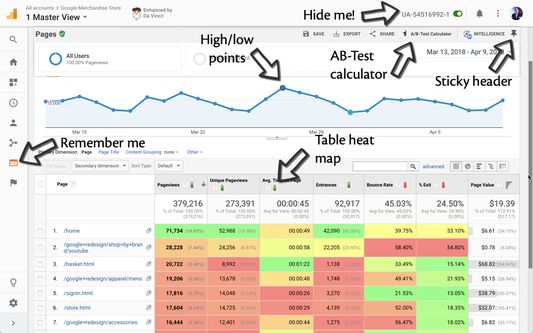
▻ Remember the last report you were on
▻ Easily turn off tracking for the specified properties (for you only)
▻ Keep the report and table header at the top when scrolling
▻ Show view name in tab title
▻ Highlight high/low points in overview graphs
▻ Table heat map
▻ Simplified table comparison when using multiple data ranges
▻ Confidence Test calculator
▻ Create request for Reporting API v4, GSheet Addon or Supermetrics based on the current report settings
▻ Add several options to the date picker
▻ Handle pop-up link when Page is prefixed with Hostname using a filter
▻ Easily clear all segments to get back to "All Users"
▻ Pin a default segment instead of "All Users"
Google Tag Manager:
▻ Create a new Tag/Trigger/Variable from the Overview pane
▻ RegEx are validated for Trigger rules and RegEx Table Lookup Variables
▻ Search filters to display only Tags/Triggers/Variables
▻ Pause/Unpause tags directly from the Tags tab
▻ Inject your own GTM container on any page you want
▻ Easily copy/paste values from/to RegEx and Table Lookup variables
▻ Remember the last container you were on
▻ Remember your sorting preference for Overview, Tags, Triggers and Variables
▻ Make central table sticky & other UX improvements
▻ Easily turn off the specified container (for you only)
▻ Turn all built-in variables on/off at once
▻ Dark themed editor
▻ Show container name in tab title
▻ Automatically create a code block when creating a new custom JavaScript variable or custom HRML tag
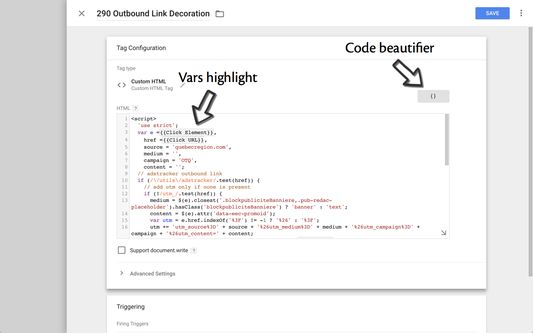
▻ Code beautification for custom HTML tags and custom JavaScript variables
▻ Highlight vars in code editor
▻ Sort fields, custom dimensions and metrics when editing a GA tag
▻ Tidy GTM Preview
▻ Exit GTM Preview easily from the Preview window
▻ Remember if GTM Preview was minimized or expanded when navigating
▻ Allow Ctrl-C/Right-Click Copy to copy selected code when in Preview Mode
Data Studio:
▻ Automatically show sampling
▻ Auto-refresh the dashboard at the desired interval
Google Ads (aka AdWords):
▻ Table Heat Maps
Google Analytics:
▻ Go directly to UA Config Variable from a GA Tag
▻ Revert/Refund transactions or individual items [1]
▻ Remember the last report you were on
▻ Easily turn off tracking for the specified properties (for you only)
▻ Keep the report and table header at the top when scrolling
▻ Show view name in tab title
▻ Highlight high/low points in overview graphs
▻ Table heat map
▻ Simplified table comparison when using multiple data ranges
▻ Confidence Test calculator
▻ Create request for Reporting API v4, GSheet Addon or Supermetrics based on the current report settings
▻ Add several options to the date picker
▻ Handle pop-up link when Page is prefixed with Hostname using a filter
▻ Easily clear all segments to get back to "All Users"
▻ Pin a default segment instead of "All Users"
Google Tag Manager:
▻ Create a new Tag/Trigger/Variable from the Overview pane
▻ RegEx are validated for Trigger rules and RegEx Table Lookup Variables
▻ Search filters to display only Tags/Triggers/Variables
▻ Pause/Unpause tags directly from the Tags tab
▻ Inject your own GTM container on any page you want
▻ Easily copy/paste values from/to RegEx and Table Lookup variables
▻ Remember the last container you were on
▻ Remember your sorting preference for Overview, Tags, Triggers and Variables
▻ Make central table sticky & other UX improvements
▻ Easily turn off the specified container (for you only)
▻ Turn all built-in variables on/off at once
▻ Dark themed editor
▻ Show container name in tab title
▻ Automatically create a code block when creating a new custom JavaScript variable or custom HRML tag
▻ Code beautification for custom HTML tags and custom JavaScript variables
▻ Highlight vars in code editor
▻ Sort fields, custom dimensions and metrics when editing a GA tag
▻ Tidy GTM Preview
▻ Exit GTM Preview easily from the Preview window
▻ Remember if GTM Preview was minimized or expanded when navigating
▻ Allow Ctrl-C/Right-Click Copy to copy selected code when in Preview Mode
Data Studio:
▻ Automatically show sampling
▻ Auto-refresh the dashboard at the desired interval
0 人のレビュー担当者が 0 と評価しました
権限とデータ
必要な権限:
- クリップボードへのデータ入力
- ブラウザーのタブへのアクセス
- すべてのウェブサイトの保存されたデータへのアクセス
任意の許可設定:
- 通知の表示
- すべてのウェブサイトの保存されたデータへのアクセス
詳しい情報
- アドオンリンク
- バージョン
- 2021.7.9
- サイズ
- 1.22 MB
- 最終更新日
- 1年前 (2025年3月27日)
- 関連カテゴリー
- バージョン履歴
- コレクションへ追加