
Grasshopper 作成者: mp
Advanced Tab Manager
46 人のユーザー46 人のユーザー
拡張機能メタデータ
スクリーンショット
この拡張機能について
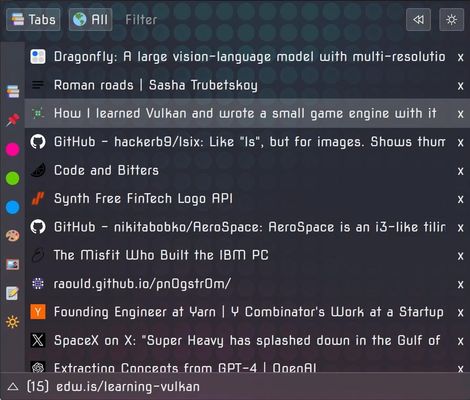
This is meant to complement or even replace the tab bar.
It's a tab manager but also supports History, Bookmarks, and more.
It provides vertical tabs.
It can be used as a popup or on the sidebar.
(Most of the file size is background images for themes)
Why the permissions?
Some Features:
And more.
Shortcuts:
- Ctrl + Space = Toggle popup
- Ctrl + Shift + Space = Toggle sidebar
Recommended userChrome.css:
1) Go to about:config
2) Enable: toolkit.legacyUserProfileCustomizations.stylesheets
3) Find the profile directory, you can see that path in about:profiles
4) Create chrome/userChrome.css in it
5) Add this to that file and save it:
6) Restart Firefox
Chrome?
There's currently no Chrome version. Chrome has no sidebar API, and even then, porting it requires modifying some of the code. And some things don't work the same. So no Chrome version for now.
It's a tab manager but also supports History, Bookmarks, and more.
It provides vertical tabs.
It can be used as a popup or on the sidebar.
(Most of the file size is background images for themes)
Why the permissions?
- Tabs: To be able to query and update tabs.
For example to make tabs pinned or muted.
To move, open, close tabs. - History: To get the recent history.
There's a History mode.
(History is not modified or deleted).
This is an optional permission. - Bookmarks: To get the bookmarks.
There's a Bookmarks mode.
(Bookmarks can be added but not deleted).
I don't want to touch deletion methods at all.
Since I don't want to be responsible for accidental loss of bookmarks.
So to remove a bookmark you have to use the native browser interface.
This is an optional permission. - Sessions: To get the recently closed tabs.
There's a Closed mode.
(Last 25 closed tabs. These can be forgotten).
To save custom color and titles on tabs. - Clipboard: To paste text from the clipboard when right clicking the filter.
This is used to fill the filter with the content.
This is an optional permission. - "contextualIdentities" and "cookies" for Container features.
Some Features:
- Tab management. What you'd expect: Focus, move, close, duplicate, tag, color, add icon, set a custom title, pin/unpin, unload, mute.
- Filter. Find tabs by typing. Filter by tab type, with over 30 modes.
- Tab Box. An extra view at the bottom to always have certain tabs in view.
- Filterable Menus. All context menus can be filtered by typing anything, to find items very quickly.
- Go Back. Go to the previously visited tabs with a click of a button.
- Go To Playing Tab. Go to the tabs emitting sound by clicking a button or selecting items from a list.
- Close Tabs. Over 18 ways of closing tabs using different criteria.
- Signals. A signal system to interface with programs, using
GET,POST,PUT. - Title Bar. Set a custom title, or use the date, or display information dynamically. For instance you could show
Now Playinginformation if you useSignalsand check the music you are listening to. - Zones. Create special tabs that act as visual dividers. These are normal tabs, but special within Grasshopper.
- Favorites. A favorites bar that can be placed at any side, with a selection of commands.
- Obfuscate Tabs. Scramble the text and favicon of a tab so others can't see it. Restore it anytime.
- Notes. Simple global notepad to take notes. And per-tab notes to annotate information on specific tabs.
- Cael. AI assistant that can help you with settings and commands, or just talk. This uses OpenRouter.
- Datastore. Data store system to store different versions of settings, notes, or themes.
- Stuff. An assorted collection of small interesting & useful tools, including some easter eggs.
- Lock Screen. Lock the sidebar, and optional require a password to unlock. Soft security.
- History. Change the mode to recent browsing history.
- Bookmarks. Change the view to bookmarks. Bookmark tabs.
- Closed. Change the view to to view recently closed tabs. Restore tabs.
- Global. View tabs from all windows.
- Auto Click. Click things by just hovering over them with the mouse for a while.
- Media. View images and videos from tabs.
- Warnings. Get warnings on certain actions. Like warn when closing a tab that is emitting sound. All configurable.
- Footer. Information at the bottom. Tab Box toggle. Other controls.
- Theme. Change background color, text color, background image, font, border colors. Use a custom CSS.
- Colors. Color tabs, and configure how they are seen, like icons, background. Define custom colors.
- Pinline. A separator between pins and normal tabs which shows information.
- Gestures. Middle click and drag to do gestures. Configurable.
- Icons. Define custom icons, add them to tabs. Customize all the icons, including when they are visible, and their positions.
- Tags. Add one or more tags to tabs. Show them in different ways.
- Shortcuts. Configure and add keyboard shortcuts, map them to any command.
- Combos. Create command combos, which are a sequence of commands. These appears as another command which you can map anywhere.
- Auto Close. Make unused tabs to close automatically after some time. This avoids collecting hundreds of tabs.
- Mouse Events. Most UI elements allow to be mapped with commands on click, middle click, middle click press, click press, shift click, ctrl click, ctrl shift click, wheel up, wheel up. Depends on the element.
- Tree. Track which are the parents of the other tabs, which can be used for tab management or visual categorization. This is not tree tab style. This just adds icons on the tabs, and allows some operations.
- Auto Blur. Blur the sidebar when the mouse leaves, unblur it when it enters.
- Containers. Open tabs in containers. Open tabs without containers (restore). Use icons to know which tabs are using containers.
- Commands. Almost 700 commands to perform anything Grasshopper can do, which can be ran with the command palette (ctrl ctrl). They can be mapped to click events, keyboard events, put in the favorites bar, put in any of the many configurable menus, or used in combos.
And more.
Shortcuts:
- Ctrl + Space = Toggle popup
- Ctrl + Shift + Space = Toggle sidebar
Recommended userChrome.css:
1) Go to about:config
2) Enable: toolkit.legacyUserProfileCustomizations.stylesheets
3) Find the profile directory, you can see that path in about:profiles
4) Create chrome/userChrome.css in it
5) Add this to that file and save it:
/* Hides the entire tab bar */
#TabsToolbar{
    display: none !important;
}

/* Hides the new Firefox sidebar tools strip and splitter */
#sidebar-main,
#sidebar-launcher-splitter{
    display: none !important;
}

/* Hides the large header on the new revamped sidebar */
#sidebar-panel-header{
    display: none !important;
}

/* Disables the top bar from appearing on mouse-over in F11 Fullscreen */
#navigator-toolbox[inFullscreen="true"]{
    display: none !important;
}

/* Ensures the mouse trigger area itself is disabled in Fullscreen */
#fullscr-toggler{
    display: none !important;
}

/* Shrinks the sidebar splitter and makes it transparent but keeps it functional */
#sidebar-splitter{
    width: 1px !important;
    border: none !important;
    background-color: transparent !important;
}

/* Removes the built-in padding at the bottom of the sidebar container */
#sidebar-box{
    padding: 0 !important;
}

/* Hides the sidebar footer which can reserve empty space even when empty */
#sidebar-footer{
    display: none !important;
}

/* Removes any residual margins from the panel itself */
.sidebar-panel{
    margin: 0 !important;
    padding: 0 !important;
}
6) Restart Firefox
Chrome?
There's currently no Chrome version. Chrome has no sidebar API, and even then, porting it requires modifying some of the code. And some things don't work the same. So no Chrome version for now.
12 人のレビュー担当者が 4.9 と評価しました
権限とデータ
詳しい情報
- アドオンリンク
- バージョン
- 6669
- サイズ
- 9.89 MB
- 最終更新日
- 10時間前 (2026年9月8日)
- 関連カテゴリー
- バージョン履歴
- コレクションへ追加