Firefox ブラウザーアドオン
  • 拡張機能
  • テーマ
    • Firefox 向け
    • スペルチェック辞書と言語パック
    • 他のブラウザーサイト
    • Android 向けアドオン
ログイン
HTML Tag Changer のプレビュー

HTML Tag Changer 作成者: Kai Grunert

Select HTML elements and change their tag names. You can select elements with a CSS selector and specify the intended new tag name. You can also hide or remove the elements. E.g. this can be useful to include specific elements in the Reader View.

0 (0 reviews)0 (0 reviews)
1 User1 User
Firefox をダウンロードして拡張機能を入手する
ファイルをダウンロード

拡張機能メタデータ

スクリーンショット
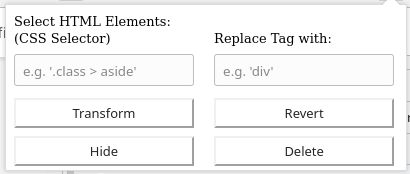
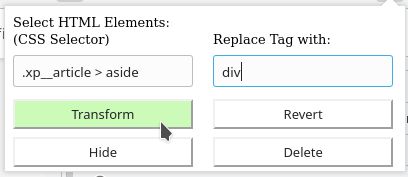
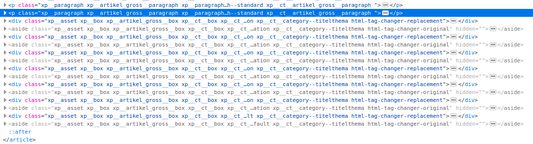
Default display if you open the add-onSelect the HTML elements with a CSS selector and type the new tag nameThe original source code before the transformationThe new source code after the transformation
この拡張機能について
This browser add-on can change the HTML element tag names on a web page into another tag name. You can select the HTML elements that should be replaced with a CSS selector and state the new tag names.

Furthermore you can hide or delete the selected elements from the web page. The former is usually preferred, because you will be able to revert the changes afterwards. If you use delete, you need to reload the complete page to revert the changes.

Example: The Reader View of Firefox includes and presents only a selection of HTML elements like <p>. But if the web page contains important hint or content boxes in <aside> elements, you will not see them in the Reader View. You can use this add-on to change all <aside> elements in appropriate elements before you turn on the Reader.

There is a Revert button - if it doesn't work correctly, just reload the complete page.

Hints:
  • Due to a lack of API support, the event listeners for an element can not be copied into the new element
  • Pay attention to the structure of a web page: some elements (often inline elements) don't allow to include other elements. E.g. if you want to change all <aside> elements into <p> elements, this can lead to unpredictable behavior if the <aside> element contains further block elements, because <p> is not allowed to contain block elements.
  • If the replacement contains web components, this can also lead to some side effects

Details:

The add-on does not delete the original elements, but it hides them. Therefore the actions can be reverted.
Rated 0 by 0 reviewers
ログインしてこの拡張機能を評価
まだ評価されていません

星の評価を保存しました

5
0
4
0
3
0
2
0
1
0
まだレビューはありません
詳しい情報
アドオンリンク
  • ホームページ
  • サポートサイト
バージョン
1.0
サイズ
29.6 KB
最終更新日
6年前 (2020年5月2日)
関連カテゴリー
  • ウェブ開発
  • アピアランス
ライセンス
独自のライセンス
バージョン履歴
  • すべてのバージョンを見る
コレクションへ追加
このアドオンを報告
Mozilla のホームページへ

アドオン

  • このサイトについて
  • Firefox アドオンブログ
  • 拡張機能ワークショップ
  • 開発者センター
  • 開発者ポリシー
  • コミュニティブログ
  • フォーラム
  • バグを報告
  • レビューガイド

ブラウザー

  • Desktop
  • Mobile
  • Enterprise

製品情報

  • Browsers
  • VPN
  • Relay
  • Monitor
  • Pocket
  • Bluesky (@firefox.com)
  • Instagram (Firefox)
  • YouTube (firefoxchannel)
  • プライバシー
  • Cookie
  • 法的情報

特に 明記されている 場合を除き、当サイト上のコンテンツは Creative Commons 表示・継承ライセンス v3.0 あるいはそれ以降のバージョンで公開されています。