
JobProfill 作成者: Rashmi Jadhav
Automatically fills the job application form by using previously saved user profile
拡張機能メタデータ
スクリーンショット
この拡張機能について
JobProfill is a Mozilla Firefox Add-On that cuts down your task of having to fill the lengthy, far-fetched job application forms by automatically populating the fields for you. This extension currently supports greenhouse.io portal. In further releases, more extensive support will be provided for more job portals.
Steps to use the JobProfill:
1. Open the job posting where you would like to apply(only the postings that are on greenhouse.io).
2. Fill out the form for the posting.
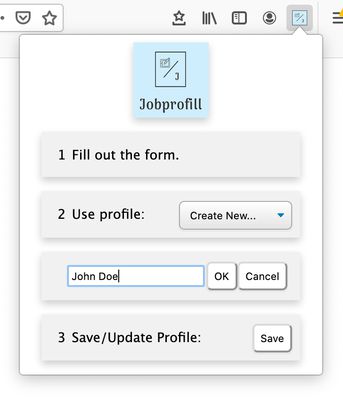
3. Just before submitting the job posting, right click on the JobProfill icon in the browser toolbar.
4. Create a profile by giving a name.
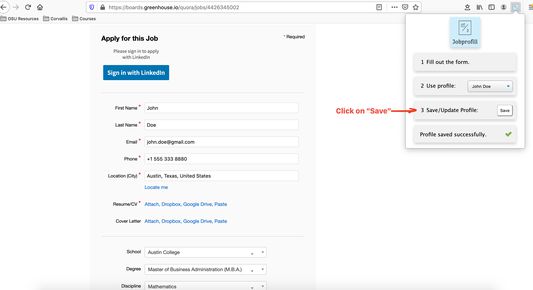
5. Click on "Save". Now all your details are saved for any future applications for any job posting.
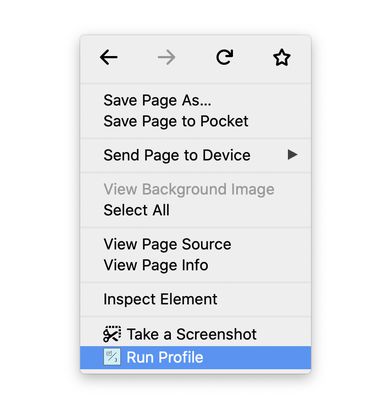
6. When you visit another posting, do not enter any data. Right click anywhere in the browser and choose "Run Profile".
7. Ta-da! You profile will be automatically populated in the form!
8. You may modify the data and update the same profile.
Steps to use the JobProfill:
1. Open the job posting where you would like to apply(only the postings that are on greenhouse.io).
2. Fill out the form for the posting.
3. Just before submitting the job posting, right click on the JobProfill icon in the browser toolbar.
4. Create a profile by giving a name.
5. Click on "Save". Now all your details are saved for any future applications for any job posting.
6. When you visit another posting, do not enter any data. Right click anywhere in the browser and choose "Run Profile".
7. Ta-da! You profile will be automatically populated in the form!
8. You may modify the data and update the same profile.
2 人のレビュー担当者が 5 と評価しました
権限とデータ
詳しい情報
- アドオンリンク
- バージョン
- 2.8
- サイズ
- 147.54 KB
- 最終更新日
- 6年前 (2020年3月13日)
- 関連カテゴリー
- バージョン履歴
- コレクションへ追加