LeechBlock NG 作成者: James Anderson
LeechBlock NG is a simple productivity tool designed to block those time-wasting sites that can suck the life out of your working day. All you need to do is specify which sites to block and when to block them.
Android™ 版 Firefox でも利用可能Android™ 版 Firefox でも利用可能
105,742 人のユーザー105,742 人のユーザー
Scan the QR code to open this extension in Firefox for Android

拡張機能メタデータ
スクリーンショット
この拡張機能について
LeechBlock NG (Next Generation) is a simple free productivity tool designed to block those time-wasting sites that can suck the life out of your working day. (You know: the ones that rhyme with 'Blue Cube', 'Space Hook', 'Sticky Media', 'Quitter', and the like.) All you need to do is specify which sites to block and when to block them.
You can specify up to 30 sets of sites to block, with different times and days for each set. You can block sites within fixed time periods (e.g., between 9am and 5pm), after a time limit (e.g., allow up to 10 minutes in every hour), or with a combination of time periods and time limit (e.g., allow up to 10 minutes in every hour between 9am and 5pm).
Additional features include:
Version history: https://www.proginosko.com/leechblock/version-history/
Documentation: https://www.proginosko.com/leechblock/documentation/
Usage examples: https://www.proginosko.com/leechblock/examples/
Permissions: https://www.proginosko.com/leechblock/faq/permissions/
Frequently asked questions: https://www.proginosko.com/leechblock/faq/
Support: https://www.proginosko.com/leechblock/support/
GitHub repo: https://github.com/proginosko/LeechBlockNG
You can specify up to 30 sets of sites to block, with different times and days for each set. You can block sites within fixed time periods (e.g., between 9am and 5pm), after a time limit (e.g., allow up to 10 minutes in every hour), or with a combination of time periods and time limit (e.g., allow up to 10 minutes in every hour between 9am and 5pm).
Additional features include:
- Lockdown: Block sites immediately for a specified duration.
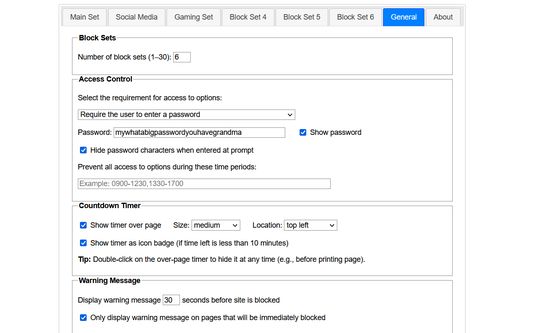
- Access control: Set a password or random access code for the options page, to slow you down in moments of weakness!
- Delaying: Set a countdown to delay access to sites instead of completely blocking them.
- Password: Require a password to allow access to blocked sites.
- Wildcards: Block a range of sites (e.g., *.somesite.com).
- Exceptions: Whitelist sites you don't want to be blocked (e.g., +allowedsite.com).
- Keywords: Block or allow pages based on keywords (e.g., ~badword).
Version history: https://www.proginosko.com/leechblock/version-history/
Documentation: https://www.proginosko.com/leechblock/documentation/
Usage examples: https://www.proginosko.com/leechblock/examples/
Permissions: https://www.proginosko.com/leechblock/faq/permissions/
Frequently asked questions: https://www.proginosko.com/leechblock/faq/
Support: https://www.proginosko.com/leechblock/support/
GitHub repo: https://github.com/proginosko/LeechBlockNG
Please check the documentation, FAQ page, examples page, and support forums before emailing support queries to the developer. Thanks!
2,014 人のレビュー担当者が 4.8 と評価しました
権限とデータ
必要な権限:
- ブラウザーのタブへのアクセス
- ナビゲーション中のブラウザーアクティビティへのアクセス
- すべてのウェブサイトの保存されたデータへのアクセス
任意の許可設定:
- ブラウジング履歴へアクセス
- すべてのウェブサイトの保存されたデータへのアクセス
データ収集:
- 開発者によると、この拡張機能はデータ収集を必要としません。
詳しい情報
- バージョン
- 1.7.3
- サイズ
- 435.54 KB
- 最終更新日
- 2日前 (2026年8月4日)
- 関連カテゴリー
- バージョン履歴
- コレクションへ追加