New Tab Here 作成者: pollti
Lets you open a new tab at any position. Using different configurable ways (keyboard shortcut, toolbar button, context menus of tabs, …) you can open tabs anywhere you like.
29 人のユーザー29 人のユーザー
拡張機能メタデータ
スクリーンショット
この拡張機能について
Always having many open tabs? I won't blame you – but I may have a useful feature for you :) Ever wanted to open a new tab in the middle? New Tab Here lets you open tabs wherever you want.
Current features:
* Open new tabs at the position of the currently selected tab
** in page's context menu
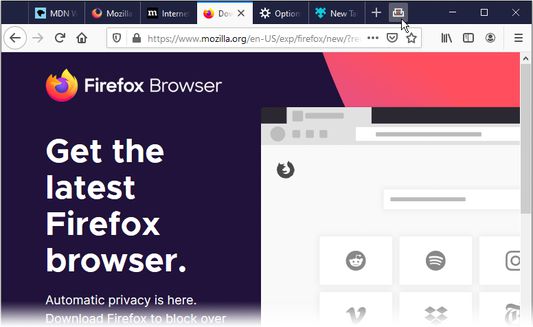
** from toolbar button (in tab bar by default configuration)
** with a self-chosen keyboard shortcut, default: Ctrl+Y
** from Firefox' Tools menu
* Open a new tab at any position by right-clicking on a tab
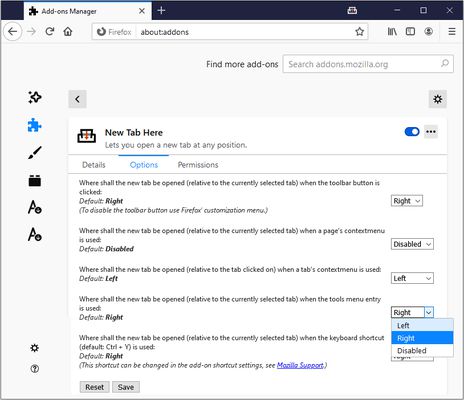
All of these can separately be disabled in the add-on settings. You can also choose whether to open tabs to the left or right of the currently selected (or clicked respectively) tab for each separately.
Languages:
* English
* German
* Russian
Future features:
* new ideas or pull requests are welcome
Known bugs:
* None yet, please report bugs here: https://github.com/pollti/NewTabHere/issues
Current features:
* Open new tabs at the position of the currently selected tab
** in page's context menu
** from toolbar button (in tab bar by default configuration)
** with a self-chosen keyboard shortcut, default: Ctrl+Y
** from Firefox' Tools menu
* Open a new tab at any position by right-clicking on a tab
All of these can separately be disabled in the add-on settings. You can also choose whether to open tabs to the left or right of the currently selected (or clicked respectively) tab for each separately.
Languages:
* English
* German
* Russian
Future features:
* new ideas or pull requests are welcome
Known bugs:
* None yet, please report bugs here: https://github.com/pollti/NewTabHere/issues
6 人のレビュー担当者が 5 と評価しました
権限とデータ
詳しい情報
- アドオンリンク
- バージョン
- 2.0.0
- サイズ
- 17.79 KB
- 最終更新日
- 6年前 (2020年5月29日)
- バージョン履歴
- コレクションへ追加