Speak Dictionary 作成者: Aakash Pawar
Speak Dictionary displays the meaning/definition of any word selected by the user on any webpage and also speaks the meaning/definition of the selected word.
7 人のユーザー7 人のユーザー
拡張機能メタデータ
スクリーンショット
この拡張機能について
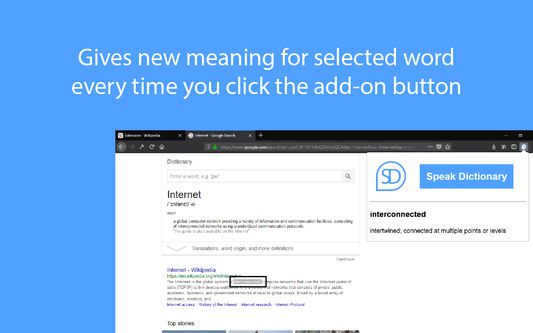
Speak Dictionary displays the meaning/definition of the word which you have selected on a webpage. It is displayed on popup window which opens when you click on the add-on button with Speak Dictionary icon which is on the top right corner of the screen. On the popup you will see the word which you have selected and the meaning/definition of the word below it.
And as the name suggests, it also speaks the meaning/definition of the word which is displayed. So, after you select the word what you have to do is, just click on the add-on button with Speak Dictionary logo or press Ctrl + Q to open the popup and you will see that as soon as the selected word and its definition is displayed, the speech also starts where the selected word is spoken first and then the meaning/definition of the word is spoken.
The Default Shortcut key to open the popup is Ctrl + Q.
And as the name suggests, it also speaks the meaning/definition of the word which is displayed. So, after you select the word what you have to do is, just click on the add-on button with Speak Dictionary logo or press Ctrl + Q to open the popup and you will see that as soon as the selected word and its definition is displayed, the speech also starts where the selected word is spoken first and then the meaning/definition of the word is spoken.
The Default Shortcut key to open the popup is Ctrl + Q.
2 人のレビュー担当者が 2.5 と評価しました
権限とデータ
詳しい情報
- アドオンリンク
- バージョン
- 1.3resigned1
- サイズ
- 28.13 KB
- 最終更新日
- 2年前 (2024年4月25日)
- ライセンス
- MIT License
- バージョン履歴
- コレクションへ追加