Firefox ブラウザーアドオン
拡張機能
テーマ
すべて見る...
Firefox 向け
スペルチェック辞書と言語パック
他のブラウザーサイト
Android 向けアドオン
ログイン
検索
検索
Spotify Hotkeys
作成者:
Jerosa
Add configurable keyboard shortcuts and notifications to the Spotify Web Player
4.9 (34 件のレビュー)
4.9 (34 件のレビュー)
176 人のユーザー
176 人のユーザー
Firefox をダウンロードして拡張機能を入手する
ファイルをダウンロード
拡張機能メタデータ
スクリーンショット
この拡張機能について
Add configurable keyboard shortcuts and notifications to the Spotify Web Player
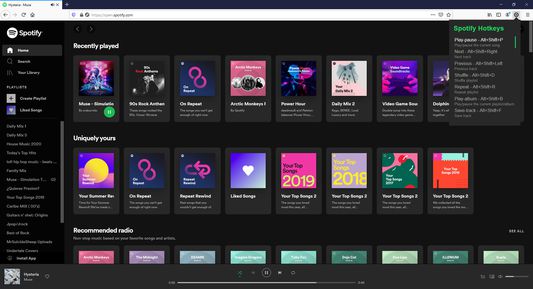
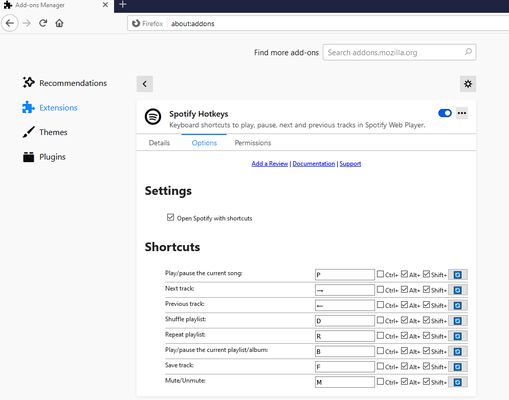
Default Keyboard Shortcuts
Play/Pause: Alt+Shift+W
Next: Alt+Shift+Right Arrow
Previous: Alt+Shift+Left Arrow
Shuffle: Alt+Shift+D
Repeat: Alt+Shift+R
Play Album: Alt+Shift+G
Save Track: Alt+Shift+L
Mute/Unmute: Alt+Shift+M
Volume Up: Alt+Shift+Up Arrow
Volume Down: Alt+Shift+Down Arrow
Skip Forward: Alt+Shift+Period
Skip Back: Alt+Shift+Comma
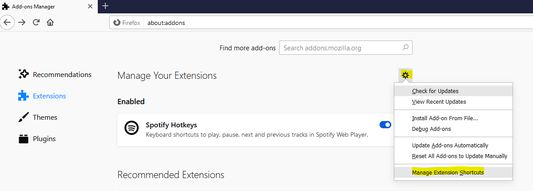
All shortcuts can be customized in Firefox extension settings. Skip duration is configurable (1-60 seconds) in the extension options page.
34 人のレビュー担当者が 4.9 と評価しました
ログインしてこの拡張機能を評価
まだ評価されていません
星の評価を保存しました
5
30
4
3
3
1
2
0
1
0
権限とデータ
必要な権限:
通知の表示
ブラウザーのタブへのアクセス
open.spotify.com のユーザーデータへのアクセス
play.spotify.com のユーザーデータへのアクセス
データ収集:
開発者によると、この拡張機能はデータ収集を必要としません。
詳しい情報
アドオンリンク
ホームページ
サポートサイト
Copy add-on ID
バージョン
2.2.0
サイズ
21.6 KB
最終更新日
4ヶ月前 (2026年3月21日)
関連カテゴリー
アピアランス
写真/音楽/動画
タブ
ライセンス
MIT License
バージョン履歴
すべてのバージョンを見る
コレクションへ追加
コレクションを選択...
新しいコレクションを作成
このアドオンを報告