
Typing Statistics | Auto Typer 作成者: marsss
Typing Statistics: Tracks WPM and other Statistics as well as auto typers
16 人のユーザー16 人のユーザー
拡張機能メタデータ
スクリーンショット




この拡張機能について
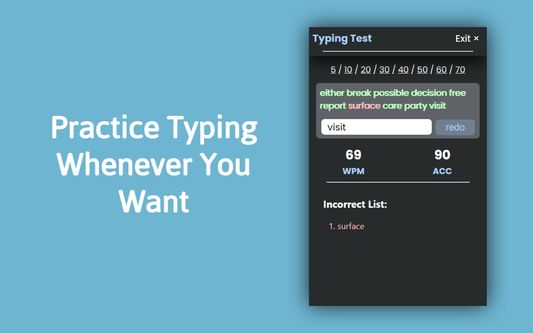
The Typing-Statistics Chrome extension is a tool that tracks and provides insights into your typing habits while using the Chrome browser. It offers valuable statistics such as the number of letters, words, and your typing speed in words per minute (WPM).
Features:
- Letter and Word Count: Get an accurate count of the letters and words you type while using Chrome.
- Words Per Minute (WPM): Track your typing speed in real-time and measure your words per minute. This feature helps you monitor your typing progress and efficiency.
- Individual Site Tracking: The extension can track typing statistics on a per-site basis, allowing you to analyze your typing performance on different websites separately.
Usage:
1. Once the Typing Statistics extension is installed, it will automatically track your typing statistics while you use Chrome. You can access the extension's features and view your typing data by following these steps:
2. Click on the Typing Statistics extension icon in the Chrome toolbar.
3. A dropdown menu will appear, showing you a list of visited sites. Click into any arrow and you will be shown current typing statistics and options to access more details.
4. Explore the available options, such as viewing overall typing statistics, and site-specific statistics.
5. The extension will continuously update the statistics in real-time as you type, providing you with up-to-date information about your typing performance.
UPDATES (v3.4.7 >> v3.4.8):
- Fix data loading speed
- Fix bugs
Features:
- Letter and Word Count: Get an accurate count of the letters and words you type while using Chrome.
- Words Per Minute (WPM): Track your typing speed in real-time and measure your words per minute. This feature helps you monitor your typing progress and efficiency.
- Individual Site Tracking: The extension can track typing statistics on a per-site basis, allowing you to analyze your typing performance on different websites separately.
Usage:
1. Once the Typing Statistics extension is installed, it will automatically track your typing statistics while you use Chrome. You can access the extension's features and view your typing data by following these steps:
2. Click on the Typing Statistics extension icon in the Chrome toolbar.
3. A dropdown menu will appear, showing you a list of visited sites. Click into any arrow and you will be shown current typing statistics and options to access more details.
4. Explore the available options, such as viewing overall typing statistics, and site-specific statistics.
5. The extension will continuously update the statistics in real-time as you type, providing you with up-to-date information about your typing performance.
UPDATES (v3.4.7 >> v3.4.8):
- Fix data loading speed
- Fix bugs
0 人のレビュー担当者が 0 と評価しました
権限とデータ
詳しい情報
- アドオンリンク
- バージョン
- 3.4.8
- サイズ
- 1.34 MB
- 最終更新日
- 2年前 (2024年7月4日)
- 関連カテゴリー
- プライバシーポリシー
- このアドオンのプライバシーポリシーを読む
- バージョン履歴
- コレクションへ追加
- Fix data loading speed
- Fix bugs