CopyLink Pro 作成者: MediaSmart
Instantly copy the current URL with Cmd+Shift+C (or Ctrl+Shift+C). No more accidental DevTools openings. Lightweight, private, with visual feedback. Works on all websites.
14 人のユーザー14 人のユーザー
拡張機能メタデータ
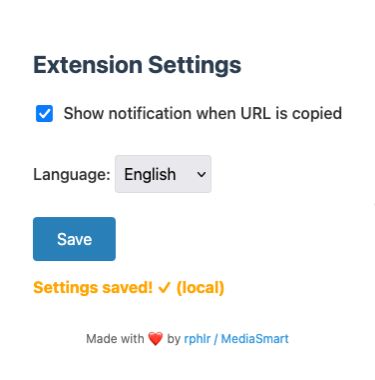
スクリーンショット
この拡張機能について
Instantly copy the current page’s URL with Cmd+Shift+C (or Ctrl+Shift+C).
No more DevTools popping up by mistake — streamline your workflow.
🖱️ Lightweight and ultra-fast
⌨️ No more accidental DevTools openings
🔒 Private – no data collection
🔔 Subtle visual feedback on the page
🌍 Multilingual interface (English/French)
🖱️ Integrated right-click context menu
Perfect for power users, developers, and anyone who copies links all day long.
Works seamlessly on all websites.
Take back control of your keyboard.
No more DevTools popping up by mistake — streamline your workflow.
🖱️ Lightweight and ultra-fast
⌨️ No more accidental DevTools openings
🔒 Private – no data collection
🔔 Subtle visual feedback on the page
🌍 Multilingual interface (English/French)
🖱️ Integrated right-click context menu
Perfect for power users, developers, and anyone who copies links all day long.
Works seamlessly on all websites.
Take back control of your keyboard.
0 人のレビュー担当者が 0 と評価しました
権限とデータ
詳しい情報
- アドオンリンク
- バージョン
- 2.0.3
- サイズ
- 1.32 MB
- 最終更新日
- 6ヶ月前 (2025年7月21日)
- 関連カテゴリー
- ライセンス
- MIT License
- バージョン履歴
- コレクションへ追加
No background scripts, no tracking — just a clean, focused experience.
The extension integrates smoothly into your browser, letting you copy the current page URL.
via a keyboard shortcut or right-click menu, without interrupting your workflow.
Designed for developers, communicators, and anyone who copies links more than they breathe.
📎 Open and documented code: https://github.com/rphlr/url-copier
📬 Feedback and suggestions are welcome!