MM3 Proxy Switch ავტორი MM3Tools
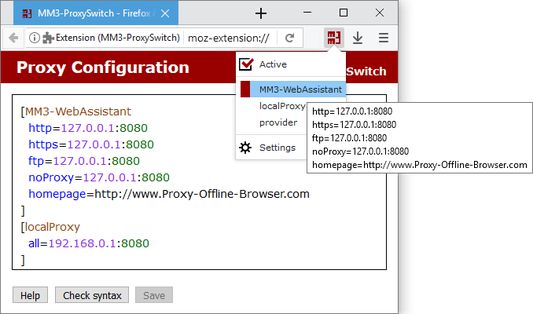
In the Firefox Browser (and other Mozilla programs) you can per default configure only the setting for one internet connection. With this Proxy Switch you can manage different configurations and simply switch over between these.
431 მომხმარებელი431 მომხმარებელი
გაფართოების მონაცემები
ეკრანის სურათები
გაფართოების შესახებ
To switch between a direct connection or different proxy configurations you then must no longer respectively execute the dialog Connection Settings newly.
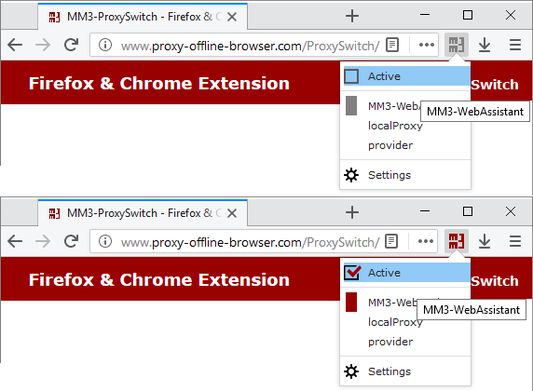
With this Proxy Switch you can toggle with one click between the direct connection to the internet and other proxy configurations.
::: Help :::
The MM3-ProxySwitch includes the operation instructions, this is availably additional on the homepage.
Use the forum at SourceForge.net or write an e-mail for us at problems.
With this Proxy Switch you can toggle with one click between the direct connection to the internet and other proxy configurations.
::: Help :::
The MM3-ProxySwitch includes the operation instructions, this is availably additional on the homepage.
Use the forum at SourceForge.net or write an e-mail for us at problems.
Display answers: Please click on all reviews.
4,6 შეფასება 17 მიმომხილველისგან
ნებართვები და მონაცემები
მოთხოვნილი ნებართვები:
- ბოლოს შენახული ისტორიის, ფუნთუშებისა და მასთან დაკავშირებული მონაცემების წაშლა
- ბრაუზერის პროქსის პარამეტრების მართვა
- თქვენს მონაცემებთან წვდომა ყველა საიტზე
დამატებითი მონაცემები
- დამატების ბმულები
- ვერსია
- 2019
- ზომა
- 46,75 კბ
- ბოლო განახლება
- 6 წლის წინ (25 ოქტ 2019)
- მსგავსი კატეგორიები
- ვერსიის ისტორია
- კრებულში დამატება