PrivateSearch ავტორი Patrik
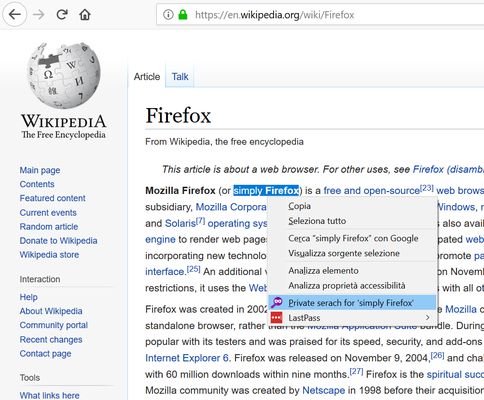
Search any text privately, with a simple right-click. The extension adds an option to the context menu to instantly open a search in a new private window, using your default search engine.
40 მომხმარებელი40 მომხმარებელი
გაფართოების მონაცემები
ეკრანის სურათები
გაფართოების შესახებ
How does it work?
1. Select the text you want to search
2. Right-click on the selected text
3. Select "Private search for..."
4. A new private window will open with the search results.
No data collected, no configuration needed.
⚠️ Important
To work properly, the extension requires the "Run in Private Windows" permission. Firefox will ask you to enable it during installation; you can also do it later from the extensions settings.
1. Select the text you want to search
2. Right-click on the selected text
3. Select "Private search for..."
4. A new private window will open with the search results.
No data collected, no configuration needed.
⚠️ Important
To work properly, the extension requires the "Run in Private Windows" permission. Firefox will ask you to enable it during installation; you can also do it later from the extensions settings.
5 შეფასება 4 მიმომხილველისგან
დამატებითი მონაცემები
- ვერსია
- 1.2resigned1
- ზომა
- 22,47 კბ
- ბოლო განახლება
- 2 წლის წინ (26 აპრ 2024)
- მსგავსი კატეგორიები
- ლიცენზია
- All Rights Reserved (ყველა უფლება დაცულია)
- ვერსიის ისტორია
- კრებულში დამატება