
SyncMarks ავტორი Offerel
Self-hosted bookmark and tab sync across Firefox, Edge and Chrome browsers.
იმუშავებს Firefox Android™იმუშავებს Firefox Android™
52 მომხმარებელი52 მომხმარებელი
წააკითხეთ QR-კოდი ამ გაფართოების გასახსნელად Firefox-ში Android-ზე

გაფართოების მონაცემები
ეკრანის სურათები

გაფართოების შესახებ
Keep your bookmarks and tabs synchronized across different browsers and devices without depending on a vendor-specific cloud service. SyncMarks synchronizes bookmarks and open tabs across browsers using your own self-hosted server.
Unlike browser vendor cloud synchronization, SyncMarks gives you full control over where your data is stored. No vendor specific account or other third-party cloud service is required.
Use SyncMarks to keep your bookmarks synchronized between Firefox, Microsoft Edge, Chrome and other supported browsers. Each browser profile can have its own independent configuration and connect to a different SyncMarks server.
Features
• Synchronize bookmarks across browsers
• Synchronize open tabs between devices
• Self-hosted server architecture
• No vendor lock-in
• No third-party cloud required
• Independent configuration for each browser profile
• Cross-browser synchronization
• Open Source
• Privacy-focused
How it works
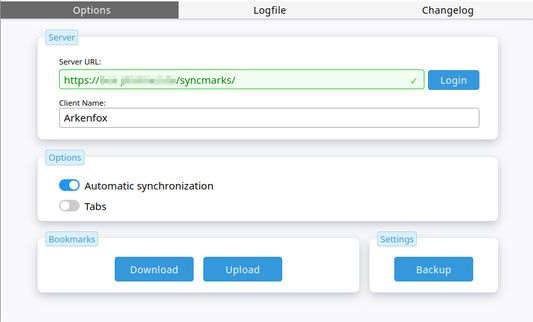
SyncMarks consists of a browser extension and the SyncMarks WebApp.
The extension connects to your SyncMarks server and synchronizes your bookmarks and tabs. You decide where your data is stored and how your server is operated.
The SyncMarks WebApp can be deployed on your own infrastructure. Installation instructions and source code are available in the project documentation.
Support
If you encounter issues or have suggestions, please visit the project page and documentation.
Permissions
- Optional access to all sites:Since the Extenstion doesnt know about your server url, this is to ensure, that your server can be accessed. All data will be transmitted only via your own url.
- Read and modify bookmarks:This AddOn syncs your bookmarks and need access to them.
- Display notifications: The AddOn uses notifications to alert you about errors occurred or to notify you about pushes send from other clients to you.
If SyncMarks works well for you, consider leaving a review. Feedback helps improve the project.
Unlike browser vendor cloud synchronization, SyncMarks gives you full control over where your data is stored. No vendor specific account or other third-party cloud service is required.
Use SyncMarks to keep your bookmarks synchronized between Firefox, Microsoft Edge, Chrome and other supported browsers. Each browser profile can have its own independent configuration and connect to a different SyncMarks server.
Features
• Synchronize bookmarks across browsers
• Synchronize open tabs between devices
• Self-hosted server architecture
• No vendor lock-in
• No third-party cloud required
• Independent configuration for each browser profile
• Cross-browser synchronization
• Open Source
• Privacy-focused
How it works
SyncMarks consists of a browser extension and the SyncMarks WebApp.
The extension connects to your SyncMarks server and synchronizes your bookmarks and tabs. You decide where your data is stored and how your server is operated.
The SyncMarks WebApp can be deployed on your own infrastructure. Installation instructions and source code are available in the project documentation.
Support
If you encounter issues or have suggestions, please visit the project page and documentation.
Permissions
- Optional access to all sites:Since the Extenstion doesnt know about your server url, this is to ensure, that your server can be accessed. All data will be transmitted only via your own url.
- Read and modify bookmarks:This AddOn syncs your bookmarks and need access to them.
- Display notifications: The AddOn uses notifications to alert you about errors occurred or to notify you about pushes send from other clients to you.
If SyncMarks works well for you, consider leaving a review. Feedback helps improve the project.
2,8 შეფასება 4 მიმომხილველისგან
ნებართვები და მონაცემები
მოთხოვნილი ნებართვები:
- სანიშნების ნახვა და შეცვლა
- შეტყობინებების ჩვენება
- ბრაუზერის ჩანართებთან წვდომა
დამატებითი მონაცემები
- დამატების ბმულები
- ვერსია
- 2.2.0
- ზომა
- 61,78 კბ
- ბოლო განახლება
- 18 დღის წინ (5 ივლ 2026)
- მსგავსი კატეგორიები
- ვერსიის ისტორია
- კრებულში დამატება