
PageSaver - Webpage to PDF or Image sɣur PixelsTech
Webpage to PDF converter with full page support and reader mode. Save web pages as PDF document or image with professional formatting.
2 209 yiseqdacen2 209 yiseqdacen
Asiɣzef aɣefisefka
Tuṭṭfiwin n wegdil

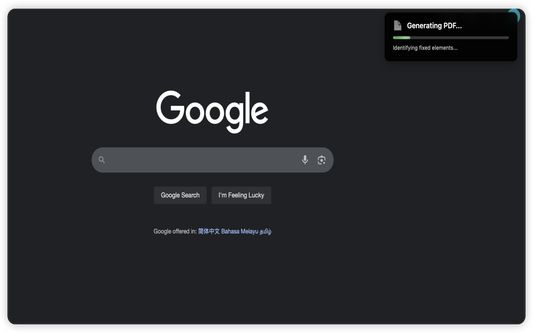

Ɣef usiɣzef agi
Transform how you capture, save, and process web content with PageSaver - your all-in-one browser productivity tool.
PageSaver is the ultimate browser extension for capturing, converting, and managing web content. Whether you need to save an entire webpage as PDF, capture full-page screenshots including content beyond the viewport, PageSaver has you covered.
PERFECT FOR:
* Saving webpage(including long webpage) as PDF or Image
• Saving long ChatGPT conversations and thread discussions
• Creating clean, readable PDFs from cluttered web articles
• Archiving important web content for offline access
• Converting web pages to multiple formats for documentation
KEY FEATURES
📸 ADVANCED SCREENSHOT & CAPTURE
• Full Page Screenshot - Capture entire webpages, including content outside the viewport
• Long Page Support - Perfect for capturing infinite scroll pages, ChatGPT conversations, and lengthy discussions
• Flexible Capture Modes - Capture the visible area, draw to select a region, or pick a specific element on the page
• Built-in Screenshot Editor - Annotate captures with pen, highlighter, shapes, arrows, text, blur, and pixelate tools; undo/redo support
• Multiple Export Formats - Save screenshots as PNG, JPG, WebP, or PDF directly from the editor
📄 SAVE WEBPAGE AS PDF
• One-Click PDF Export - Convert any webpage to PDF instantly
• Reader Mode PDF - Generate clean, distraction-free PDFs from webpage with enhanced readability
• HTML to PDF Converter - Transform web content into professional documents
📝 MARKDOWN EXPORT
• Save as Markdown - Convert webpages to Markdown format for easy editing
• Preserve Structure - Maintain heading hierarchy and formatting
• Developer-Friendly - Perfect for documentation and note-taking
🔖 SAVE FOR LATER
• Bookmark & Archive - Save webpages for later retrieval
• Offline Access - Download saved pages as PDF anytime
• Content Library - Build your personal web content collection
COMMON USE CASES
FOR RESEARCHERS & STUDENTS
• Save research articles as clean PDFs
• Archive academic resources for offline study
• Convert web content to Markdown for notes
FOR PROFESSIONALS
• Capture complete client conversations (Slack, email threads, chat logs)
• Create PDF reports from web dashboards
• Archive important documentation
FOR CONTENT CREATORS
• Save inspiration and reference materials
• Capture social media threads and discussions
• Convert web tutorials to offline formats
FOR EVERYONE
• Screenshot full webpages without scrolling
• Save recipes, articles, and guides as PDFs
• Keep important information accessible offline
WHY CHOOSE PAGESAVER?
✓ All-in-One Solution - Multiple tools in one extension
✓ Fast & Efficient - Capture and convert in seconds
✓ User-Friendly - Intuitive interface, no technical knowledge required
✓ Actively Maintained - Regular updates and improvements
WHAT YOU CAN DO WITH PAGESAVER:
✓ Save webpage as PDF
✓ Save webpage as image
✓ Save webpage as Markdown
✓ Convert HTML to PDF
✓ Convert HTML to Image
✓ Full page screenshot capture
✓ Screenshot entire webpage (including scrollable content)
✓ Capture long ChatGPT conversations
✓ Capture visible area, selected region, or specific page element
✓ Edit and annotate screenshots with drawing, text, blur and more
✓ Export screenshots as PNG, JPG, WebP, or PDF
✓ Generate reader mode PDFs
✓ Save for later reading
✓ Offline webpage archive
START SAVING SMARTER TODAY
Install PageSaver now and revolutionize how you capture, save, and manage web content. Whether you're a student, professional, researcher, or casual user, PageSaver provides the tools you need to work more efficiently online.
Download PageSaver and never lose important web content again!
SUPPORT & FEEDBACK
Questions? Suggestions? We'd love to hear from you! Your feedback helps us improve PageSaver for everyone.
PageSaver - Capture. Convert. Save. All in one click.
PageSaver is the ultimate browser extension for capturing, converting, and managing web content. Whether you need to save an entire webpage as PDF, capture full-page screenshots including content beyond the viewport, PageSaver has you covered.
PERFECT FOR:
* Saving webpage(including long webpage) as PDF or Image
• Saving long ChatGPT conversations and thread discussions
• Creating clean, readable PDFs from cluttered web articles
• Archiving important web content for offline access
• Converting web pages to multiple formats for documentation
KEY FEATURES
📸 ADVANCED SCREENSHOT & CAPTURE
• Full Page Screenshot - Capture entire webpages, including content outside the viewport
• Long Page Support - Perfect for capturing infinite scroll pages, ChatGPT conversations, and lengthy discussions
• Flexible Capture Modes - Capture the visible area, draw to select a region, or pick a specific element on the page
• Built-in Screenshot Editor - Annotate captures with pen, highlighter, shapes, arrows, text, blur, and pixelate tools; undo/redo support
• Multiple Export Formats - Save screenshots as PNG, JPG, WebP, or PDF directly from the editor
📄 SAVE WEBPAGE AS PDF
• One-Click PDF Export - Convert any webpage to PDF instantly
• Reader Mode PDF - Generate clean, distraction-free PDFs from webpage with enhanced readability
• HTML to PDF Converter - Transform web content into professional documents
📝 MARKDOWN EXPORT
• Save as Markdown - Convert webpages to Markdown format for easy editing
• Preserve Structure - Maintain heading hierarchy and formatting
• Developer-Friendly - Perfect for documentation and note-taking
🔖 SAVE FOR LATER
• Bookmark & Archive - Save webpages for later retrieval
• Offline Access - Download saved pages as PDF anytime
• Content Library - Build your personal web content collection
COMMON USE CASES
FOR RESEARCHERS & STUDENTS
• Save research articles as clean PDFs
• Archive academic resources for offline study
• Convert web content to Markdown for notes
FOR PROFESSIONALS
• Capture complete client conversations (Slack, email threads, chat logs)
• Create PDF reports from web dashboards
• Archive important documentation
FOR CONTENT CREATORS
• Save inspiration and reference materials
• Capture social media threads and discussions
• Convert web tutorials to offline formats
FOR EVERYONE
• Screenshot full webpages without scrolling
• Save recipes, articles, and guides as PDFs
• Keep important information accessible offline
WHY CHOOSE PAGESAVER?
✓ All-in-One Solution - Multiple tools in one extension
✓ Fast & Efficient - Capture and convert in seconds
✓ User-Friendly - Intuitive interface, no technical knowledge required
✓ Actively Maintained - Regular updates and improvements
WHAT YOU CAN DO WITH PAGESAVER:
✓ Save webpage as PDF
✓ Save webpage as image
✓ Save webpage as Markdown
✓ Convert HTML to PDF
✓ Convert HTML to Image
✓ Full page screenshot capture
✓ Screenshot entire webpage (including scrollable content)
✓ Capture long ChatGPT conversations
✓ Capture visible area, selected region, or specific page element
✓ Edit and annotate screenshots with drawing, text, blur and more
✓ Export screenshots as PNG, JPG, WebP, or PDF
✓ Generate reader mode PDFs
✓ Save for later reading
✓ Offline webpage archive
START SAVING SMARTER TODAY
Install PageSaver now and revolutionize how you capture, save, and manage web content. Whether you're a student, professional, researcher, or casual user, PageSaver provides the tools you need to work more efficiently online.
Download PageSaver and never lose important web content again!
SUPPORT & FEEDBACK
Questions? Suggestions? We'd love to hear from you! Your feedback helps us improve PageSaver for everyone.
PageSaver - Capture. Convert. Save. All in one click.
Rated 3,7 by 9 reviewers
Tisirag akked yisefka
Yesra tisirag:
- Sers isefka ɣef afus
- Sader-d ifuyla, ɣeṛ daɣen beddel amazray n usader deg iminig
- Kcem γer icarren n iminig
- Kcem ɣer isefka-inek deg ismal web meṛṛa
Ugar n telɣut
- TigIseɣwan n uzegrir
- Lqem
- 2.5.8
- Teɣzi
- 319,02 KB
- Aleqqem aneggaru
- 25 μέρες πριν (24 Ιουλ 2026)
- Taggayin i ilan assaɣ
- Turagt
- Akk izerfan ttwaḥerzen
- Amazray n Lqem
- Tibzimin
- Rnu ar tegrumma
Aneflay n usiɣzef-agi isutur-ak-d tallelt akken ad iseddu taneflit ines ticki tmuddeḍ-as cwiṭ n tewsa.