
Capture Full Page Screenshot sɣur Softpulse Infotech
Capture a screenshot of your current page according to visible and fullpage with just one click
1 485 yiseqdacen1 485 yiseqdacen
Asiɣzef aɣefisefka
Tuṭṭfiwin n wegdil
Ɣef usiɣzef agi
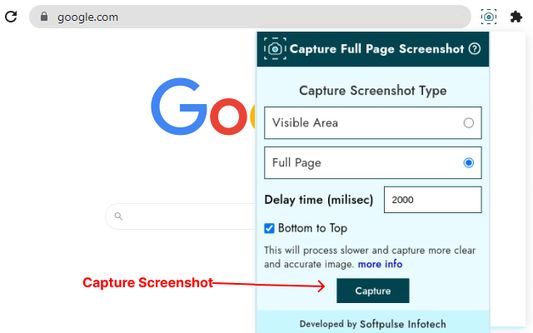
Capture Full Page Screenshot extension is a free, easy-to-use extension that allows users to capture visible area and full-page screenshots in seconds. With this extension, the user can capture the screenshot by touching the button so now let's take a screenshot the easy way.
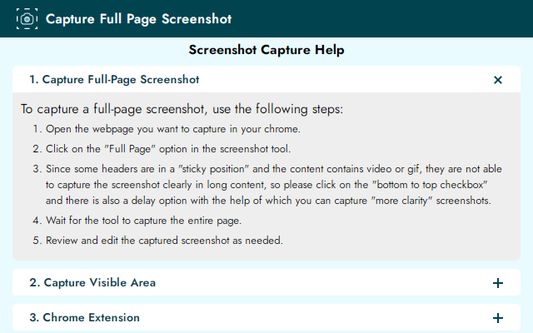
Do you need help capturing full-page screenshots with sticky headers and dynamic content like videos or GIFs? Our this feature smoothly scrolls from bottom to top, ensuring complete captures every time. There's a slight 2000 milliseconds latency for longer content to provide a clear screenshot, but your experiences through the screenshot have been fantastic. Your patience is appreciated as we guarantee a clear, comprehensive capture.
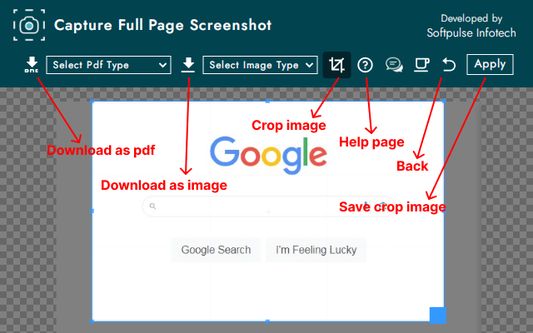
Using this extension, users can download the captured screenshot in two versions: PDF format and Image format.
In PDF format, there are multiple options to download, including US letter portrait, US letter landscape, US legal portrait, US legal landscape, A4 portrait, A4 landscape, and Full screenshot.
For image format, there are three options such as PNG, JPEG, and WEBP. With a wide range of cropping features, users can easily crop the capture screenshot to enhance their screenshots.
Capture Full Page Screenshot is the ultimate extension for effortless and beautiful screenshot creation with no limitations.
Top Features:
✔High-quality screenshot
✔Visible part screenshot
✔Support long screenshot
✔Web page whole capture, quickly save webpage as PDF and Image
✔Allow you to crop the captured screenshot
✔Download without any loss
✔Download screenshots in PDF and Image format
✔Download screenshots on multiple options in PDF and Image format
If you have any comments or suggestions on the Capture Full Page Screenshot extension, please get in touch with us at jaron.smith2006@gmail.com. We appreciate your feedback!
Do you need help capturing full-page screenshots with sticky headers and dynamic content like videos or GIFs? Our this feature smoothly scrolls from bottom to top, ensuring complete captures every time. There's a slight 2000 milliseconds latency for longer content to provide a clear screenshot, but your experiences through the screenshot have been fantastic. Your patience is appreciated as we guarantee a clear, comprehensive capture.
Using this extension, users can download the captured screenshot in two versions: PDF format and Image format.
In PDF format, there are multiple options to download, including US letter portrait, US letter landscape, US legal portrait, US legal landscape, A4 portrait, A4 landscape, and Full screenshot.
For image format, there are three options such as PNG, JPEG, and WEBP. With a wide range of cropping features, users can easily crop the capture screenshot to enhance their screenshots.
Capture Full Page Screenshot is the ultimate extension for effortless and beautiful screenshot creation with no limitations.
Top Features:
✔High-quality screenshot
✔Visible part screenshot
✔Support long screenshot
✔Web page whole capture, quickly save webpage as PDF and Image
✔Allow you to crop the captured screenshot
✔Download without any loss
✔Download screenshots in PDF and Image format
✔Download screenshots on multiple options in PDF and Image format
If you have any comments or suggestions on the Capture Full Page Screenshot extension, please get in touch with us at jaron.smith2006@gmail.com. We appreciate your feedback!
Rated 1,8 by 5 reviewers
Tisirag akked yisefka
Ugar n telɣut
- Lqem
- 1.0
- Teɣzi
- 609,02 KB
- Aleqqem aneggaru
- 2 éve (2024. márc. 13.)
- Taggayin i ilan assaɣ
- Turagt
- Akk izerfan ttwaḥerzen
- Amazray n Lqem
- Rnu ar tegrumma